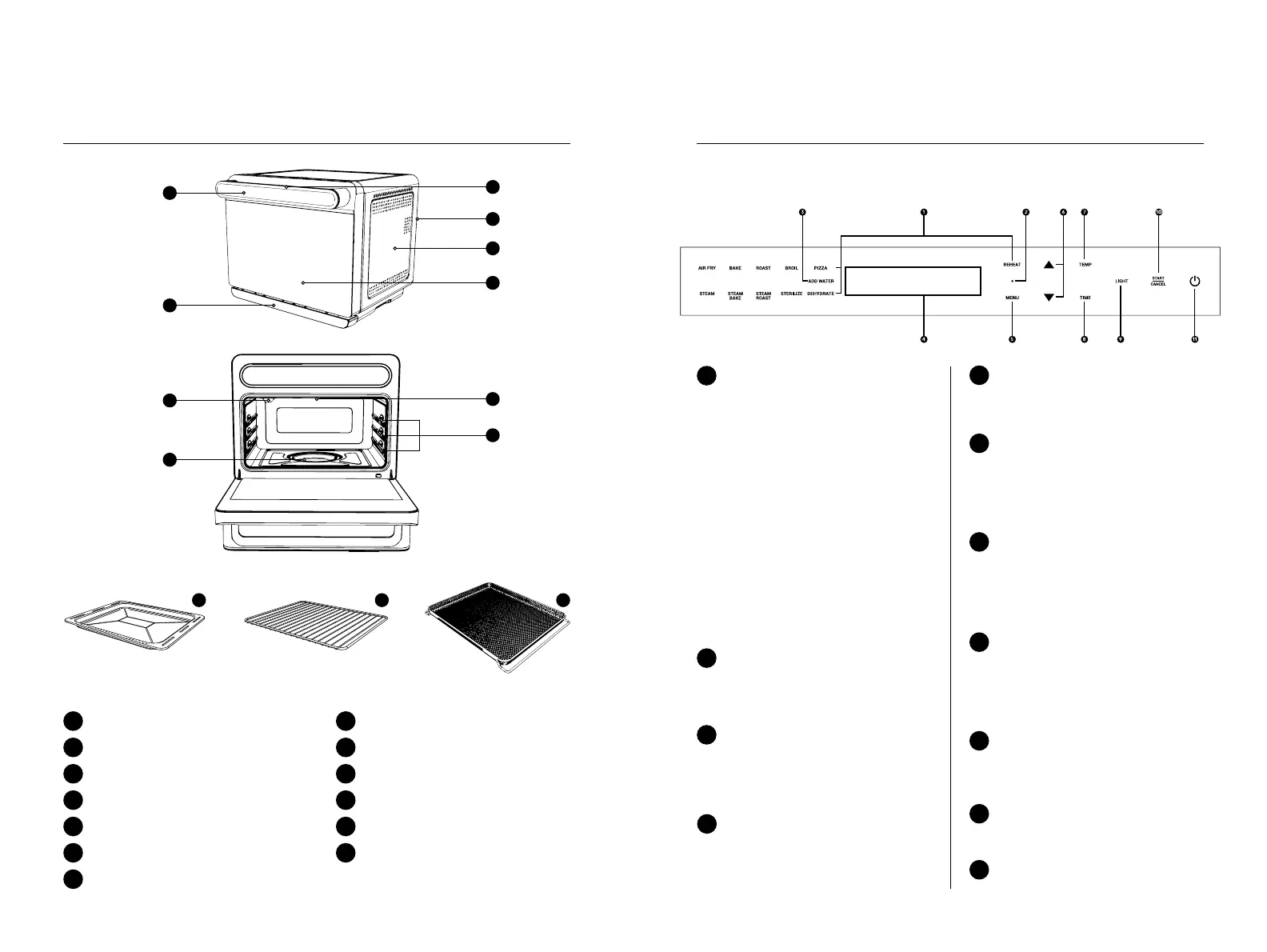
Steami parts overview
*NOTE: Images are for visual representations only. Always refer to actual product.
The handle of the Steami is also the control panel. Get to know the different controls and
their functions.
Cooking Programs
Select any of the below cooking
programs using the MENU
button (except for REHEAT):
1
Control Panel
1
Handle
2
Steam Vent (located at the back of the unit)
3
Water Tank
6
Oven Door
5
Top Heating Element
8
Shelf Rack
9
SS 304 Evaporating Plate
10
SS 304 Baking Pan
11
SS 304 Wire Rack
12
SS 304 Fry Basket
13
SS Housing
4
Light Bulb
7
ADD WATER Indicator
REHEAT Indicator
illuminates and flashes on the
screen if there is no water in the
water tank.
illuminates when the REHEAT
program is selected.
3
Arrow Keys
TEMP button
TIME button
Use to adjust cooking
temperature and time. Press
arrow up to increase, arrow down
to decrease.
Press to select cooking
temperature before making
adjustments using the arrow up
or arrow down button.
Press to select cooking time
before making adjustments using
the arrow up or arrow down
button.
6
7
8
2
Control panel details
Temp/Time/Status Messages
Display
Displays the cooking
temperature, time and status
messages of the unit.
4
MENU button
Press to cycle through the
different cooking programs.
Convection
AIR FRY BROIL
BAKE PIZZA
ROAST DEHYDRATE
REHEAT
*press the button directly
Steam
STEAM
STERILIZE
Convection + Steam
STEAM BAKE
STEAM ROAST
5
LIGHT button
9
START/CANCEL button
Press to start or cancel cooking.
10
Press to switch the light bulb on
and off.
POWER button
Press to turn the unit on and off.
11
11 12 13
Outer part
Inner part
Accessories
1
6
7
10
2
3
4
5
8
9
1110


 To Next Page