4 5
Setting Up Your Phone
Follow these step-by-step instructions to set
up your F4L.
Power off the phone before inserting any cards!
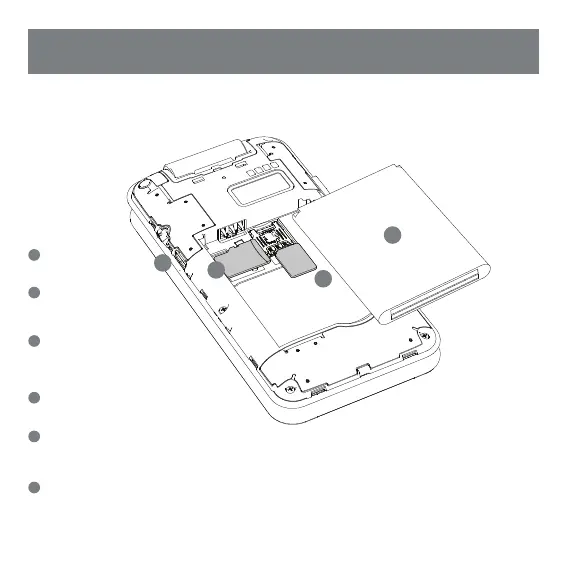
Remove Back Cover
• Remove the back cover by
prying at the corner
Insert microSD™ Memory Card
(Optional)
• Remember to power off the phone and
remove battery before inserting memory card.
Insert SIM
• Orient SIM card to match diagram
on slot.
• SIM support 4G LTE connections.
Insert the Battery
• Align the battery contacts, then insert the battery
contact-first.
Replace Back Cover
• After installing the SIM card, memory card, and battery,
align the cover and snap it closed. Be sure to press
around all the edges to ensure a secure fit.
Charge/Sync
• Plug in the microUSB connector to charge the phone
or transfer data.
1
3
3
2
2
4
4
5
6
6
Warning:
SIM cards are small enough to become a choking
hazard, so please keep them away from children
& pets. SIM cards are also quite delicate. Please
be careful when handling your card.


 To Next Page