Need help?
Do you have a question about the Nuu X6mini and is the answer not in the manual?
Guidelines for safe phone operation in various environments, including avoiding hazardous areas and toxic chemicals.
Adherence to traffic laws and airport regulations for safe phone use during travel.
Instructions for phone use in hospitals, including turning off near medical instruments.
Cautions against using the phone in hazardous areas and around fuels or chemicals.
Recommendations for authorized accessories, battery use, and keeping the phone away from water.
Steps to make emergency calls, including dialing 911 from the home screen.
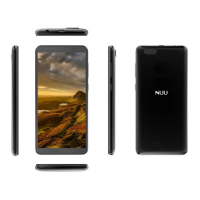
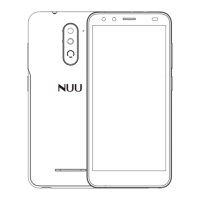
Visual guide to the phone's external design, including ports and buttons.
Detailed explanations of each numbered component shown in the appearance diagram.
Instructions on how to turn the smartphone on and off using the power key.
Overview of setting up security measures like password locks and system settings.
How to make calls, use international dialing prefixes, and view call history.
Exploring call options, speed dial, and adjusting call settings within the dialing interface.
Instructions on viewing, searching, and adding contacts to the phone.
Step-by-step guide to adding new contact details, including saving to Google or SIM.
Using the messaging function for text and multimedia messages, and conversation history.
Instructions for composing and sending SMS and MMS messages, including attachments.
Overview of browser features like the recent tab for navigating previous pages.
Managing browser windows, saving and accessing bookmarks, and finding content on a page.
Understanding Bluetooth technology and steps to enable it for device pairing.
Guide to enabling Wi-Fi and connecting to secured or unsecured networks.
Instructions on preparing the camera, opening it, and taking photos or videos.
Methods for sharing pictures via apps or Bluetooth, and adjusting images with various effects.
How to view images in albums and use crop tools to adjust picture size and proportion.
Steps to open the music application and navigate to the music player.
How to search for music by artist, song, or album name and supported formats.
Instructions for recording voice or audio, saving recordings, and using formats like 3GPP and OGG.
Steps to access the alarm clock interface for setting, editing, and deleting alarms.
Information on downloading music, movies, and games from the Google Play Store.
Configuring Wi-Fi, Bluetooth, and SIM card settings for network access and communication.
Customizing display properties like brightness and wallpaper, and adjusting sound and notification preferences.
Monitoring data usage and managing system settings like applications and notifications.
Information on viewing phone memory usage and monitoring general power usage.
Managing installed applications, running services, and notification preferences.
Setting up screen locks like pattern, PIN, or password, and managing location services.
Setting up and managing PIN and password for screen unlock and SIM card protection.
Procedure for setting up and managing the SIM card PIN for unauthorized use prevention.
Adding user accounts and configuring language, custom dictionary, and keyboard settings.
Procedures for backing up data to servers and restoring the phone to factory settings.
Adjusting date and time settings, selecting time zones, and choosing date format options.
Enabling features like power button call ending and auto-rotate screen, and adjusting text size.
Information on installing printing software and viewing phone information and firmware updates.
Steps for connecting the phone via USB cable and selecting connection modes for file transfer.
Information on FCC labeling requirements and operating conditions for device compliance.
Warning against unauthorized changes or modifications to the device that could void user authority.
Information for users regarding device compliance, potential interference, and correction measures.
Details on SAR requirements, testing, and compliance with radio wave exposure guidelines.
Information on SAR limits, device testing, and reported SAR values for ear and body usage.
Guidelines for maintaining compliance with RF exposure requirements during body-worn operations.
 General
| Display Size | 5.0 inches |
|---|---|
| Resolution | 480 x 854 pixels |
| Processor | Quad-core 1.3 GHz |
| RAM | 1 GB |
| Internal Storage | 8 GB |
| Expandable Storage | microSD, up to 32 GB |
| Rear Camera | 5 MP |
| Front Camera | 2 MP |
| Battery | 2000 mAh |
| SIM | Dual SIM |
| Operating System | Android 6.0 (Marshmallow) |

 To Next Page