11 12
4.OPERATION AND USE
4.OPERATION AND USE
4.2 Color screen wire controller function introduction
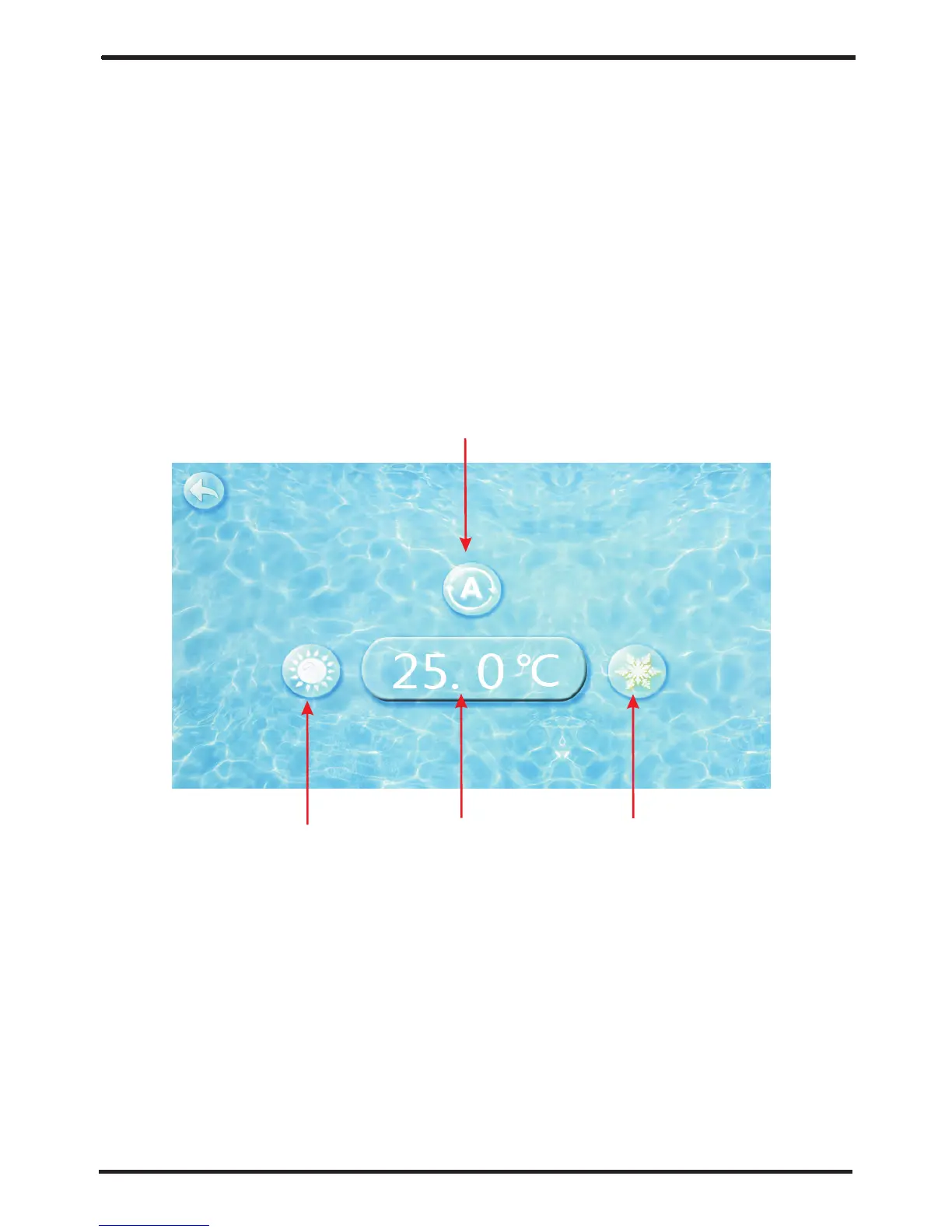
(2) Mode switch and target temperature Setting
Click the refrigeration mode button , automatic mode button or
heating mode button then you can select the corresponding mode.
① ②
③
Note: when the unit is designed for single automatic mode or single
thermal mode,
the mode can not be switched.
(1) Booting and shutdown
In shutdown status, click then the unit will be booted ①
In booting status, click then the unit will be shut down.①
As shown in figure 1.1:
Click the temperature set
button , you can set the target temperature.
④
2.2 1 Mode switch
2-2 Target temp. setting
①
④
③
②
In the main interface, click mode button or inlet water temperature setting
button, interface displays as follows:
Click the value to set time directly, the click confirm button to save
the
Settings.
In the main interface, click on the clock Settings button,
interface displays as follows:
(3) Clock setting
Click on the time Settings button ,
interface displays as follows:
①
Note: if the input format is not correct, the wrong time will be saved by
clicking confirm button.
For example: setup time: the 30-11-2016 16:00:00, input 30 11 16 16 00 00 ,
the time change then click confirm button.
3-1The operation of time setting
① ②



 To Next Page