Copyright 2010-2017 Obihai Technology, Inc.
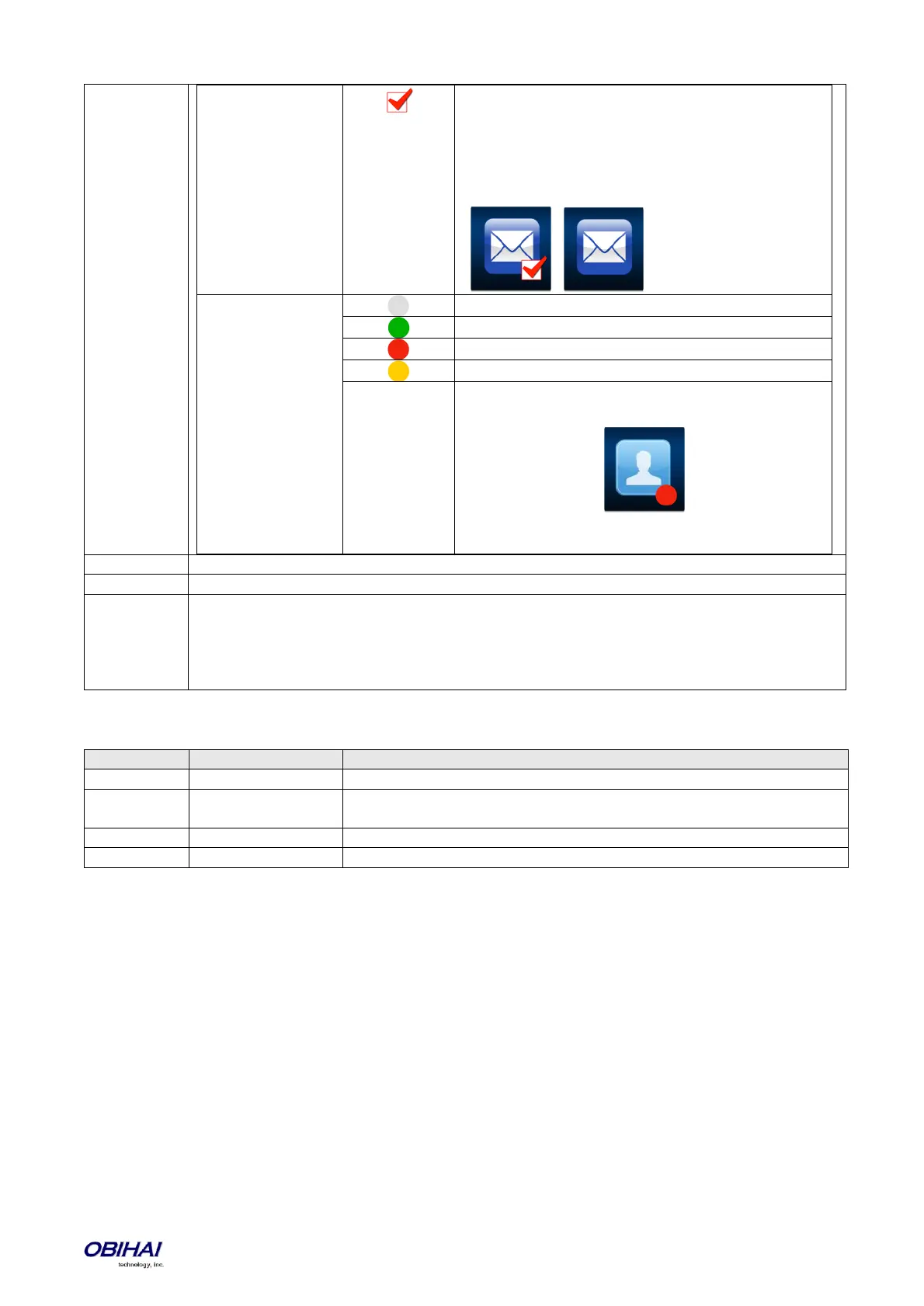
This icon shown when there are new messages in the
underlying mailbox. Otherwise the icon is hidden. When
combining this with the default mwi background image,
it will look like these on the screen when there are new
messages and when there are no new messages,
respectively:
Shown when presence is offline
Shown when presence is online (i.e. available)
Shown when presence is dnd (i.e. busy)
Shown when presence is away
An example combining default background image, icon,
and presence:
In this case the buddy picture is not available and
presence is dnd.
Specify the id of the <style> in the <MainMenuItemStyles> XML to use to style this item.
Specify a value that evaluates to "1" to make the item invisible, or "0" to make
It is possible to push an <ObihaiIPPhoneExecute> XML APP to the phone to trigger the phone to
refresh some screen elements. For this purpose, the XML would include one or more <ExecuteItem>
with the attribute URI ='RefreshWidget:{comma-separated-list of refresh-id's}
Here the refresh-id attribute is used to refrence this item for the same purpose
Macros available in <MainMenu>
Returns "1" if Line Keys are shown or "0" if Line Keys are shown
The value of the cn attribute in <MainMenu>
Example
<MainMenu ncol='$eval($sys.lines?4:6)' width='$eval($sys.lines?320:480)' noscroll='0' scrollstyle='2'
c1='http://192.168.15.225:8080/phone-icons/main-menu/'
c2='http://192.168.15.225:8080/icons/'
c3='http://192.168.15.225:8080/phone-xml/'
c4='http://192.168.15.225:8080/pictures/'
cell-width='80' cell-height='68' hlborder='2' hlbordercolor='0xffff00'
textcolor='0xffffff' hltextcolor='0xffff00'
font='@gfont' size='10'>
<item id='phone-book' bgimg='@(c1)phbk.png' label='Contacts'/>
<item id='calls' bgimg='@(c2)calls.png' label='Calls'/>
<item id='call-history' bgimg='call-history.png' label='Recent'/>
<item id='prod-info' bgimg='prod-info.png' label='Product Info'/>
<item id='settings' bgimg='settings.png' label='Settings'/>
<item id='preferences' bgimg='preference.png' label='Preferences'/>
<item id='buddy' bgimg='buddy.png' label='Buddy List'/>
<item id='netcf' bgimg='net-services.png' label='Net Services'/>
<item id='netdir' bgimg='net-dir.png' label='Net Dir'/>
<item id='sd' bgimg='spd.png' number='14089991001' service='sp1' name='Angelina Jolie'
label='Angelina'/>



 To Next Page