Copyright 2010-2017 Obihai Technology, Inc.
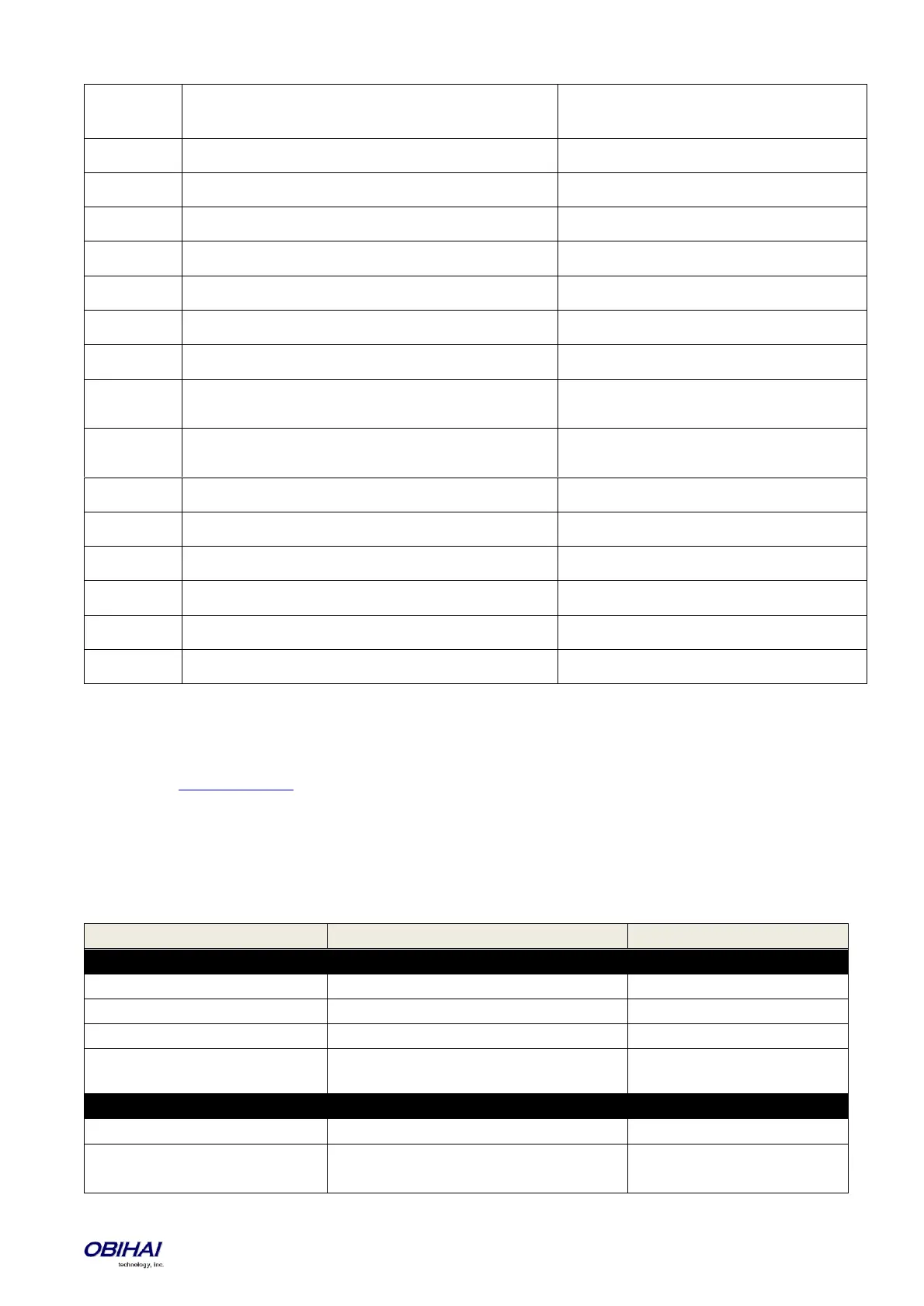
Device MAC address lower case, with colon, such as
9c:ad:ef:00:00:00
Firmware version, such as 1.0.3.1626
Hardware version, such as 2.8
Device current IP Address, such as 192.168.15.100
Device Model Name, such as OBi110
Device Model Number, such as 110
Device OBi Number, such as 200123456
Device S/N, such as 88B01NA00000
Value Auto Provisioning::GPRMn
Auto Provining::ConfigURL,
Auto Firmware Update::FirmwareURL
Value Auto Provisioning::TPRMn
Auto Provining::ConfigURL,
Auto Firmware Update::FirmwareURL
Value of User Define Macro n::Value
The value of User Define Macro n::ExpandIn
Value of DHCP option 66 assigned by server
Value of DHCP option 150 assigned by server
Value of DHCP option 159 assigned by server
Value of DHCP option 160 assigned by server
Value of DHCP option 161 assigned by server
Zero-Touch, Massive Scale Remote Provisioning:
OBi ZT or Zero Touch provisioning is a system level approach to deploying and maintaining thousands or millions of OBi
devices with high security and control at the device level down to the individual parameter provisioned on each device.
Please contact sales@obihai.com for information regarding the capability, process and practice of using OBi ZT
Provisioning.
Device Admin Parameters
Available under the Device Admin Page
This page includes the following configuration parameters.
Web Server (X_DeviceManagement.WebServer.)
Administrator Password, case sensitive
User Password, case sensitive
Allow user to create LCD Screenshot from the
option in Device Update page
IVR (X_DeviceManagement.IVR.)
Enable IVR for local configuration
IVR access password (must be all digits)



 To Next Page