Manual Device Add Options
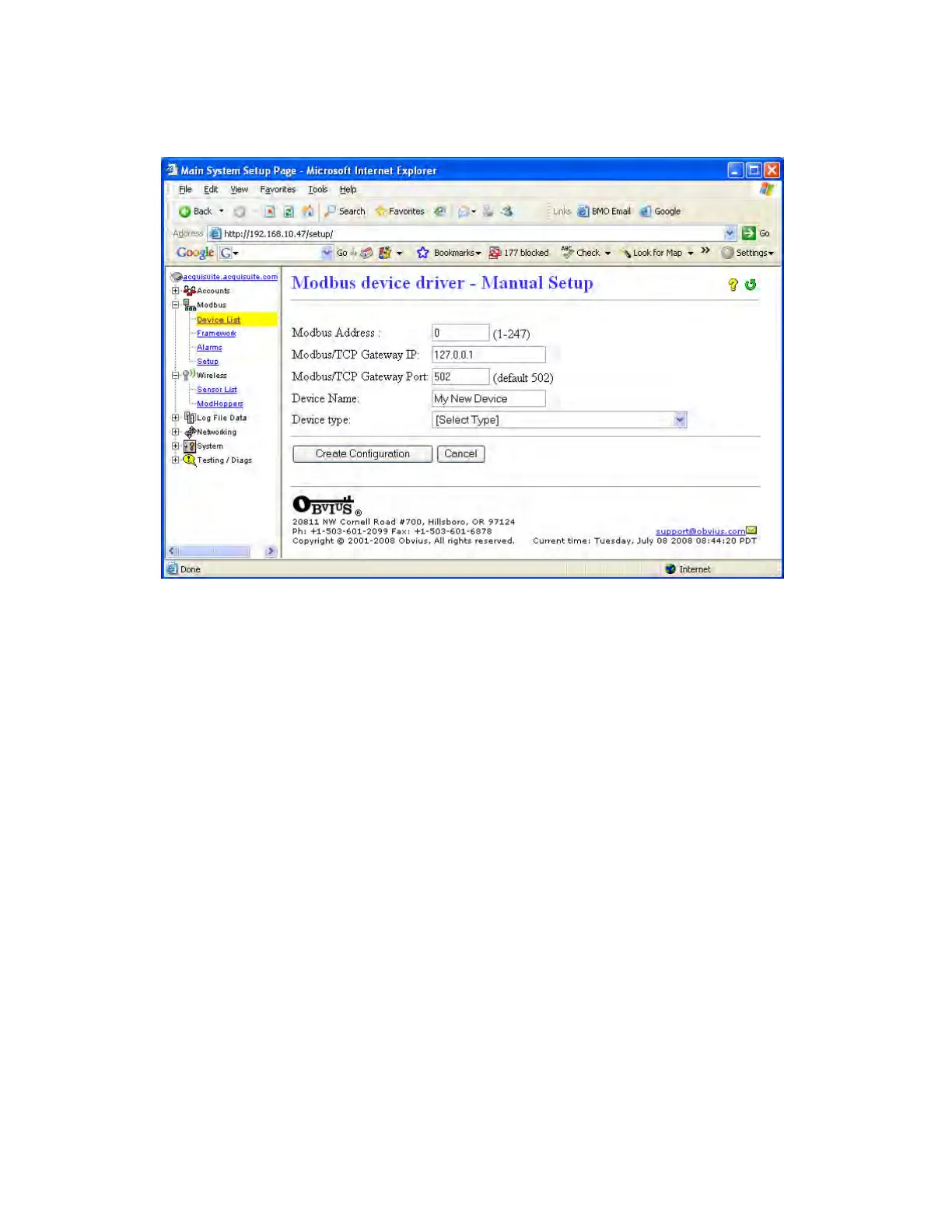
Modbus devices may be added manually by clicking on the “add” link on the bottom of the Modbus device list page. This
option is intended for use when adding devices to the configuration profile prior to installing the physical hardware, or
configuring Modbus/TCP devices that will not automatically populate in the Modbus device list.
The manual setup page has several options that must be configured before the AcquiSuite will recognize the Modbus device.
The options are as follows:
Modbus Address: The Modbus device address must be supplied. Note: when configuring a device on a remote
Modbus/TCP gateway, the Modbus address of the remote device must not be the same as any address on the local RS485
loop.
Modbus/TCP Gateway IP: This option allows the AcquiSuite to log data from a remote Modbus device that is attached to
the LAN via a Modbus TCP gateway device such as an EGX or Moxa gateway. For local Modbus devices attached to the
AcquiSuite RS485 port, use “127.0.0.1”.
Modbus/TCP Gateway Port: If a remote Modbus/TCP gateway is used, the tcp port of the remote gateway must be
specified. The default TCP port is 502 on most gateways. For local Modbus devices attached to the AcquiSuite RS485 port,
use 502.
Device Name: You must provide a name for the Modbus device to identify it in the device list. This should be something
that will identify the meter location and purpose.
Device Type: This menu will allow the selection of any built in driver or any Modbus Framework template that is available
on the AcquiSuite. It is important to select the driver or template that matches the Modbus device.
Note: Up to 32 remote Modbus/TCP devices may be added to the system. Because of addressing the devices on the
AcquiSuite device list, each Modbus/TCP device must have a unique ID in the same way that Modbus/RS485 devices do.
There is no hard limit on the number of Modbus/RS485, however typical systems should not exceed 64 total devices for
performance reasons. Depending on the Modbus/RS485 device, the RS485 line may limit the system to 32 physically
attached meters, but can be expanded with the use of either ModHoppers or RS485 repeaters. The ModBus addressing
system on some meters will only allow addresses between 1 and 64, the Modbus Protocol requires the address be between 1
and 256.
Page 17 A8812 AcquiSuite – Data Acquisition Server
Shop for Power Metering products online at:
1.800.561.8187
www.PowerMeterStore.ca


 To Next Page