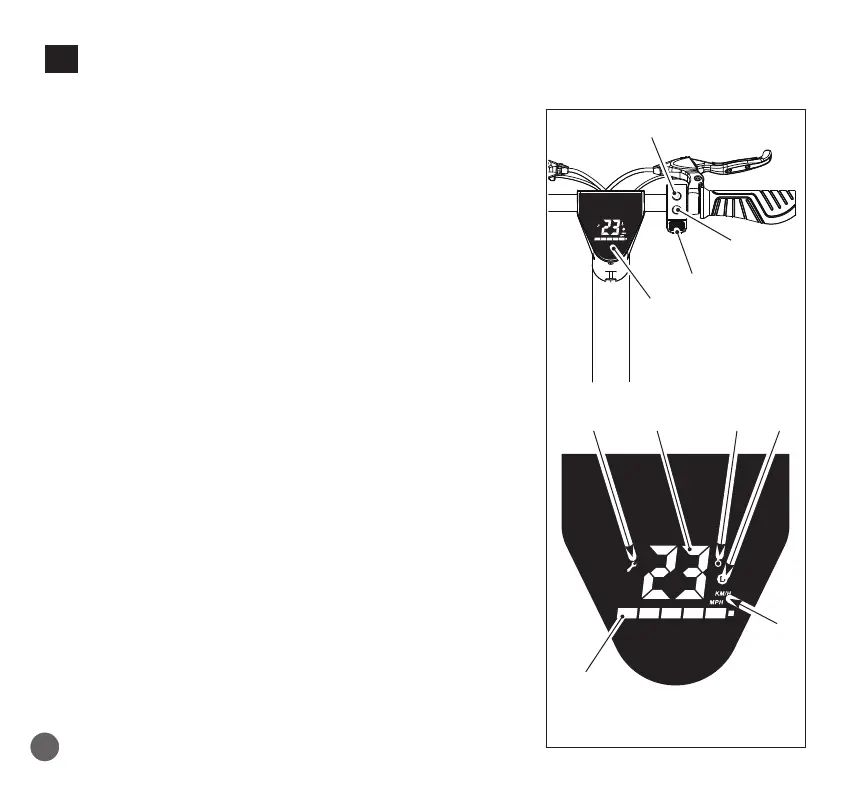
10. DISPLAY AND FUNCTION KEYS
23• ON/OFF key
Keep the key pressed to switch on/off the appliance.
24• Function key:
- Press it shortly to select the mode (in sequence):
- Beginner mode: Indicator led D off
- Normal mode: Indicator led D in white colour
- Sport mode: Indicator led D in red colour
- Shortly press this key two times to turn on/off the
front and rear lights together.
Cruise mode: maintain a constant speed (≥6KM/h) for
6 seconds to activate cruise mode.
To exit this mode, press the throttle lever or pull one
of the brake levers
25• Odometer (KM/H)
26• Selected function indicator
27• Anomaly report indicator.
Please contact an authorized assistance centre.
28• Unit of measurement of speed.
29• Charge level of the battery
30• Components overheating function indicator.
It lights up when the motor temperature is high; stop
the e-scooter and wait a few minutes before resuming
travel.
Note: it is not possible to increase speed with the specic
lever while you are braking.
12
23
14
24
2527
29
30
28
26
96
EN


 To Next Page