12
OTS POWERCOM
BATTERY CHARGING
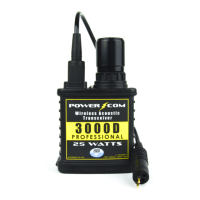
The PowerCom is equipped with a high capacity rechargeable Lithium-
Ion battery that is charged through the Earphone/Microphone connector
located at the top of the unit. To charge the unit, disconnect the Earphone/
Microphone Assembly and connect the provided smart charging device.
The LED at the top of the unit will illuminate to show that the unit is
receiving power and the LED on the Battery Charger will illuminate red,
LED on the battery charger will illuminate green to show that the battery is
LOW BATTERY INDICATOR
The red LED at the top of the unit will blink rapidly and a voice will prompt
the diver by stating “Low Battery” every 5 minutes to indicate a low battery
level. The unit will state “Diver shutting down” ten seconds before the unit
shuts down due to low battery level.
BATTERY DISPOSAL
Dispose of the Lithium-Ion battery and the Battery Charger in accordance
with the local, state, and federal electronic waste recycling regulations. Do
not discard them in the trash.
MAINTENANCE
Routine maintenance of the PowerCom units as with all dive gear is
necessary to ensure an extended life of the equipment. Failure to properly
care for and maintain the PowerCom and ancillary components could lead
and other failures. If any of this equipment is found to not be functioning as
described in this manual, contact the Ocean Technology Systems service
PRE-DIVE PROCEDURE FOR ESTABLISHING
COMMUNICATIONS
1. Fully charged battery.
2. Perform visual inspection. Pay particular attention so that
Battery Base screws are tightened fully.
3. Earphones in holder and are properly adjusted for your
comfort.
4. Connectors lightly greased and properly mated.
5. The diver is dressed out such that the wires will not snag,
and the transducer is not obstructed by any type of diving
equipment.
6.


 To Next Page