18
OTS POWERCOM
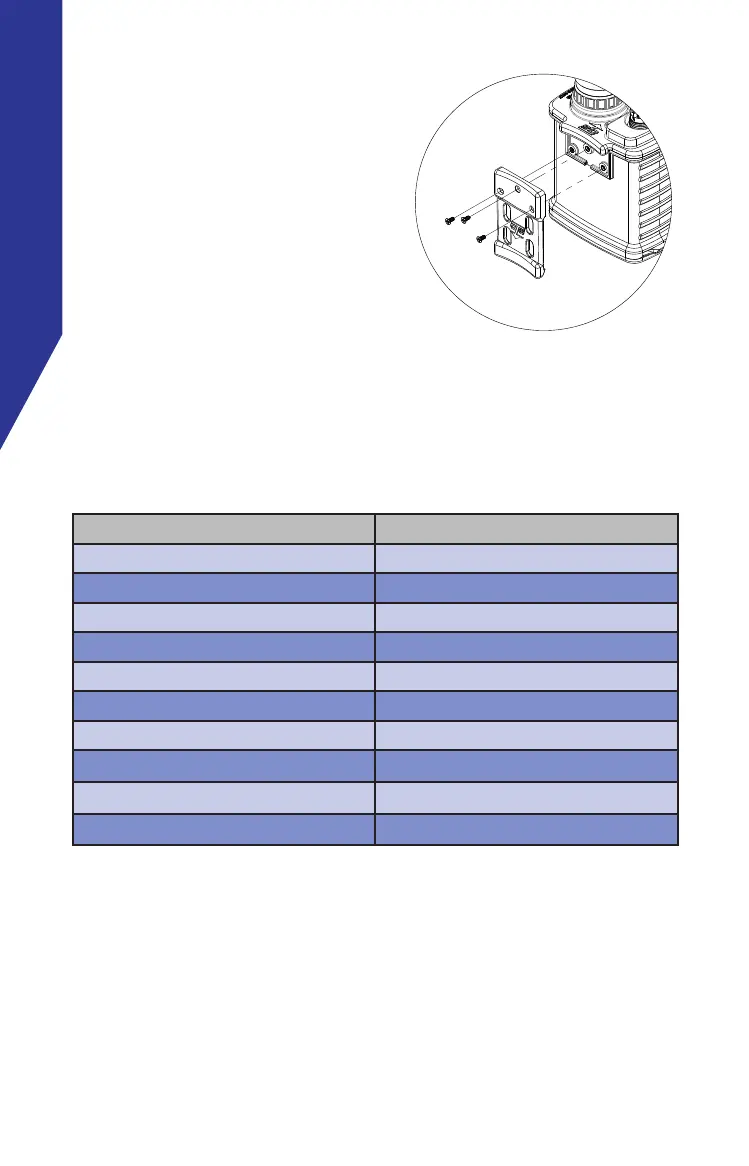
BELT CLIP REPLACEMENT
If the Belt Clip is damaged, follow
these instructions to replace the
1. Using a #4 Phillips screw
driver, loosen the three
screws that secure the Belt
Clip to the unit and remove
damaged Belt Clip
2. Replace the Belt Clip with
the new Belt Clip and re-
tighten the screws. Do not over torque the screws.
SPARE PART ORDERING INSTRUCTIONS
Spare parts are available to purchase from OTS.
Name Part Number
Main Housing 134200-000
Battery Cover, Mounting Screw 133061-000
Battery 910505-000
Battery charger 910506-000
Transducer TA-4 (PowerCom 3000D) 912020-000
Transducer TA-5 PowerCom 5000D) 912015-000
Belt Clip 137084-000
O-Ring, Housing 283058-000
O-Ring, Armored Battery Base 283059-000
O-Ring, Transducer 283003-000


 To Next Page