16
OTS POWERCOM
REPLACEMENT/SPARE PARTS
Most parts of the PowerCom unit can be replaced by the end user. The
Modularity of the system allows for easy replacement of the Battery, Belt
Clip, Transducers and Earphone/Microphone Cables. Any electronic
components of the housing and the Lid Assembly can only be replaced by
DO NOT use silicone grease on the silicone o-rings. This could cause
swelling and damage of the o-ring resulting in a failure of the pressure
housing. Use only non-silicone grease. Krytox 204 or Tribolube 71 are
acceptable lubricants. Use of silicone based lubricants will void any
warranties.
@OTSCOMM.COM or
(714) 754-7848
BATTERY REPLACEMENT
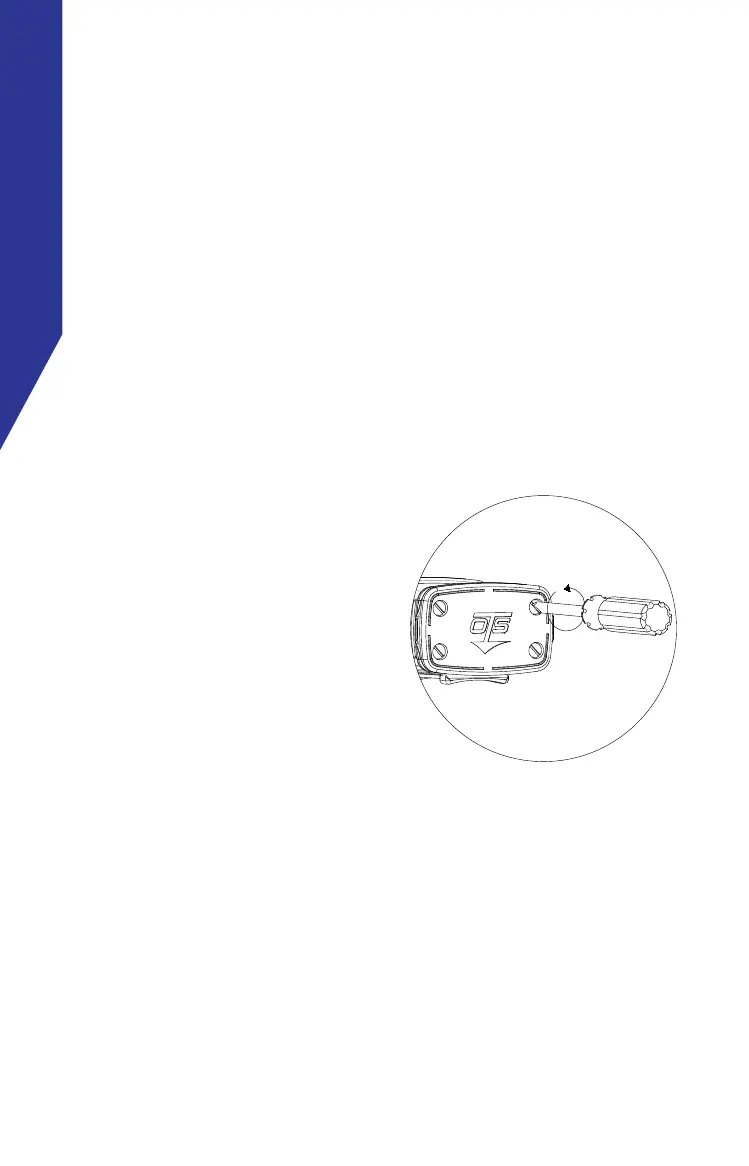
1.
the bottom of the unit as
shown. Rotate the screws
counter-clockwise until the
screw comes free from the
main housing.
2.
located on the Rubber
Armored Base to separate
the battery cover from
the rest of the unit. If the
screws were not loosened
become stuck. Do not force
the unit open. Loosen the screws until free from the threads.
The cover should come free with gentle force.
3. After removing the cover, the battery is secured to the cover
by a velcro strip. Simply pull the battery free from the cover
and replace with the fresh battery.


 To Next Page