Sauna & Steam
Oceanic Saunas 01902 450 550 sales@oceanic-saunas.co.uk
9
Steam Generator Manual
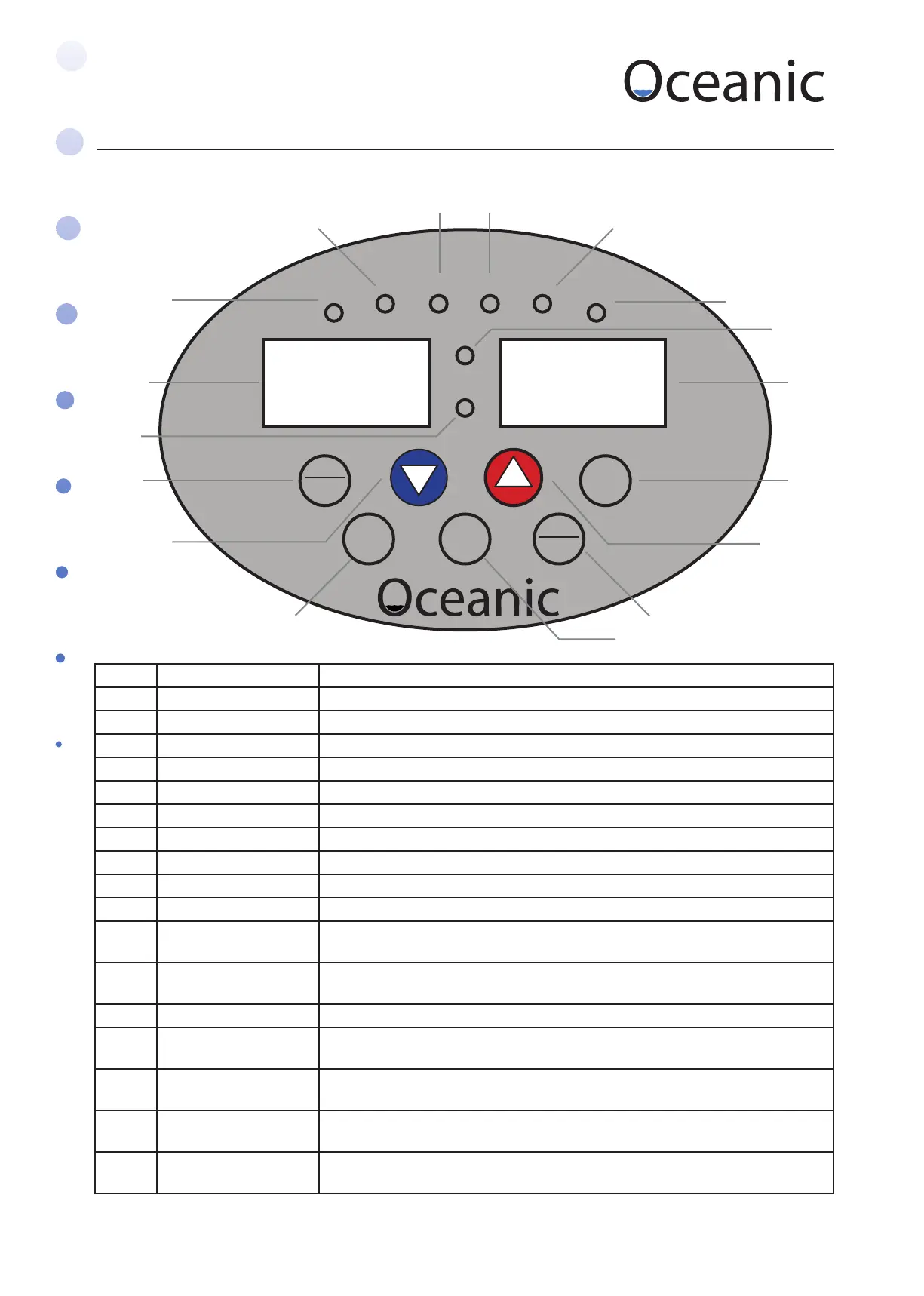
6. OC-A Controller Description
No Part Description
1 On/o Push to operate
2 Light Push to operate
3 Drain Control Push to operate / Keep pressed for SOD/ Keep pressed for normal
4 Set Preset time and temperature
5 /\ Increase button
6 \/ Decrease button
7 / ºC/F / ENTER Change from centigrade to Fahrenheit / Enter change in settings
8 Time display window Display the work time of the steam generator
9 Temp display window Display the detected temperature of steam room
10 L1 Indicator LED for the light in steam room
11 L2 Indicator LED for water level – red, water is lling - green water level OK. Note if
the LED remains red in excess of 5 minutes check water supply.
12 L3 Indicator LED for drain - red for draining - green for draining and lling at the
same time
13 L4 Red means it is in SOD mode. Green means it is in normal mode
14 L5 Indicator LED for over heat, red means the steam generator was cut o as the
heat element is too hot (lack of water, the heat elements may worked in air)
15 L6 Indicator LED for pressure - when the pressure in the boiler exceeds 1.2kg/c m2.
It will switch on.
16 L7 Indicates the detected temperature is lower than the preset temperature and
steam generator is heating.
17 L8 Indicates the detected temperature is higher than the preset temperature and
the steam generator is idling.
L1
L2
L3 L4
L5
L6
L7
L8
C/F
ENTER
DRAIN LIGHT
SET
1
2
3
47
56
17
8 9
16
15
14
1312
11
10
ON
OFF



 To Next Page