49
To access the Pre Dive Planning Sequence
(while in the Surface mode) -
• Press the Front (Advance) button 1 time
• Press and release the Side (Select) button to advance through
the Depths/Times, one screen at a time; and then return to
Surface Mode.
• The unit will revert to Surface Mode after 2 minutes if no
button is pressed.
• With each depth displayed by the Pre Dive Planning Se-
quence, you will see either predicted no decompression limits
(NDLs) based upon your previous dive profiles (if calculated
to be nitrogen controlled), or predicted oxygen tolerance
limits (OTLs) based upon either a single dive exposure or your
24 hour accumulation of oxygen (if calculated to be oxygen
controlled).
• The Maximum Depth allowed for the PO2 Alarm value set
and FO2 set point will also be displayed.
• Depths greater than the Maximum Depth that can be
achieved for a PO2 of 1.60 ATA will not be displayed.
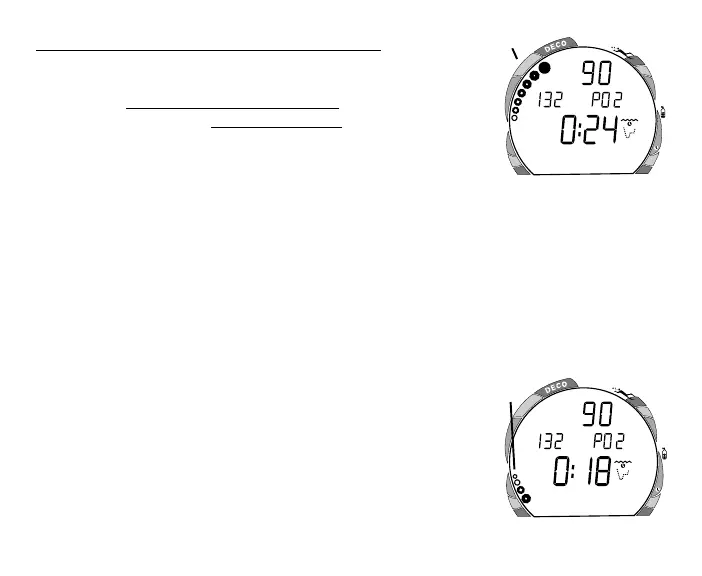
• If the Tissue Loading Bar Graph is displayed (Fig. 52a), that
next dive is calculated to be controlled by nitrogen loading.
• If the O2BG and O2 symbol are displayed (Fig. 53a), it is
calculated to be controlled by oxygen loading.
Fig. 53 - Oxygen Control
Fig. 52 - Nitrogen Control
FEET
ATR
O
2
a
a



 To Next Page