68
To access the Pre Dive Planning Sequence -
• Press the Front (Advance) button 1 time (while in Surface
Mode).
• Press and release the Side (Select) button to advance through
the sequence of depths and 'adjusted' times.
• Press Both buttons simultaneously for 2 seconds to return to
Surface Mode.
• The unit will revert to Surface Mode after 2 minutes if no
button is pressed.
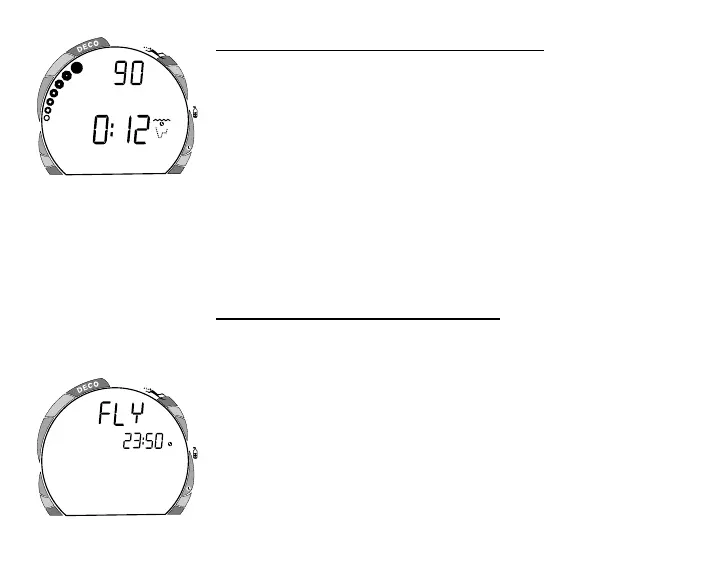
The Planning Sequence now displays adjusted No Decompres-
sion Limits (Fig. 83) based on residual nitrogen and accumulated
oxygen calculated to be remaining from the previous dives.
To access the Time to Fly Countdown (while in Surface Mode)
• Press the Front (Advance) button 2 times.
• The Time to Fly counter (Fig. 84) begins counting down 10
minutes after surfacing from a dive (after the Transition
Period) displaying the word FLY and a countdown that begins
at 23:50 (hr:min) and counts down to 0:00 (hr:min).
• If a Violation occurred during the dive, a single dash ( - ) will
appear instead of the word FLY.
• Press Both buttons simultaneously for 2 seconds to return to
Surface Mode.
• The unit will revert to Surface Mode after 2 minutes if no
button is pressed.
Fig. 83 - Adjusted NDLs
Fig. 84 - Time to Fly
ATR
O
2
FEET
ATR
O
2



 To Next Page