38 39
EN EN
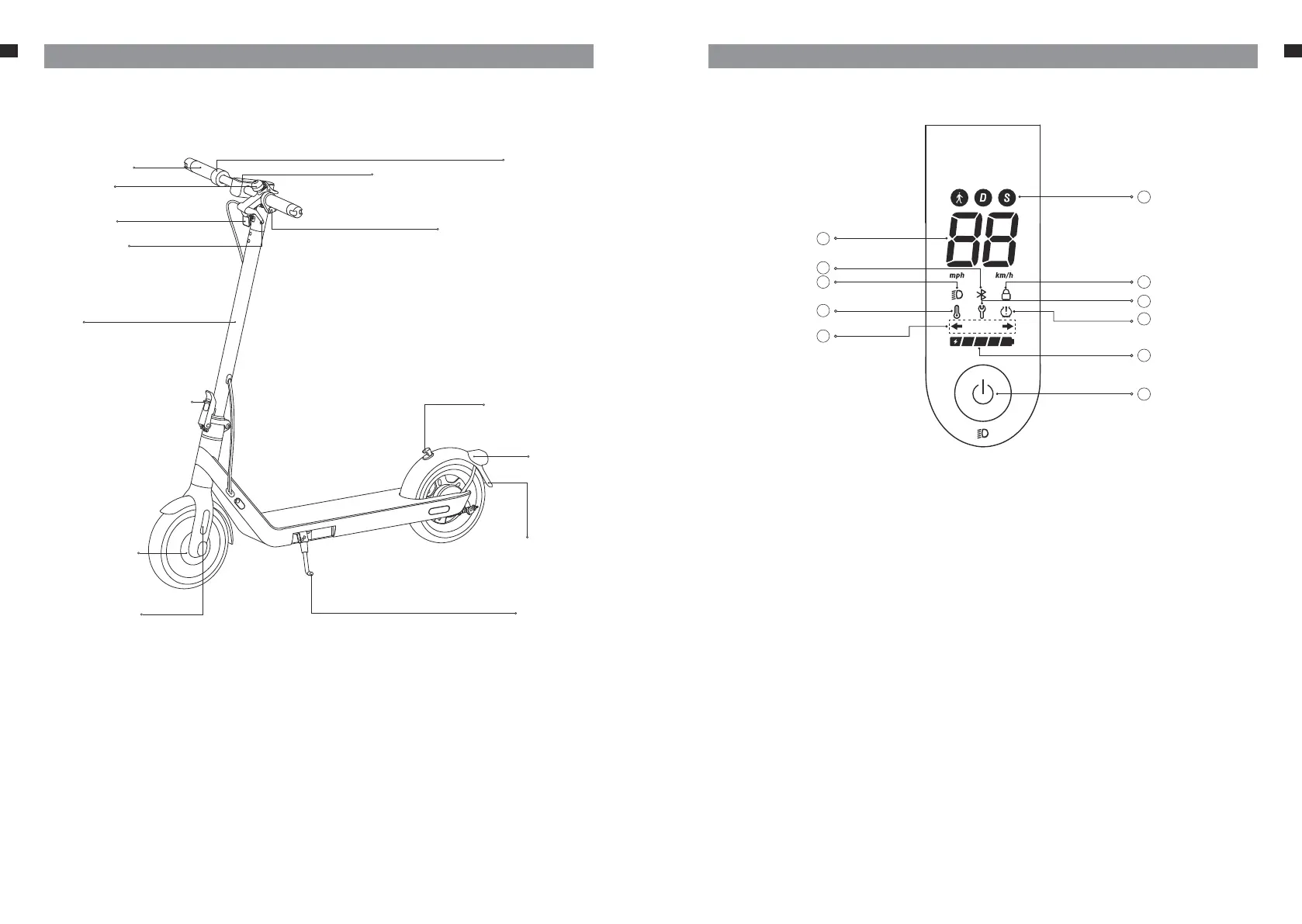
Display and Power Button
You can get the following information from the display on the handlebar:
1. Speedometer
It displays the current speed when the scooter is running. When the scooter
has an error, it displays an error code. When the scooter is charging, it
displays the current battery lever.
2. Bluetooth
The Bluetooth icon always lights up, indicating that the scooter has
successfully connected to the mobile device.
3. Light
The icon will light up when the headlight and taillight are on. The icon
does not light up when the headlight and taillight are o.
4. Temperature warning
If the battery temperature is too high or too low, the thermometer symbol
will light up. Use or charge the battery after the temperature returns to the
normal working range.
5. Steering indicating
When the scooter is on, press the left or right steering light button, then
the corresponding steering light and the indicator on the control panel will
blink. Meanwhile, the buzzer will respond at the same frequency. Press the
button again to turn o the steering light.
1
2
3
4
5
6
7
8
10
11
9
Product Overview
Handlebars
Accelerator
Control panel & power button
Bell lever
Brake lever
Headlight
Steering light button
Insurance holder
licence number
stem
Folding mechanism Lock rod hook
Taillight
Kickstand
Wheel motor
Side reflector


 To Next Page