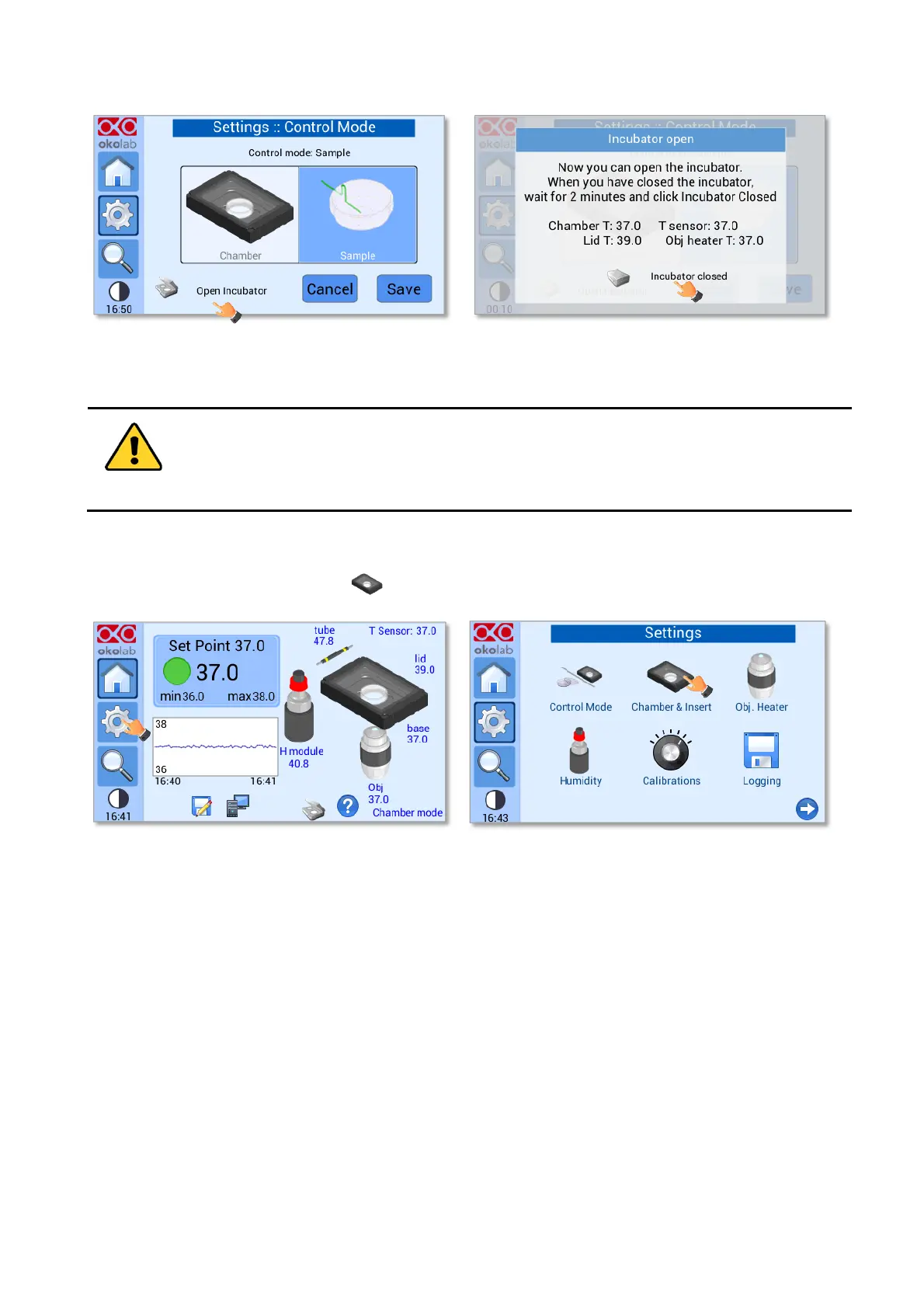
Opening the incubating chamber can lead to controller instability since both the specimen and the
inside of the chamber are exposed to the external environment. In order to avoid the problem, when
the Open Incubator feature is enabled, UNO-CONTROLLER places the thermal controller in stand-by
mode to avoid the sample overheating.
Figure 39. How to enter the Chamber & Insert menu (a - b).
Here you have to set the model of Okolab H301 incubating chamber that you have purchased and the type
of sample adapter being inserted into it. Depending on these selections, UNO-CONTROLLER will automatically
change the control settings.
To set the configuration press on the Chamber icon (see pointer 1 in Figure 40 a), then scroll among
different chambers using the arrows on the left and right sides of the screen (see pointer 2 in Figure 40 b). When
the chamber you use appears on the screen, press Next to select it (see pointer 2 in Figure 40 b).


 To Next Page