52
Note ►After any change in the Setpoint value the device enters into a transient regime.
Note ►For example, if the Tolerance from setpoint is 0.5 or greater (for a temperature setpoint of 37°C and
the temperature reaches a value equal or less than 36.5°C or equal or more than 37.5°C) for a period of time
equal or longer than 10 minutes (Time set in Figure 79 b) then the system triggers an Alarm.
Flag the Buzzer checkbox if you want the Alarm to be acoustical as well rather than just being displayed.
To disable the visual and acoustical alarms, remove the flag from the tab labeled Enabled. In this case the Alarms
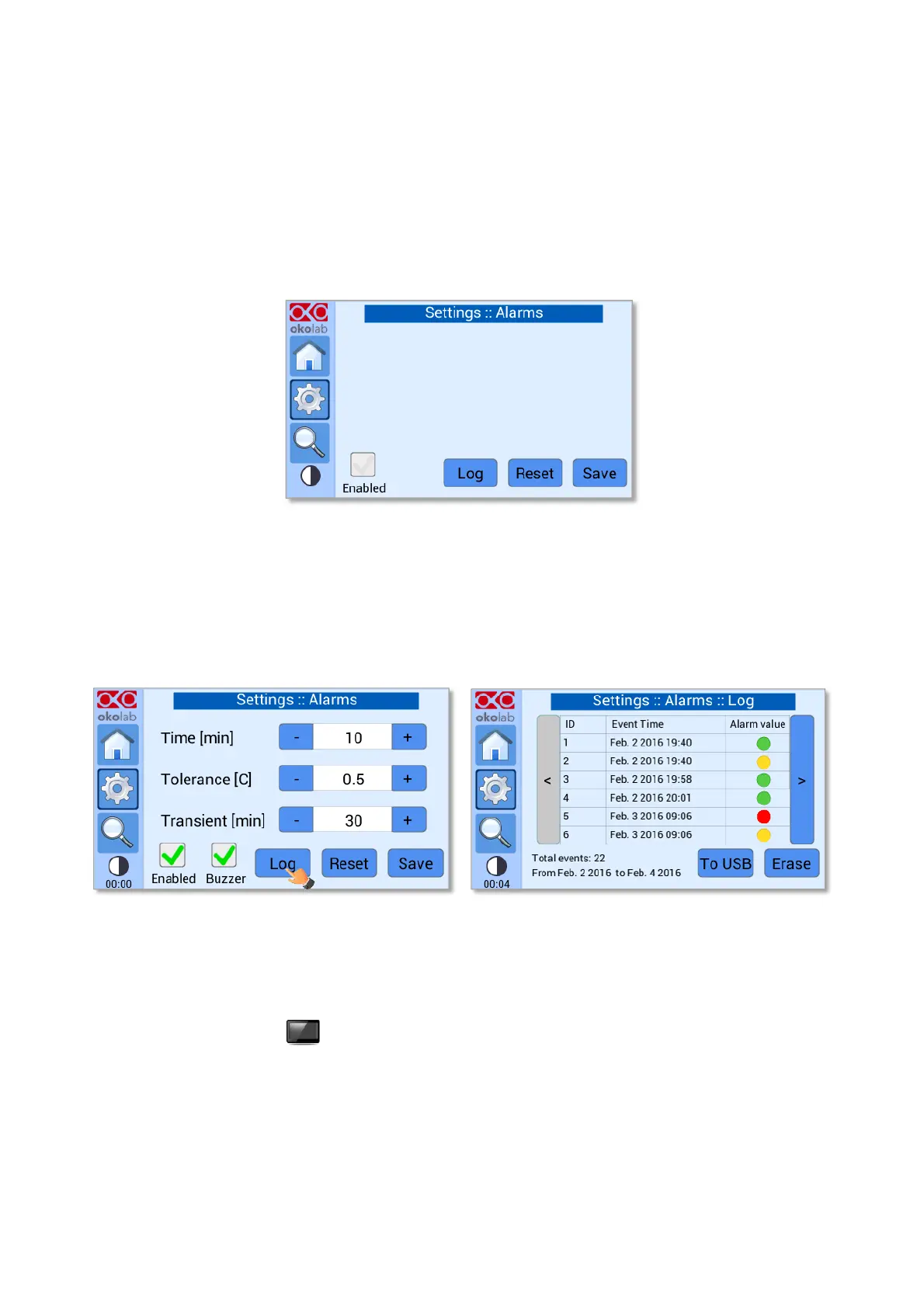
page becomes as shown in Figure 80.
Figure 80. Settings – Alarms - Disabled.
Note ► When disabling the alarms, a possible alarm condition is shown only by a red status LED (for example
is a device is accidentally disconnected).
Note ► By Pressing on Log (see Figure 81 a), you can view all the times that the status LED has changed
color (see Figure 81 b). Press on To USB if you want to download the alarms data to a USB drive or on Erase
if you want to delete them.
Figure 81. Settings – Alarms – Log (a - b).
8.2.8 Display
Press on Display icon (see Figure 82 a) to enter the display configuration menu (see Figure 82 b).


 To Next Page