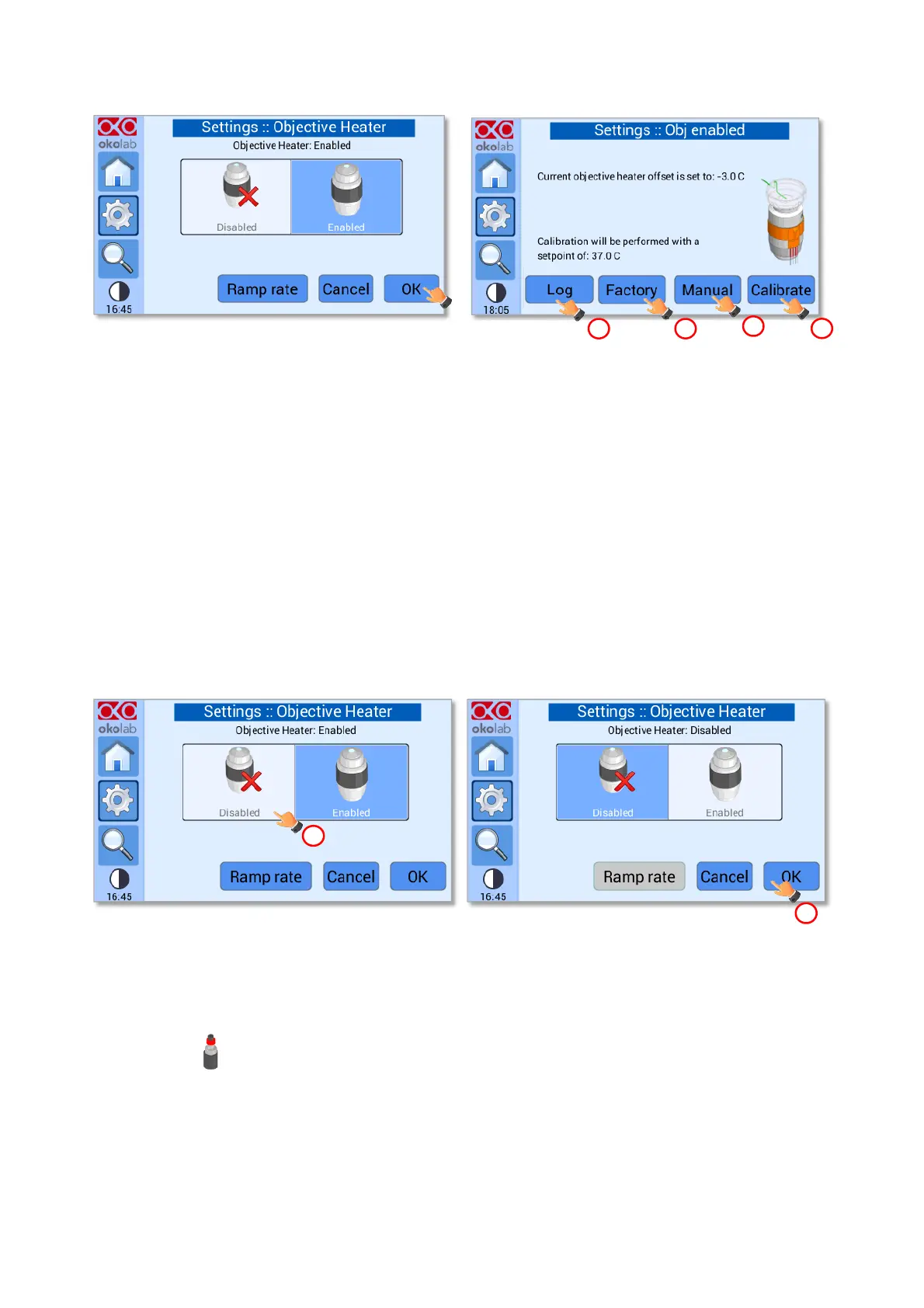
Figure 45. Settings – Obj. Heater –Enabled - menu (a – b).
Four options are available:
1. By pressing Log button (see pointer 1 in Figure 45in b) you can select parameters obtained by calibrations
previously performed (see paragraph 8.2.5.3).
2. By pressing Factory button (see pointer 2 in Figure 43 b) UNO-CONTROLLER will recover the factory
offset.
3. Press Manual button (see pointer 3 in Figure 43 b) to insert the offset value manually (see paragraph
8.2.5.3).
4. By pressing Calibrate button (see pointer 4 in Figure 43 b) UNO-CONTROLLER will perform a calibration
routine for your specific environment, see paragraph 8.2.5.3.
Note ► To disable the Objective Heater press on the Disabled icon (see pointer 1 in Figure 46 a) and press
OK to confirm (see pointer 1 in Figure 46 b).
Figure 46. Settings – Obj. Heater –Disabled (a -b).
8.2.4 Humidity
Press on Humidity icon to enter the Humidity menu, see Figure 47.
Note ► The Humidity control is enabled by default. Disable the Humidity control if the GF-MIXER-HM
(Humidity Module) is not in use; otherwise, UNO-CONTROLL will be in alarm.


 To Next Page