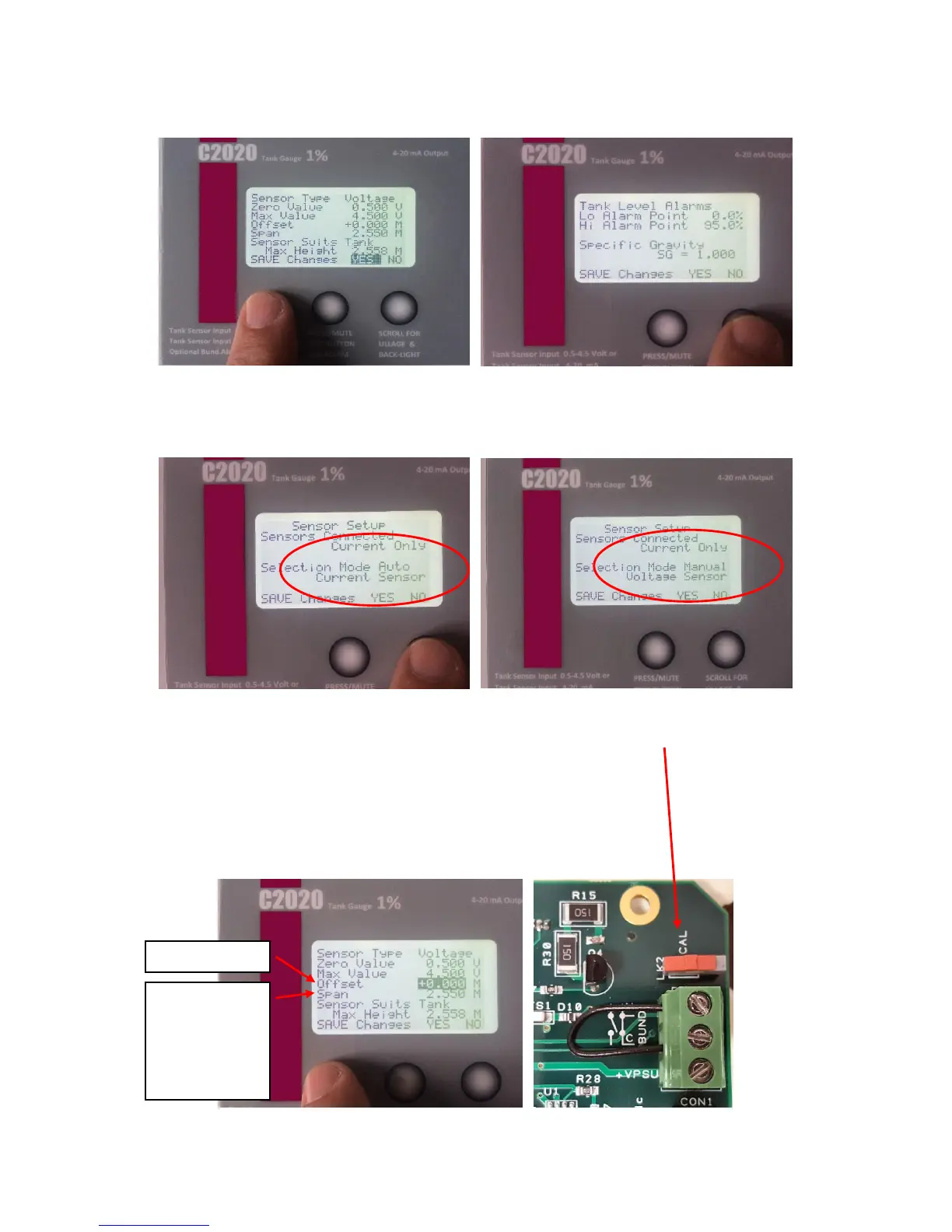
6. Now use the Right Button to scroll across to the Sensor Selection. This should be
Automatic.
If the Automatic does not work, scroll to Mode, and manually select type of sensor with
the Right Button.
7. Sensor Offset.
How far from the bottom of the tank is
the sensor positioned? Enter this here.
As standard we would recommend
50mm which is 0.050m.
Sensor Span. As Standard, this comes
set for 2.55m. Change this to suit the
sensor range you have. Curser Confirm
YES.
8. Toggle the Calibration switch.
The Gauge returns to Standard
Readings.
4. You MUST scroll YES and use the
“Hidden” Button to confirm YES for all
screens
5. Now use the Right Button to scroll
across to Alarm Trigger Points and
Specific Gravity settings.
Sensor Span
C22 = 2.55m
C23 = 3.0m
C25 = 5.0m
C27 = 10.0m


 To Next Page