Page 8 of 11
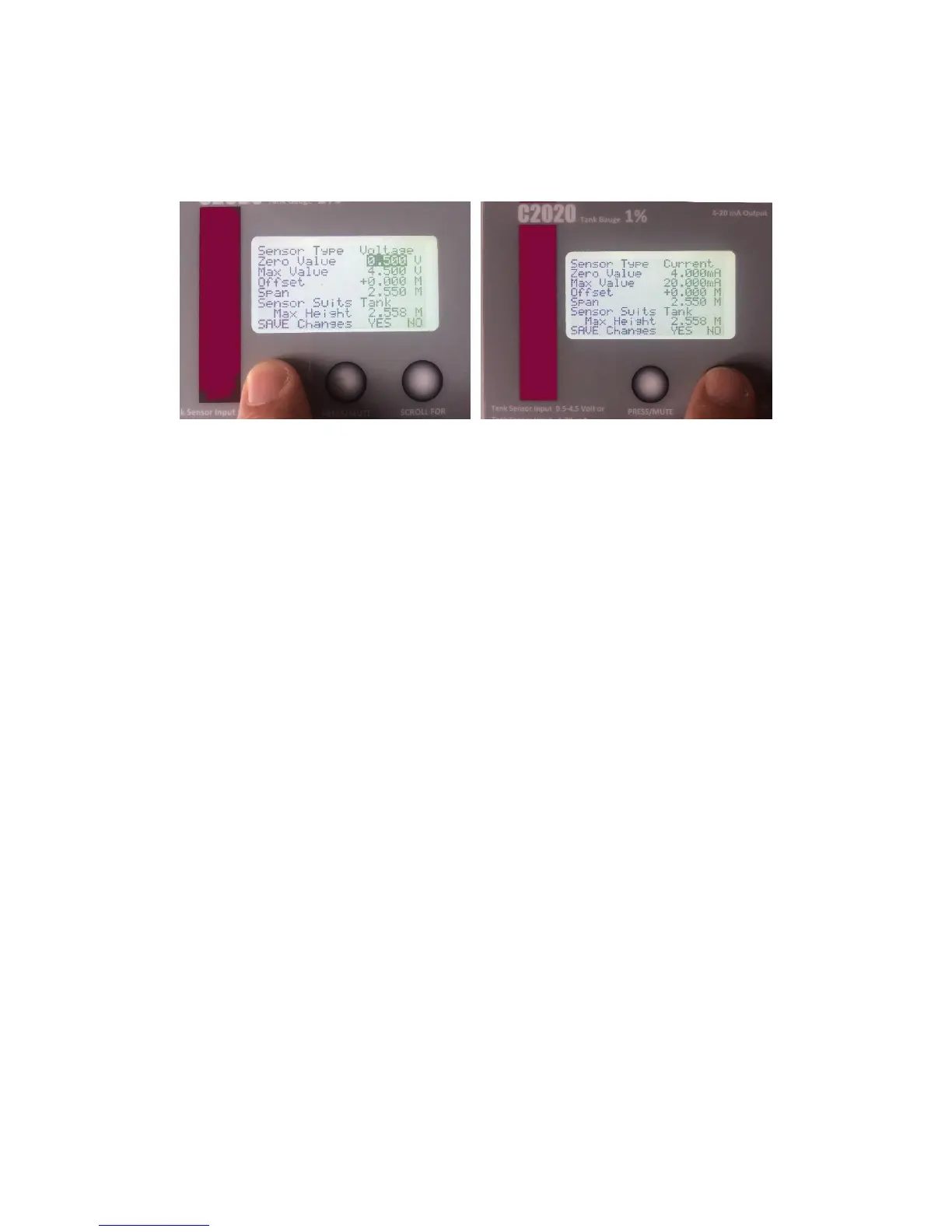
High Accuracy Calibration Adjustments.
For fine tune Calibration, the sensor settings can be adjusted to suit the individual user.
For Voltage Sensor.
The Maximum Value can be adjusted up or
down to suit. (Both must be adjusted by the
same amount).
If Gauge reads LOW, increase these values.
If Gauge reads HIGH, decrease these values
For Current Sensor.
The Zero Value can be adjusted up or down to
suit.
(Maximum Self Adjusts).
If Gauge reads LOW, increase these values.
If Gauge reads HIGH, decrease these values
Troubleshooting
• Litres Displayed Incorrectly.
Usually down to incorrect settings of the Sensor Span. Check Calibration as shown in
Section 7 – Sensor Span. The Span should match the sensor you have.
C22 = 2.55m (Default), C23 = 3.00m, C25 = 5.00m, C27 = 10.0m
• Display does not read Litres.
Gauges when powered will either read, No Sensor Connected, if there is not one, or one of
the calibration screens may be shown. This can be toggles by switching the Cal switch on the
back of the display board.
If no sensor connected, check that one is connected or check the wiring.


 To Next Page