9
EN
ON
Cool
12
13
14
15
16
17
11
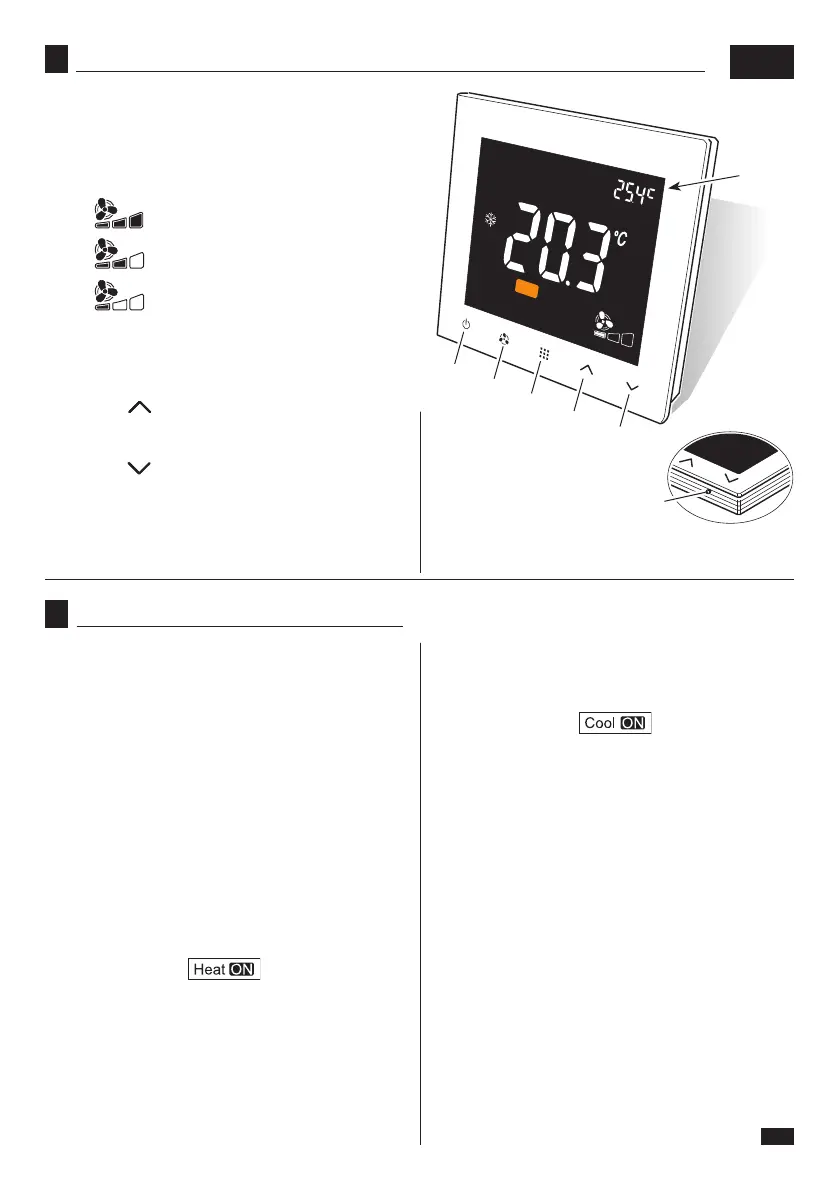
11. Display
12. Thermostat ON/OFF key
13. Fan operating mode selection key
HI = maximum speed
MED = medium speed
MIN = minimum speed
14. Operating mode selection key
COOL = “cooling” mode
HEAT = “heating” mode
15. Key “ ” - each time it is pressed, it increases
set temperature by 0,5°C.
Keep it pressed to increase temperature quickly.
16. Key “ ” - each time it is pressed, it decreases
set temperature by 0,5°C. Keep it pressed to de-
crease temperature quickly.
17. Ambient temperature detection sensor.
9
OPERATION OF THE THERMOSTAT
To use the thermostat:
- Connect it to mains voltage (see paragraph “1”).
“OFF”
appears on the display
.
- Press key (12) to switch on the thermostat.
The settings enabled before the last switch-o are
displayed.
In the centre of the display is displayed the detected
ambient temperature while in the top right corner is
displayed the set ambient temperature.
- Use the key “Mode” (14) to set the desired mode
(Heating or Cooling).
- If “Heating” (HEAT) mode is set and ambient temper-
ature is lower than the set one, the function starts and
the icon
appears.
When the ambient temperature value reaches the set
one (plus a preset value), the function stops and the
iconturnso.
- If“Cooling”(COOL)modeissetandambienttemper-
ature is higher than the set one, the function starts
and the icon
appears.
When the ambient temperature value reaches the set
one (minus a preset value), the function stops and
theiconturnso.
- When one of the two functions start, it is possible to
setthedesiredspeedofthefanwiththespecickey
(13).
- Whenthesetfunctionswitcheso,thefanalsostops.
-
Toswitchothethermostat,presskey(12);themes-
sage
“OFF”
appears
.
8
KEYS


 To Next Page