EasyManua.ls Logo

Oliso project iron M3PRO - Product Overview and Setup; Identify Iron and Solemate Components; Four Simple Steps to Start Ironing

Oliso project iron M3PRO
18 pages
Print Icon
To Next Page IconTo Next Page
To Previous Page IconTo Previous Page
Loading...
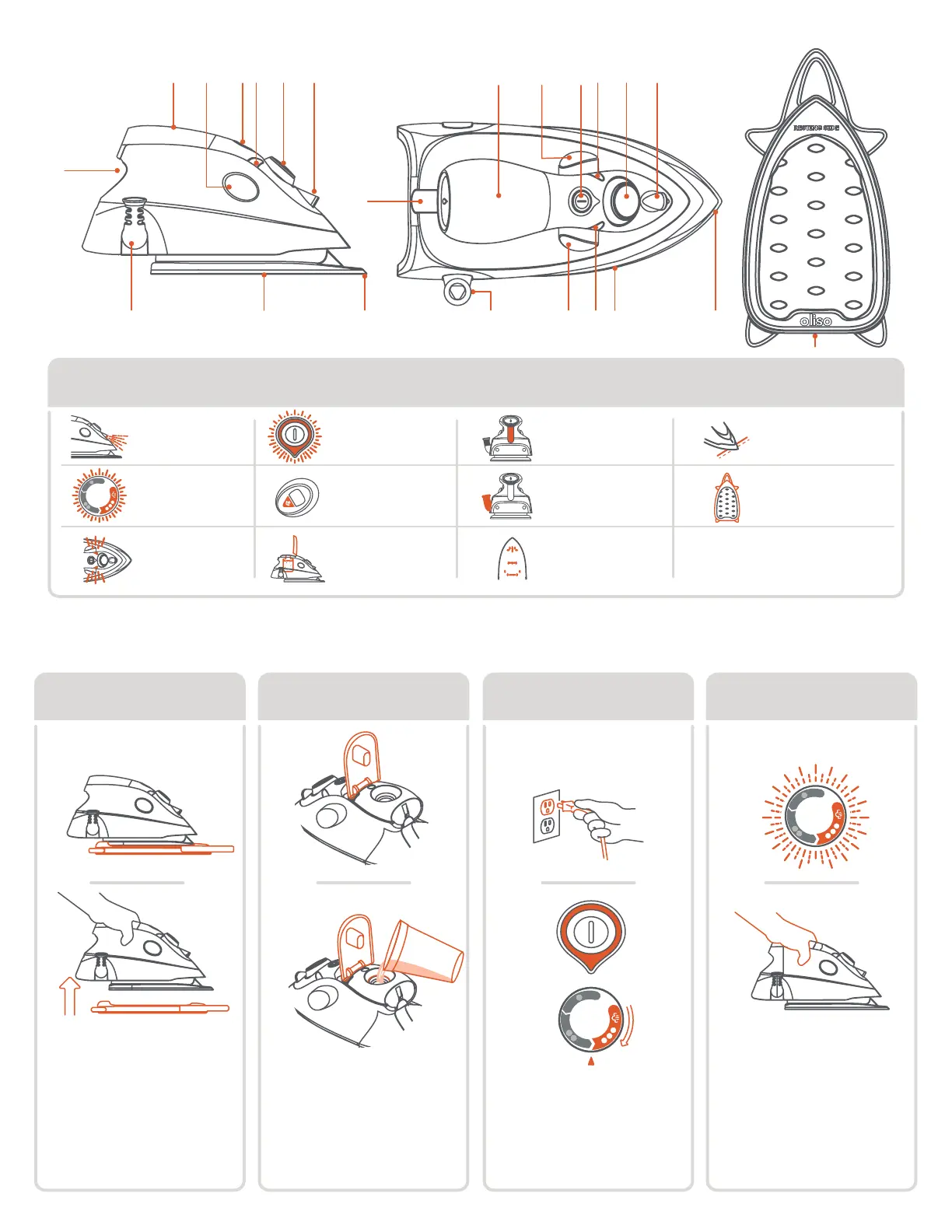
solemate
11
Steam buttons
get to know your oliso
®
project iron
®
side top solemate
5
4
Top ll water
tank cover
Fabric selector
+ status light
2
6
Soleplate
9
Cord guard
8
3
7
10
Standby button
+ status light
Steam
status lights
ProLight
1
Water level
window
Detailer tip
6
7
7
35 24 1 6 35 24 1
9
11
108 935 108
4 simple steps to start
step 3
Plug in and select fabric
setting. Press standby
button; light will go from
red to green and the
white status light will
pulse as iron is heating.
step 2
fill unplugged
Open the water tank
cover and ll with tap
water to the max level.
Note: ll cup not included.
step 4
iron
It's ready when the white
light stays on.
Note: always rest the
iron on either its heel
or its solemate™.
set up
step 1
remove solemate
Before plugging in make
sure to remove the
solemate™, and place
iron on the resting side
of the solemate™.
Max Fill
Max Fill

Other manuals for Oliso project iron M3PRO

Related product manuals