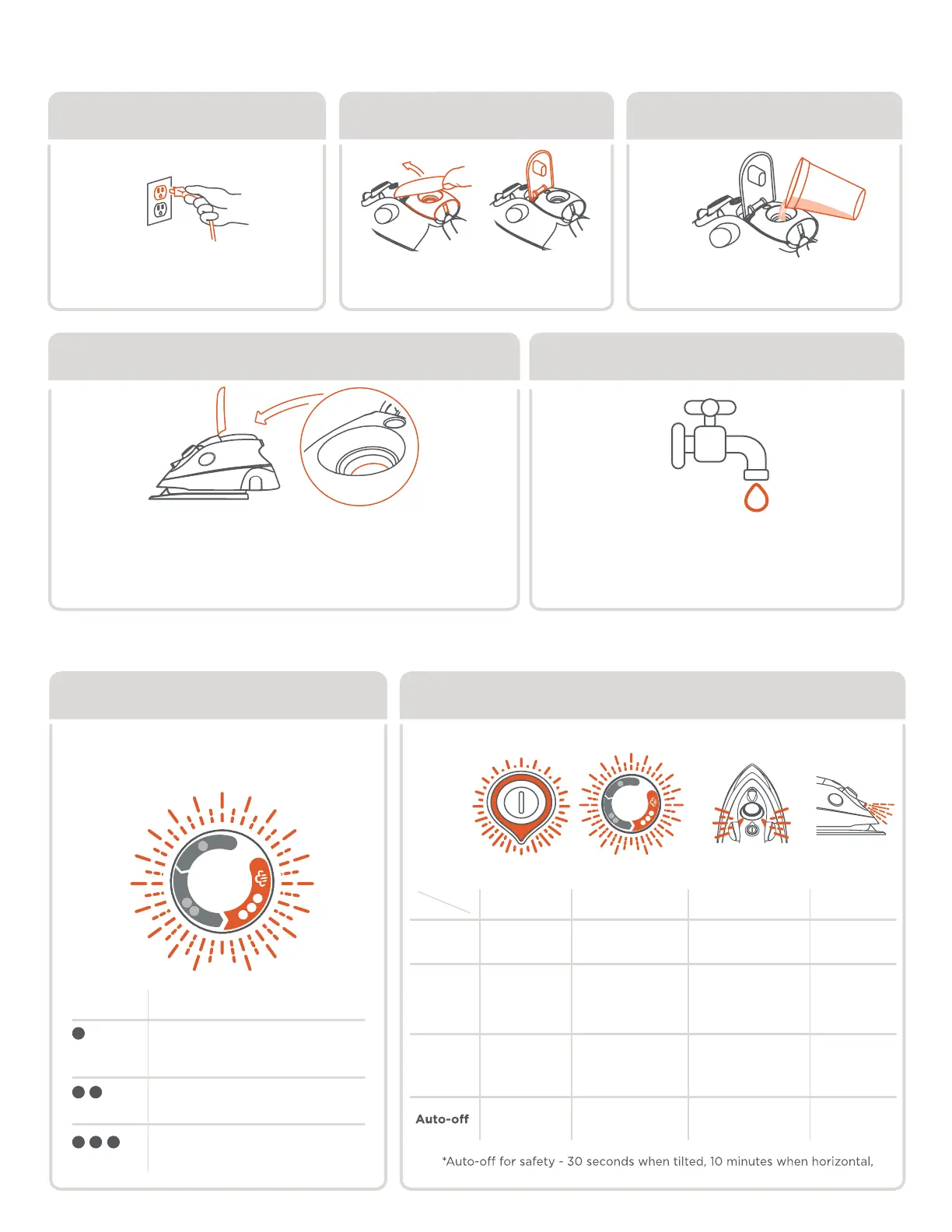
filling water tank
unplug open cover fill
Carefully fill the water tank.
Max capacity. 1.7fl oz (50mL).
Place iron on Solemate™ to cool.
Then open the cover
Press the standby button so light
turns red before unplugging
Do not fill the tank past the MAX fill line. Close the lid tightly when done.
Be careful when filling a hot iron, if water overflows,
dry the iron with a cloth before plugging back into the outlet.
It is best to empty the water tank after ironing,
let the iron cool before emptying.
This iron is designed for tap water use.
If you have very hard water,
we recommend using inexpensive bottled
spring or purified water or mixing half tap
water with half distilled water.
step 1 step 2 step 3
Max fill line Water Use
Note: fill cup not included.
Max Fill
fabric selector
Turn the fabric selector to the
desired setting.
settings temperature + fabric
Low temperature
for synthetic fabrics
Medium temperature
for wool + silk.
High temperature
for cotton + linen.
status lightsfabric selector
30 minutes when vertical.
Standby
indicator
Fabric
Selector
Prolight
position
light
Standby
Horizontal
On heel
RED
OFFOFF OFF
GREEN
GREEN
RED
OFF
OFF
OFFOFF
PULSING - heating
SOLID - ready
ON
Flashes when
tilted
Steam Status
(only ••• setting)
ready
ON
ready
ON
PULSING - heating
SOLID - ready



 To Next Page