Olive > User Guide
8. Settings
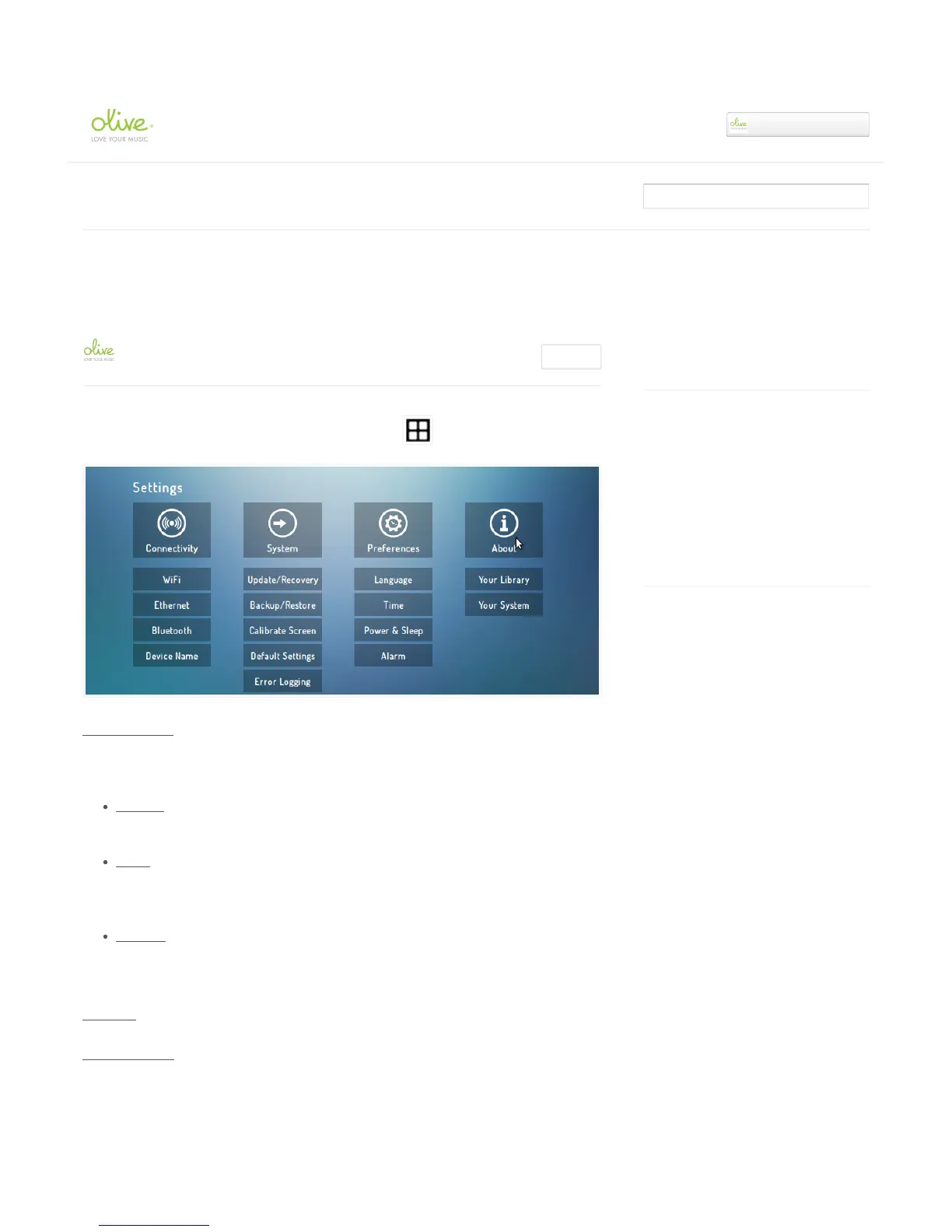
All SETTINGS are conveniently accessible by tapping on the icon.
Connectivity
Connect your Olive ONE to your network (Wireless or Wired) and Bluetooth device. !
Wireless: The Olive ONE currently supports the following wireless network
encryptions: 802.11 B/G/N, WEP/WPA/WPA2!!
Wired: The current software version does not allow a manual setup of a wired connection.
Simply connect an Ethernet cable to your ONE and it will automatically choose the wired
connection on boot-up.
Bluetooth!: The Olive ONE supports all smartphones with Bluetooth 2.1 (or higher) and that
employ the standard AVRCP protocol for audio streaming.
System
Update/Recovery
Recently viewed articles
7. Editing Metadata
6. Playlists
5. Finding the right music quickly
4. Playing music
Related articles
Playing & browsing music from the built-in
hard drive
May 8, 2014: How to install your own hard
disk drive.
3. Transferring music to the internal hard disk
drive (HDD)
What can I do to improve the touchscreen
performance?
Olive ONE Support
▾


 To Next Page