UPnP Sources
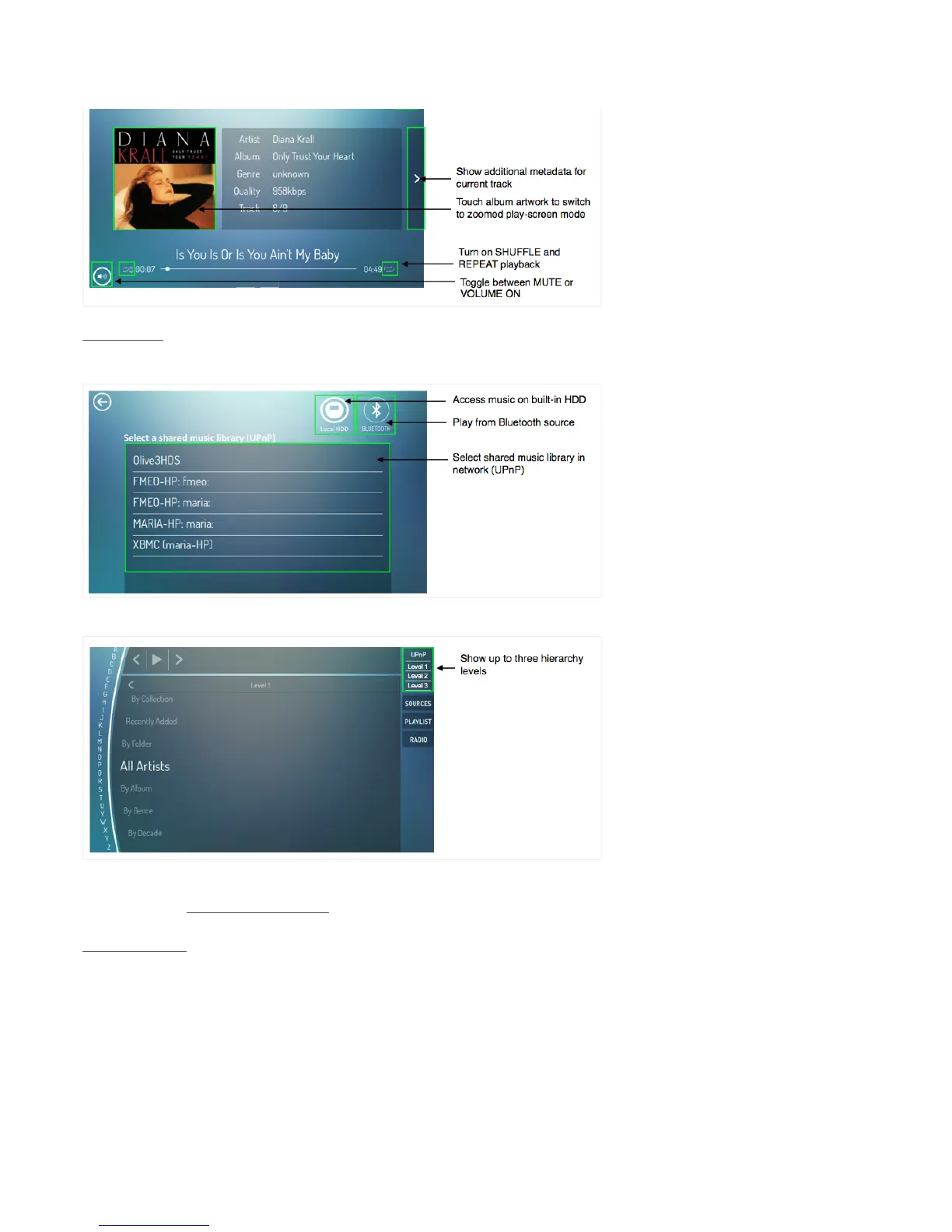
To stream music from your Mac/PC/NAS, you need to share your music library using UPnP DLNA
software in your network. Your UPnP library will then appear in the Sources screen:
Once you have selected your library the Olive ONE will display the music information in the UPnP
library screen:
Due to the many different ways UPnP software packages provide information about a shared
music library, the Olive ONE provides a standardized view to ensure maximum compatibility. You
can choose to view up to three hierarchy levels of your music library.
Bluetooth Sources
The ONE can also access and play music from your Bluetooth enabled smartphone:
1) Select SOURCES from the Launch Bar and click on the Bluetooth icon! (or go to
SETTINGS > CONNECTIVITY > BLUETOOTH).
2) Turn ON Bluetooth and wait until the status messages changes to “Initialized.”
3) Turn ON Bluetooth on your smartphone and select the ONE in the device list.


 To Next Page