Olive > User Guide
6. Playlists
Creating Playlists!
1) Keep your finger pressed on a track or album name and select “Add to playlist” from the pop-
up. (Note: We are also working on adding complete artists to playlists.)
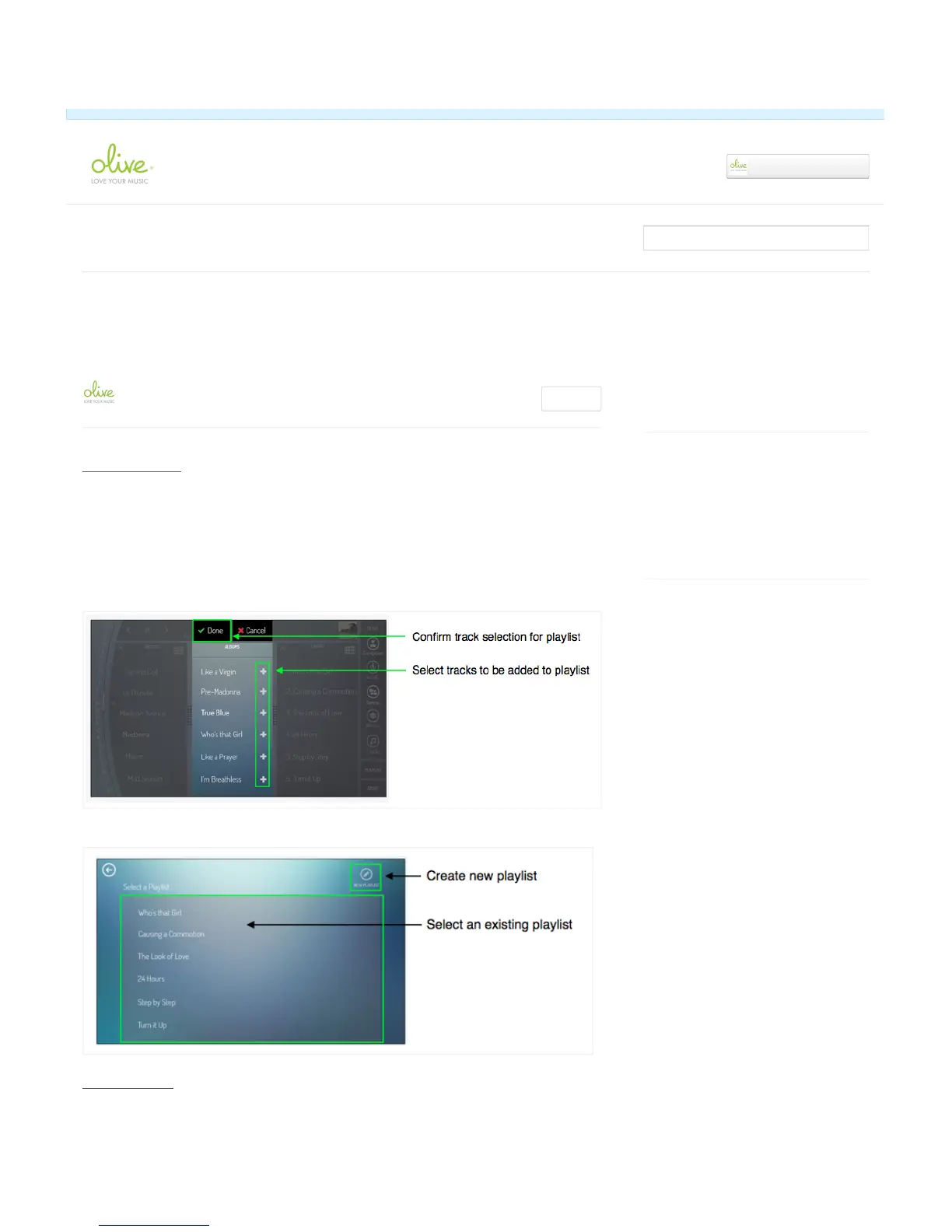
2) Select the tracks you want to add to the playlist by pressing the “+” next to each track.
3) Confirm your selection by tapping on the “DONE” button.
4) Add the tracks to an existing playlist, or create a new playlist.
Editing Playlists!
Recently viewed articles
6. Playlists
4. Playing music
Related articles
7. Editing Metadata
4. Playing music
8. Settings
Feb 10, 2014: Quick Start Guide available for
download
June 24, 2014: New software release available
for download.
✓ Article was successfully updated.
Olive ONE Support
▾


 To Next Page