Upgrading The Computer
Upgrading the System Memory (RAM) 6 - 7
6
Upgrading the System Memory (RAM)
The computer has one memory socket for 200 pin Small Outline Dual In-line
(SO-DIMM) DDRII (DDR2) type memory modules (see “Memory” on page C
- 2 for details of supported module types).
The total memory size is automatically detected by the POST routine once you
turn on your computer.
1. Turn off the computer, and remove the battery.
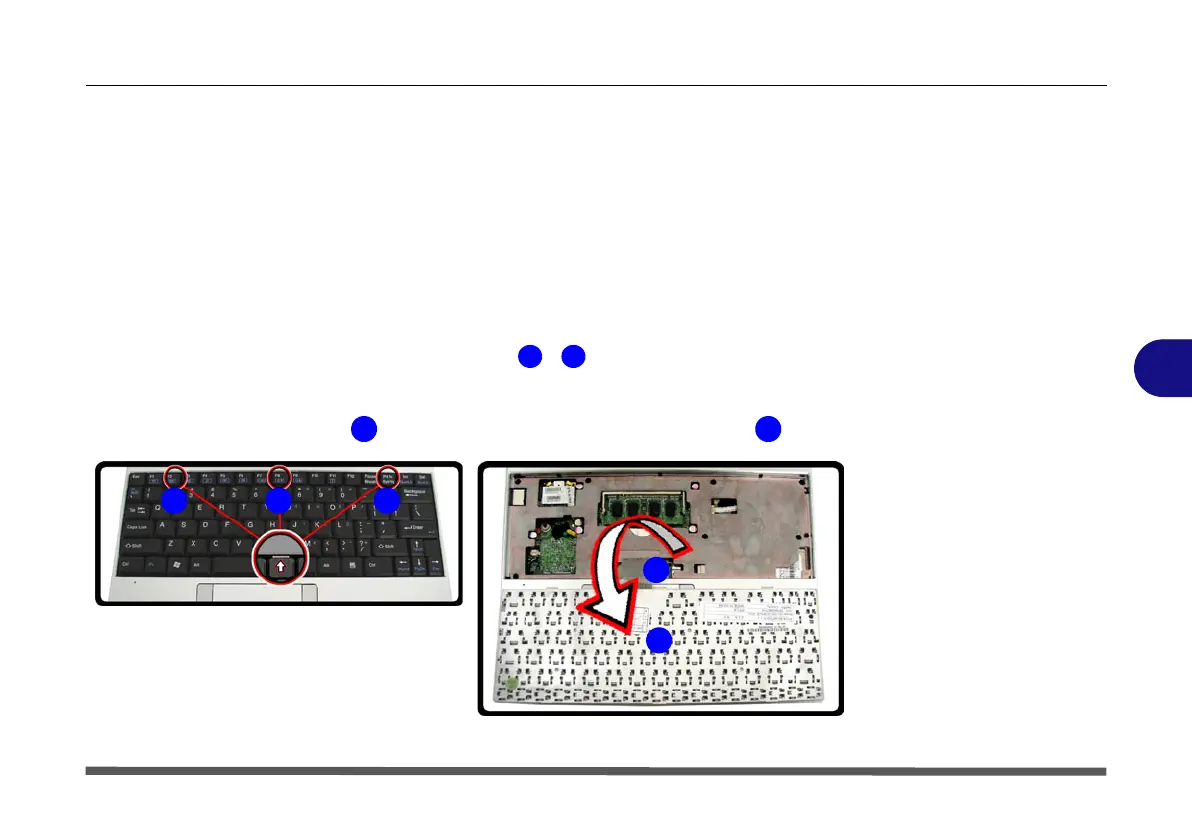
2. Carefully press in the three keyboard latches ( - ) at the top of the keyboard to
elevate the keyboard from its normal position (you will need to use a small
screwdriver to do this).
3. Carefully lift the keyboard up (do not bend the keyboard ribbon cable ).
Figure 6 - 5
Keyboard Release
1 3
5
4
5
5
321
5
4


 To Next Page