3-5
Printing
Banner Printing
When a document length from 470.5 mm (18.53") to a maximum of 915mm (36.03") is specified for printing, the print job is
treated as banner printing.
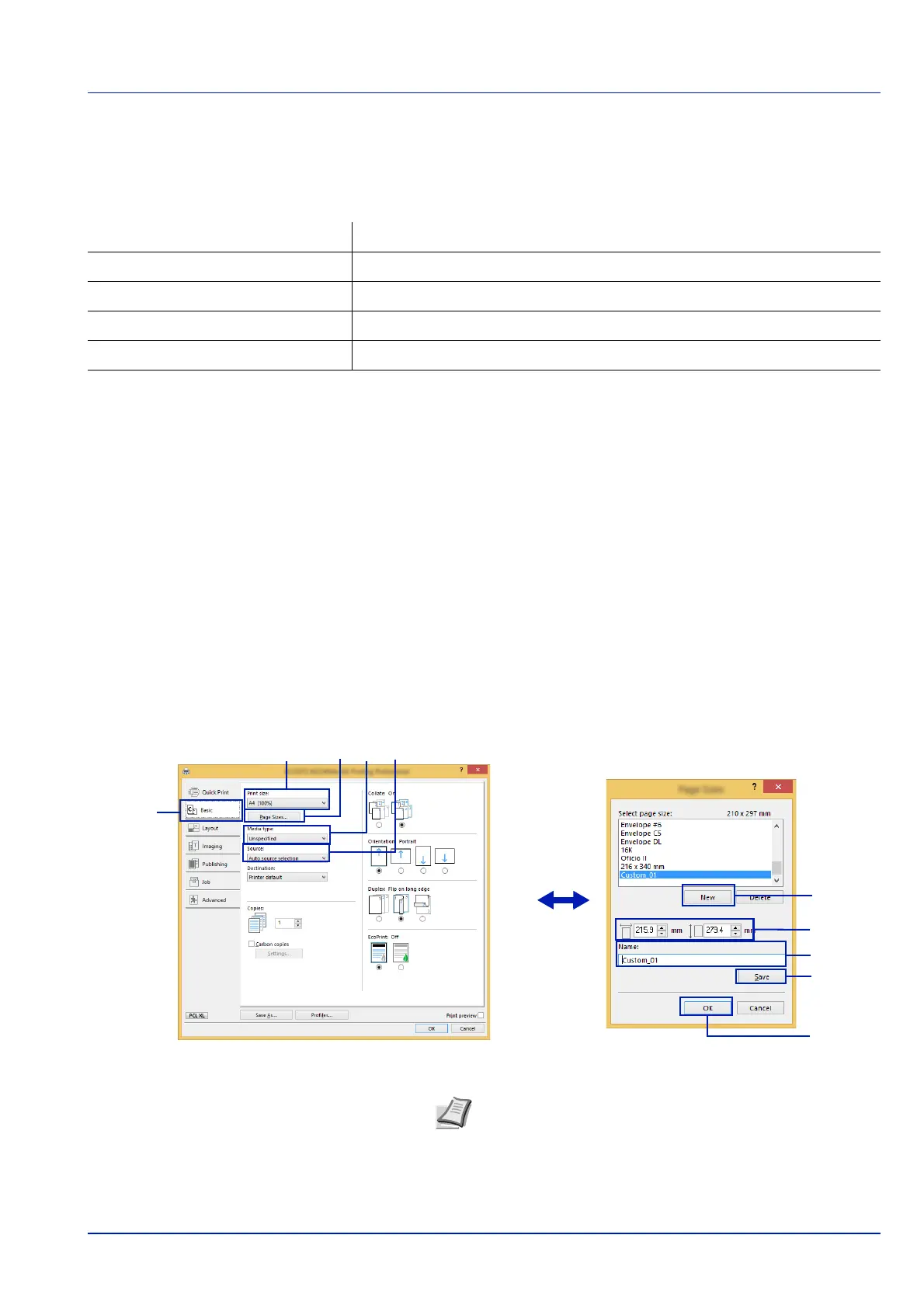
1 Display the print settings screen.
2 Click the Basic tab.
3 Click Page Sizes... to register the size.
4 Click New.
5 Enter the name of the paper.
6 Enter the length (470.5 mm (18.53") or longer), and width of the
custom paper size being registered.
7 Click Save.
8 Click OK.
9 In the Print size menu, Select the page size (name) registered in
steps 4 to 8.
10
Select MP Tray in the Source menu.
11
Select the type of paper in the Media type menu.
12Click OK.
Max. number of sheets
1 sheet (manual feed)
Paper width
210 mm to 216 mm (8.27" to 8.51")
Paper length
470.5 mm to 915 mm (18.53" to 36.03")
Paper weight
120 to 163 g/m
2
Media type
Heavy 2
Note When KPDL is used for "PDL" Settings of the Printing
System Driver
, a length setting of 470.5 mm (18.53") or longer
is handled as banner print
.













 To Next Page