12
- Water Unit
For water commands: use water commands on remote foot pedal
(section 5.3) or command panels on working table (sections 5.4) and
assistant module (sections 5.6).
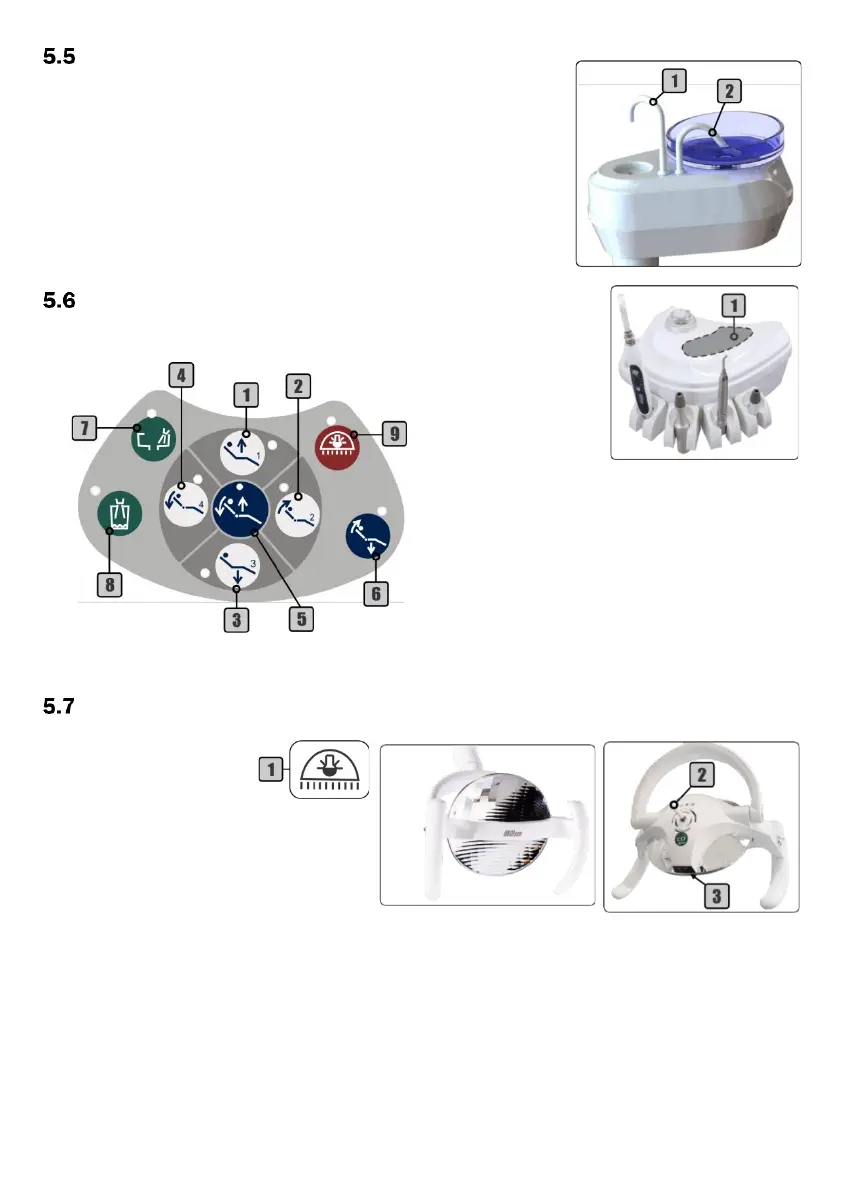
The water spouts for spittoon bowl (2) and cup filler (1) are removable.
- Assistant Module
Note: the layout of the assistant module may vary according to customer order or available handpieces.
- Operating Lights
5.7.1 - Concept Plus LED
To activate the
operating light: press the
On/Off operating light
command (1) on the
command panel (section 5.4 and 5.6) or remote
foot pedal (section 5.3) to enable sensor (3) and
control lever (2).
To turn On/Off the operating light: pass
the hand in front of the sensor (3) approximately
5 cm away or press the control lever (2).
To change the light intensity: hold your hand in front of the sensor (3) or turn the control lever (2) until the
operating light shows the desired intensity.


 To Next Page