18
The selected speed is shown on the display (5).
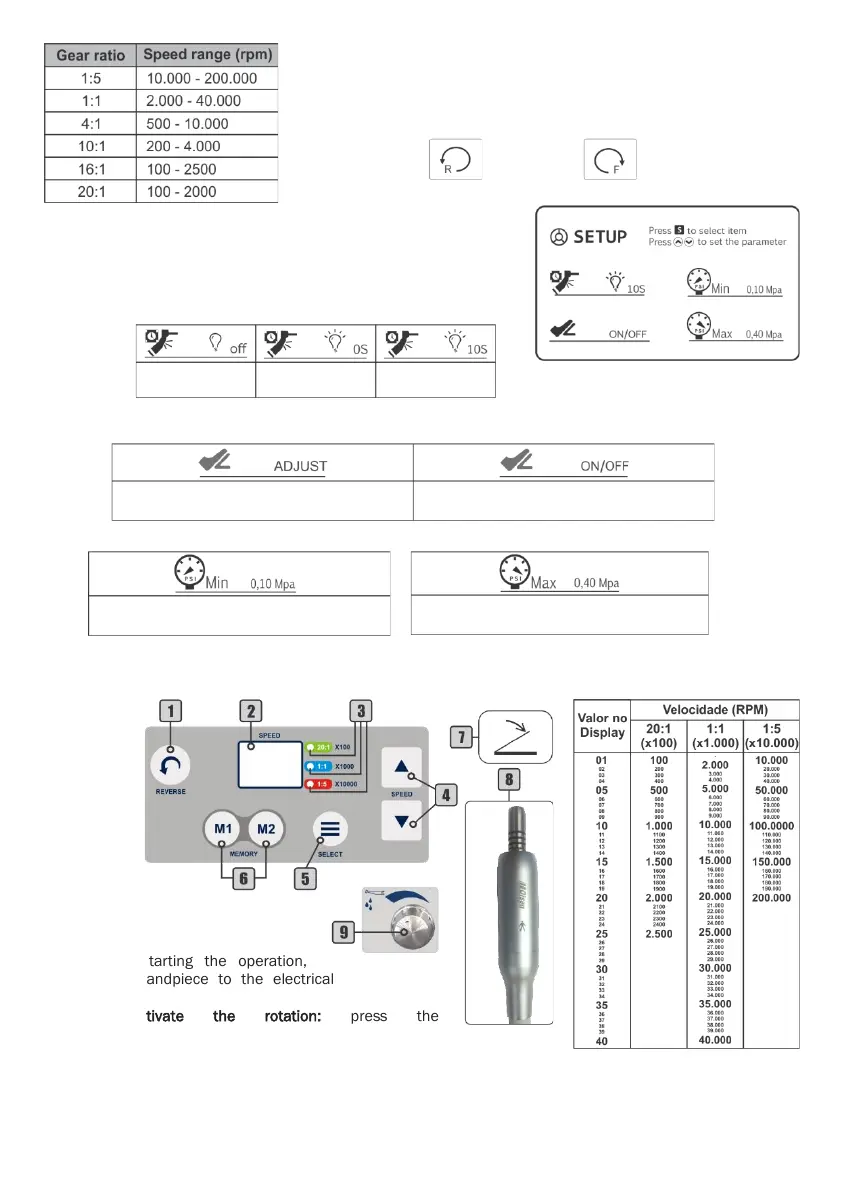
To select the gear ratio: use Gear Ratio key (10). There are the
following values available: 1:5, 1:1, 4:1, 10:1, 16:1 and 20:1.
The selected gear ratio is shown on the display (4).
To change the rotation direction: use the Direction key (9).
The selected direction is shown on the display (3).
To adjust the micromotor water: use the water control knob (15)
on the instruments control panel.
To access setup menu: press and hold the Setting key (12).
Use the Setting key (12) to select the desired option.
To adjust LED options: use the adjustment keys (13) to set the
parameter.
To adjust pneumatic activation method: use the adjustment keys (13) to set the parameter. The selected
pneumatic activation method is shown on the display (6).
To adjust input pneumatic pressure: use the adjustment keys (13) to set the parameter.
Note: the micromotor system preset by the factory according to the internal equipment pressure. It is not
recommended to change the pressure parameters.
6.8.4 - Brushless Electrical Micromotor - Built in (Optional)
Before starting the operation,
connect the handpiece to the electrical
micromotor (8).
To activate the rotation: press the
propulsion/activation pedal (7).
To select the transmission: use the Select key (5). The
selection is indicated by LED’s (3): 20: 1; 1: 1 and 1: 5.
To reverse the rotation: use the Reverse key (1).
To adjust speed: use the adjustment key (4) The speed relation of each transmission with the value of the
display (2) is indicated in the side table.


 To Next Page