7
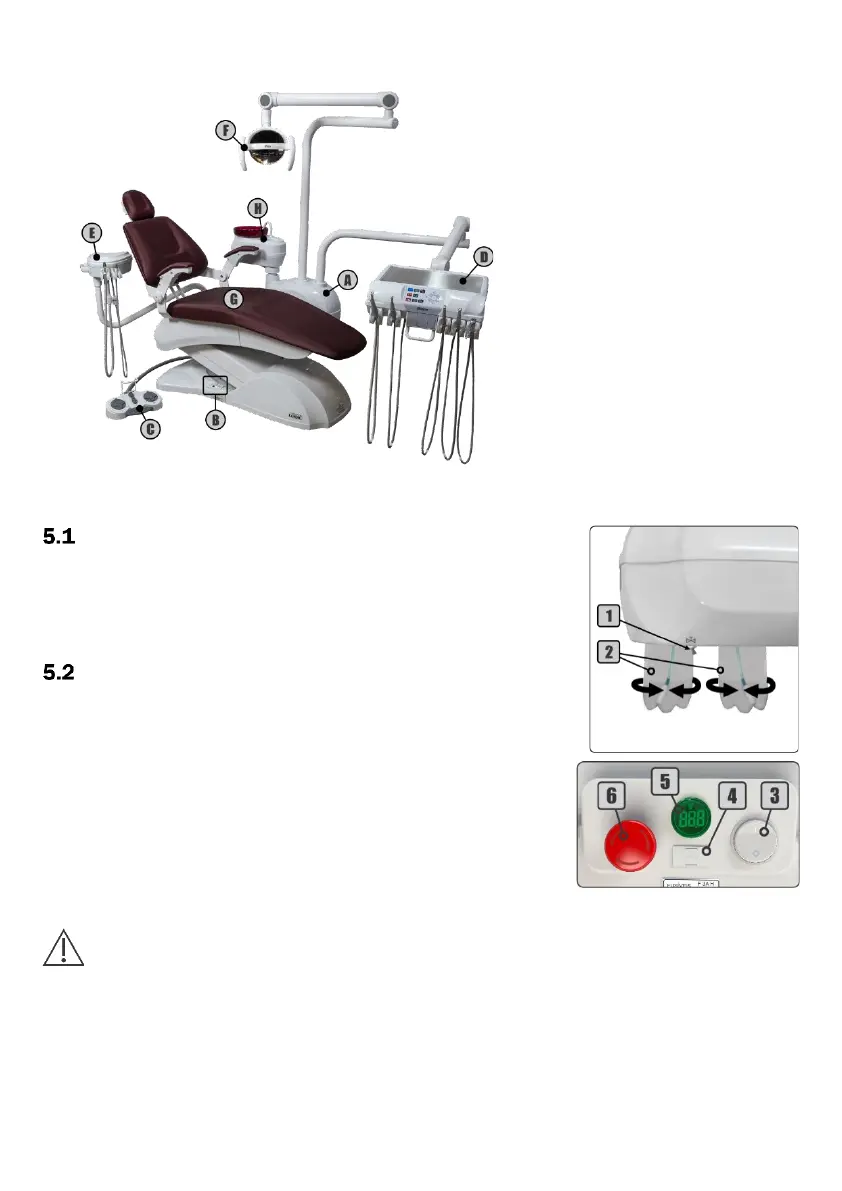
4 - Parts Identification
5 - Equipment Operating and Description
- Before Turning On the Equipment
1º - Check if the equipment is properly installed in accordance with the
instructions in chapter 6 (Installation) of the User Manual Dental Line;
2º - Turn On the air compressor that supplies the equipment;
3º - Open the main water supply valve of the equipment;
4º - Turn On the equipment's power circuit breaker.
- Turning On the Equipment
1º - Turn On the On/Off switch (3) on the base of chair;
2º - Activate the "Seat Up" command on the pedal (section 5.3) until the seat
reaches its maximum height limit;
3º - Close the pressure valve (1);
4º - Make sure the water tanks (2) are filled with water. If necessary, fill it with
drinkable water up to the limit indicated in each tank and reattach them
again. If you wish to place prophylactic products (low concentration);
5º - Open the pressure valve (1) and check if the water tanks (2) are well
attached and free of leaks;
6º - Before starting to use the equipment, check the operation of all available
instruments and controls and perform cleaning and sterilization of the
instruments (chapter 7 of the User Manual Dental Line - Cleaning and
Disinfection).
The second tank is part of the structure depending on the equipment configuration
5.2.1 - Delivery System
1 - Pressure Valve
2 - Water Tanks
5.2.2 - Electric Panel
3 - On/Off Switch
4 - Fuse Holder
5 - Digital Voltmeter (Optional)
6 - Emergency Stop Button (Optional)


 To Next Page