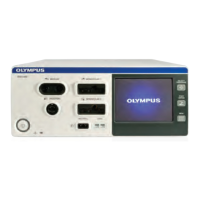
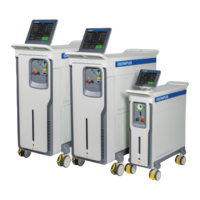
The Olympus EMPOWER Ho:YAG Lasers, including models EMP-H35S, EMP-H65S, and EMP-H100S, are advanced medical laser systems designed for various surgical procedures. This quick reference guide provides essential information for setting up and operating these devices, emphasizing user safety and efficient functionality.
Function Description
The Olympus EMPOWER Ho:YAG Lasers are high-performance holmium:yttrium-aluminum-garnet (Ho:YAG) laser systems primarily used in medical applications requiring precise tissue ablation, incision, excision, vaporization, coagulation, and hemostasis. These lasers emit energy in the infrared spectrum, which is highly absorbed by water, making them effective for a wide range of soft tissue and lithotripsy procedures. The system delivers laser energy through specialized optical fibers, allowing for minimally invasive interventions. The different models (EMP-H35S, EMP-H65S, EMP-H100S) likely offer varying power outputs and capabilities to suit diverse clinical needs.
Usage Features
The Olympus EMPOWER laser systems are designed for intuitive operation, incorporating several features to enhance user experience and procedural efficiency:
- Quick Setup: The guide outlines a straightforward setup process, starting with connecting the power cord. Users are instructed to visually inspect the power cable for damage before connecting the female end to the power port on the rear of the system. This initial check is crucial for safety.
- Foot Switch Connection: The foot switch is an integral part of the system, allowing for hands-free activation of the laser. Its connector plugs into a socket on the front panel, secured by twisting a silver ring clockwise.
- System Activation and Self-Check: To power on the device, users must ensure the rear power switch is in the active ("I") position and the red emergency stop button is not pressed (reset by turning clockwise). The unlock key, when inserted and turned 90 degrees clockwise to a vertical position, initiates the system. A light ring around the fiber connection (white on H35, blue on H65/H100) indicates power-on. The laser then performs a self-check of all components. In case of an error during startup, an error code is displayed, prompting the user to restart the device or contact Olympus Service if the error persists. The H65 and H100 models feature a dedicated "System Check Screen" to monitor this process.
- Laser Fiber Connection and Detection: The laser fiber connects to a dedicated port on the front panel. A unique ring on the fiber connector facilitates secure clamping and enables automatic detection of the fiber's status (present/absent), diameter, and type (single-use/reusable). If the fiber is not connected, an error message is displayed. The H65 and H100 models include a sensor that recognizes the user's hand, opening an external protection shutter for the fiber connector, adding a layer of safety.
- Standby/Ready Modes: The system operates in two primary modes: Standby and Ready. In Standby mode, the laser is not firing and cannot emit energy, ensuring safety during preparation. Pressing the Ready/Standby buttons on the screen or the footswitch toggles between these modes. In Ready mode, the laser is active and prepared to emit energy upon activation.
- Aiming Beam Adjustment: For precise targeting, the system features an aiming beam. Users can adjust its intensity and select between a solid or blinking beam via a dedicated button on the main screen.
- Laser Parameter Adjustment: The touch screen allows for easy adjustment of laser parameters, including energy and frequency, using +/- buttons. The "Emission Mode" area enables users to switch between different emission modes (e.g., Lithotripsy, Popcorning, Fragmentation, Dusting, Stabilization). On H65 and H100 models, pulse width can be further adjusted (short, medium, long pulse) after selecting a mode.
- Laser Activation: To activate the laser for treatment, the system must first be in Ready mode. This is achieved by pressing the READY button on the screen or the circular button on the footswitch. A safety feature requires holding the footswitch button for a few seconds (until a beep is heard) to prevent accidental activation. Once in Ready mode, stepping on the foot pedal activates the laser.
- Saving Settings (H65 and H100): The H65 and H100 models offer the convenience of saving customized settings as presets. Users can access the settings menu from the main screen, choose "presets," and then select "new" to save current configurations with a custom name. These presets can be easily recalled from the home screen for future use.
- Manual Mode (H65 and H100): These models also feature a "Manual" mode, which can be selected from the home screen instead of a specific treatment type. In Manual mode, energy, frequency, and pulse width parameters are entered manually, offering greater flexibility, and these manual settings can also be saved as presets.
- Fiber Information Display: The integrated Laser RFID system automatically recognizes and stores information about the OLYMPUS EMPOWER Laser Fiber, including its use history. Users can access this data by touching the "Fiber Info" button on the main screen. A pop-up displays details such as fiber size and type, number of uses, date of last use, and total energy (joules) and time (seconds) emitted through the fiber for a given procedure. This feature helps track fiber usage and ensures proper fiber management.
Maintenance Features
While the guide primarily focuses on operational aspects, it implicitly highlights several maintenance-related considerations:
- Visual Inspection: The instruction to visually inspect the power cable for tears or cracks before connection emphasizes a crucial preventative maintenance step. This helps identify potential electrical hazards and ensures the integrity of the power supply.
- Error Code System: The laser's ability to display error codes during startup is a key diagnostic feature. This allows users to quickly identify system malfunctions, guiding them to either restart the device or contact Olympus Service for professional assistance, thereby facilitating efficient troubleshooting and minimizing downtime.
- Fiber Management: The automatic detection of fiber status, diameter, and type, along with the display of fiber use history (number of uses, last use date, total energy emitted), aids in proper fiber management. This information helps users determine when a fiber is nearing the end of its lifespan or if it has been used beyond its recommended limits, contributing to optimal performance and patient safety.
- System Self-Check: The automated self-check performed by the laser upon startup is a fundamental maintenance feature, ensuring that all internal components are functioning correctly before operation. This proactive check helps prevent potential issues during a procedure.
- Contacting Service: The instruction to contact Olympus Service if error codes persist after restarting the device underscores the importance of professional maintenance and support for complex laser systems. This ensures that any underlying technical issues are addressed by qualified personnel.
In summary, the Olympus EMPOWER Ho:YAG Lasers are sophisticated medical devices designed for precision and ease of use, with features that support efficient setup, operation, and basic troubleshooting, while also providing tools for effective fiber management.

 Need help?
 General







 To Next Page