• If the “hour” indicator flashes in the display,
see “Setting Time and Date [Time & Date]”
(☞ P.15).
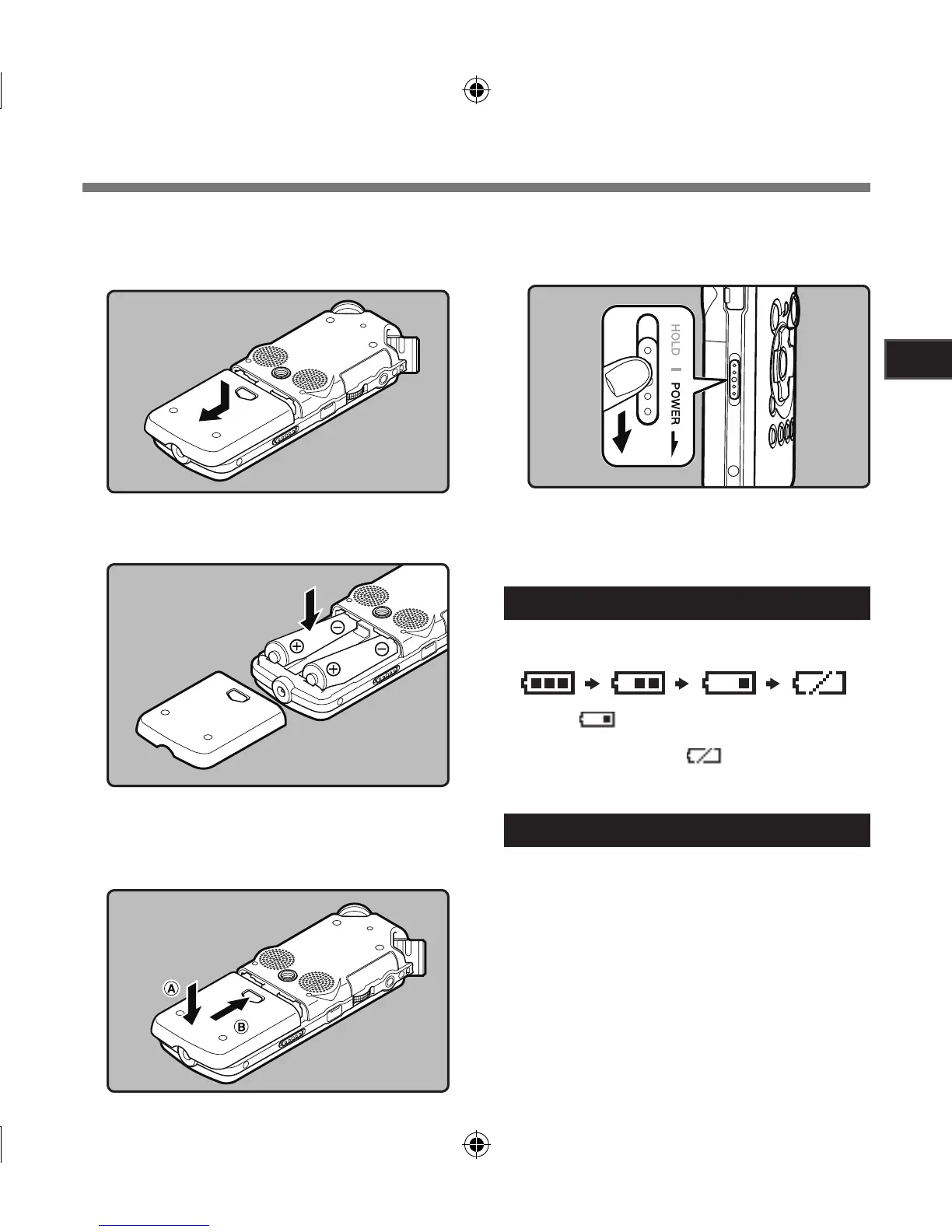
Replacing batteries
The battery indicator on the display changes as
the batteries lose power.
• When [ ] appears on the display, replace
the batteries as soon as possible. When the
battery is too weak, [ ] and [Battery Low]
appears on the display and the recorder shuts
down.
Ni-MH Rechargeable Battery
Ni-MH rechargeable batteries B-01 4PE (optional)
from Olympus can be used in the recorder. Use
them with the Olympus Ni-MH Rechargeable
Battery Charger B-90SU (optional) (For U.S.A.
and Canada) or BU-90SE (optional) (For Europe)
(☞ P.81).
Inserting Batteries
1
Press the battery cover release button,
and then slide the battery cover open
while lightly pressing down on it.
2
Insert two AA batteries with the cor-
rect = and - polarities.
3
Close the battery cover completely
by pressing to the direction A, then
sliding to the direction B.
4
Slide the
POWER
/
HOLD
switch in the
direction indicated by the arrow, and
turn the power on.



 To Next Page