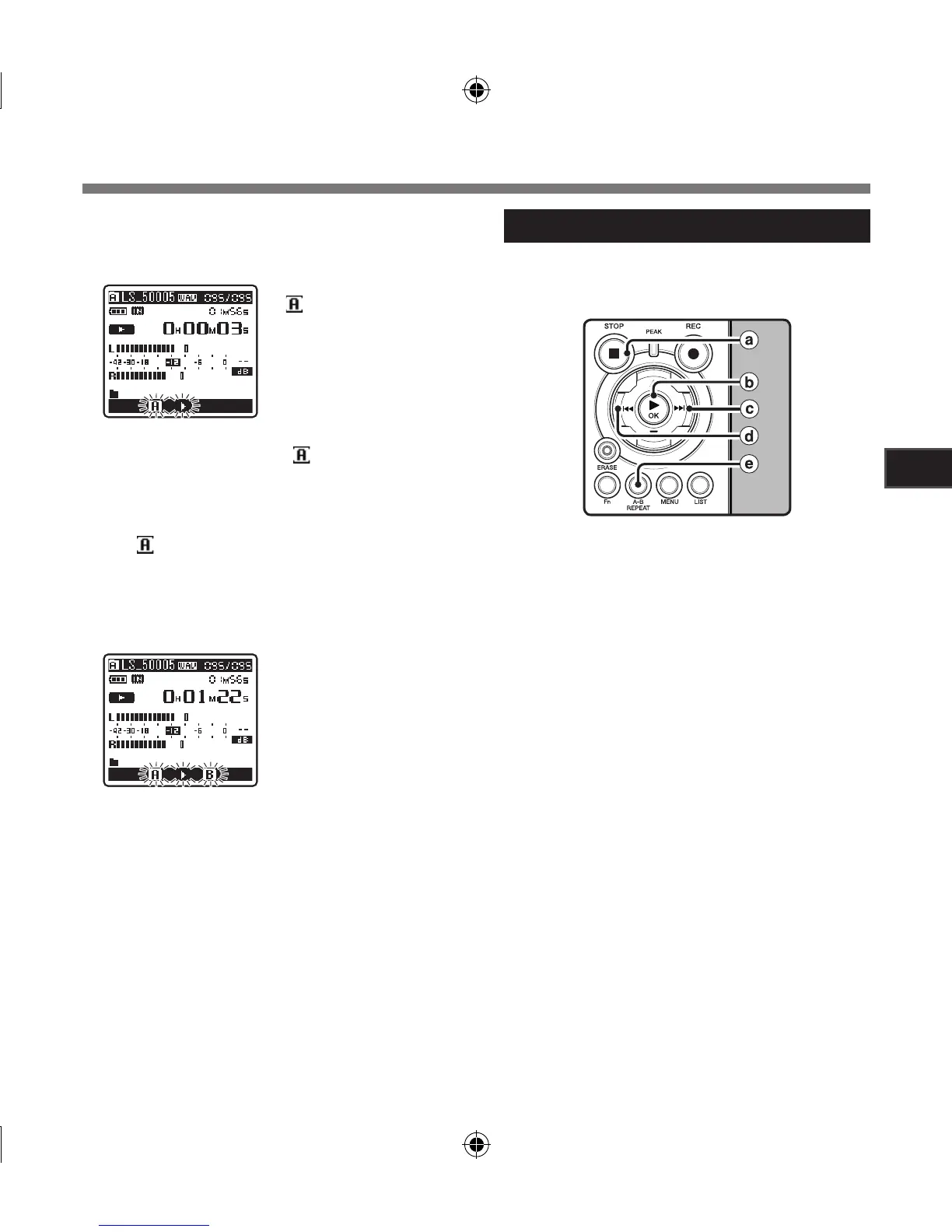
[ ] will flash on the
display
4
Press the
A-B REPEAT
button at the
point you want to start segment repeat
playback.
• The recorder repeatedly plays back the
segment until the segment repeat playback
is cancelled.
5
Press the
A-B REPEAT
button again at
the position where you want to end
segment repeat playback.
Playback
• Fast forwarding and rewinding (☞ P.29) can
be conducted when [ ] is flashing in the
same manner as during normal playback,
and you can quickly proceed as far as the end
position (☞ P.34).
• When it reaches to the end of the file while
[ ] is flashing, the point will become the end
position, and repeat playback will start.
Cancel the segment repeat playback function
a Press the
STOP
4 button
Pressing the STOP 4 button will release seg-
ment repeat playback, and stop playback.
b Press the `/
OK
button
Pressing the `/OK button will release segment
repeat playback, and stop playback.
c Press the 9 button
Pressing the 9 button will release segment
repeat playback, and cue to the beginning of
the next file.
d Press the 0 button
Pressing the 0 button will release segment
repeat playback, and reverse to the beginning
of the current file.
e Press the
A-B REPEAT
button
Pressing the A-B REPEAT button will release
segment repeat playback, and playback
continues without repeating.
Pressing any of the following buttons will
release the segment repeat playback.



 To Next Page