15
EN
1
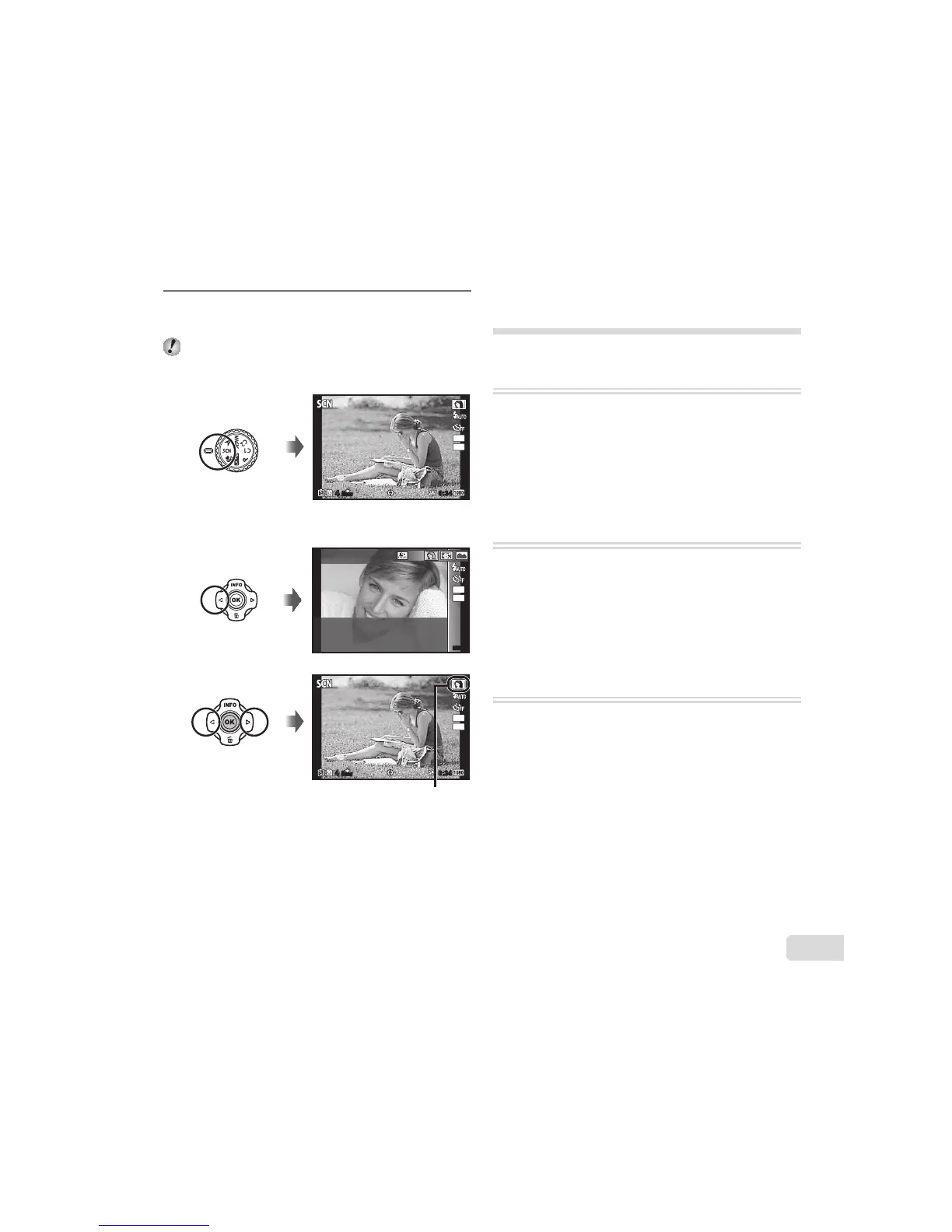
Use the mode dial to select the
shooting mode.
In or P, press H of the arrow pad for
the function menu, then press HI of the arrow
pad for the sub menu, and press the A button.
N
ORM
44
0:340:34
12
M
12
4:3
To select a submode
MENUMENU
12
M
Portrait
4:3
N
ORM
44
0:340:34
12
M
12
4:3
Icon indicating the submode that is set
Learning about the shooting
modes
P (P mode)
The camera will select the appropriate
aperture value and shutter speed for
the subject. Changes can also be made
to various shooting settings, such as
exposure compensation, as needed.
M (M mode)
The camera will automatically select the
optimal shooting mode for the scene.
The shooting condition is decided by
the camera and settings cannot be
changed, excepting some functions.
a (Super Macro mode)
Images can be taken from up to 1cm
away from the subject.
Ɣ You can press the A button to x the focus
distance (AF lock). Press the A button again to
cancel the AF lock.



 To Next Page