EasyManua.ls Logo

Omega Digitech M202 - Advanced Menu Configuration

Default Icon
8 pages
Print Icon
To Next Page IconTo Next Page
To Previous Page IconTo Previous Page
Loading...
USER MANUAL
PAGE 6
Ωmegadigitech ©2018
M202
3.2 - Advanced menu
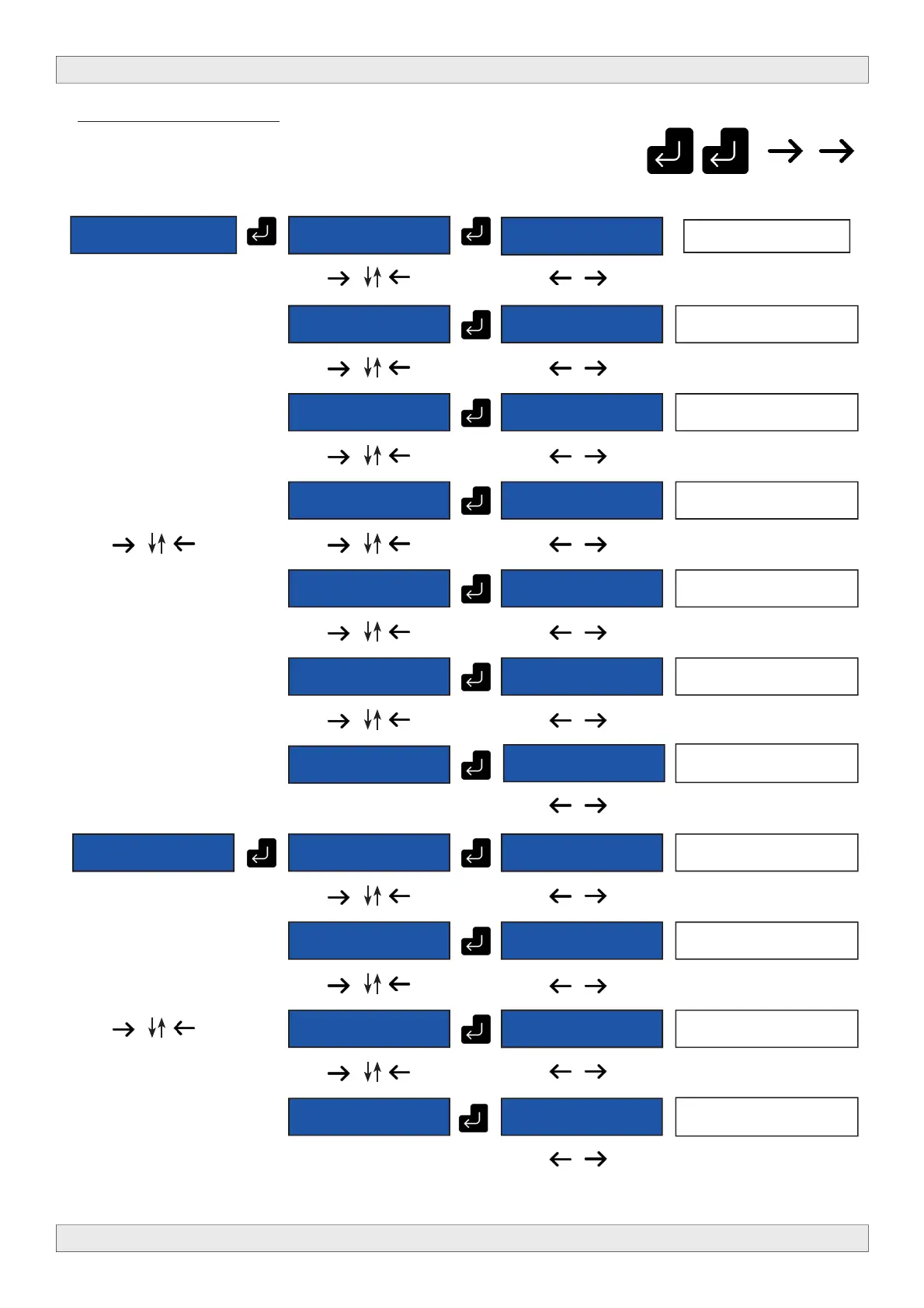
To enter the advanced menu please push following sequence of buttons
M202 19.0 DVB
SETTINGS
M202 19.0
FREQUENCY
M202 19.0
474000 KHz
Set the output frequency
M202 19.0
BANDWIDTH
M202 19.0 [8
MHz]
Select the bandwidth.
6,7 or 8 MHz
M202 19.0
CONSTELLATION
M202 19.0
[QAM64]
Select the constellation
QPSK, QAM16 or QAM64.
M202 19.0
F.E.C.
M202 19.0
[7/8]
Select the F.E.C.
1/2, 3/4, 5/6 or 7/8
M202 19.0
GUARD
INTERVAL
M202 19.0
[1/32]
Select the guard interval
1/2, 1/4, 1/8,1/16 or 1/32
M202 19.0
MODE
M202 19.0
[2K]
Select the mode 2K or 8K
M202 19.0
EXIT
M202 19.0 A/V
SETTINGS
M202 19.0
VIDEO RATE
M202 19.0
9000
Set the video rate
M202 19.0
AUDIO RATE
M202 19.0
[192 Kb/s]
Select the audio rate
M202 19.0 AUD.
COMPRESSION
M202 19.0
[MPEG1-L2]
Select the audio compression
M202 19.0
EXIT
Leave this menu.
M202 19.0
[YES]
Leave this menu.
M202 19.0
[YES]