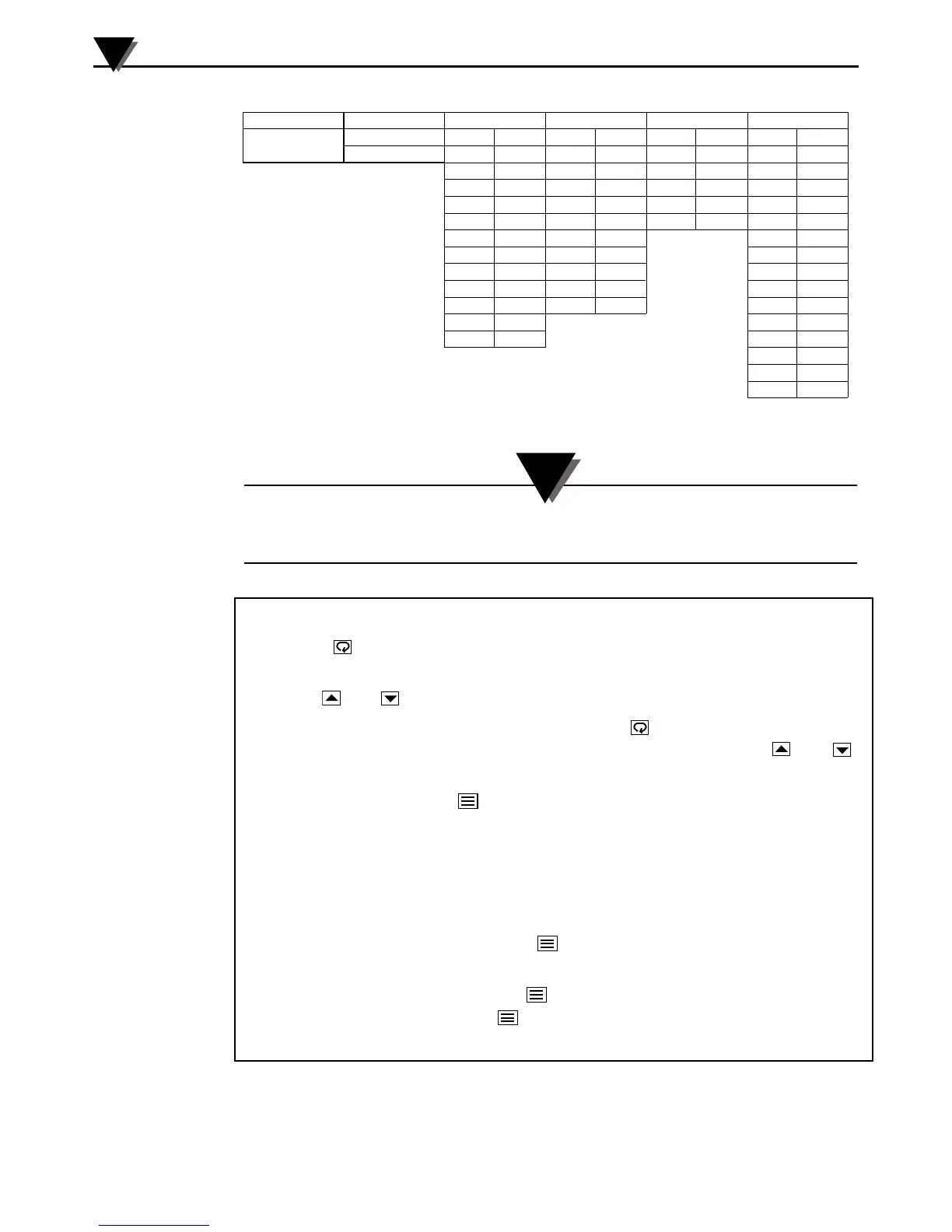
Figure 5. Menu Hierarchy Showing Factory Default Settings
Only the boldface parameters are active for the default mode
of operation.
Figure 6. Programming Procedure
BB702 Operation
3
3-4
Menu 00 Menu 01 Menu 02 Menu 03 Menu 04 Menu 05
Key Lock SETPOINT Ac.Cd =02 Ac.Cd =03 Ac.Cd =04 Ac.Cd =05
Ac.Cd
Gn.o1 434 ALr1 440 id.no 01 SnSr P
Gr.o2 ALr2 BAUd 12.o.7 Sn.00
rAtE 4 Cy.t1 0 CAL.L dEC.P
rSEt 21 Cy.t2 CAL.H FILt
H.Hys SP.tt OFF OUt.1 Ht.P
HyS.1 L.SP.L 90 OUt.2 Alr
C.HyS L.SCL CoL.t nor
HyS.2 U.SP.L 420 A1.HL HI
C.SPr H.SCL A1.Pd Pr
SPr.2 A1.OP LAt
dPnG nl A2.HL Hl
A2.Pd Pr
A2.OP OFF
Unit F
Changing the Controller’s Parameter Settings
1. Press the
key to enter the programming mode. The lower display will
alternately display the menu level and “Ac.Cd.”
2. Use the
and
keys to change to the desired menu level.
3. Once you have chosen the desired menu use the
key to scroll through
the parameters. To change the setting of a given parameter, use the
and
keys.
4. To save settings press the
key. The controller now exits the programming
menu and return to the normal operating mode.
5. To change settings on other menu levels, you must re-enter the programming
menu (from step #1).
Putting the Controller In or Out of Standby Mode
1. To enter the Standby mode hold the
key for 4 seconds until the window
flashes “StbY”.
2. To exit the Standby mode hold the
key for 4 seconds until the window
flashes “tUne”. Then press the key for 4 seconds again until “tUne” stops
flashing.
NOTE:


 To Next Page