33
OPTIMA 120
COMANDI E DISPOSITIVI DI LAVORO CONTROLS AND OPERATING DEVICES
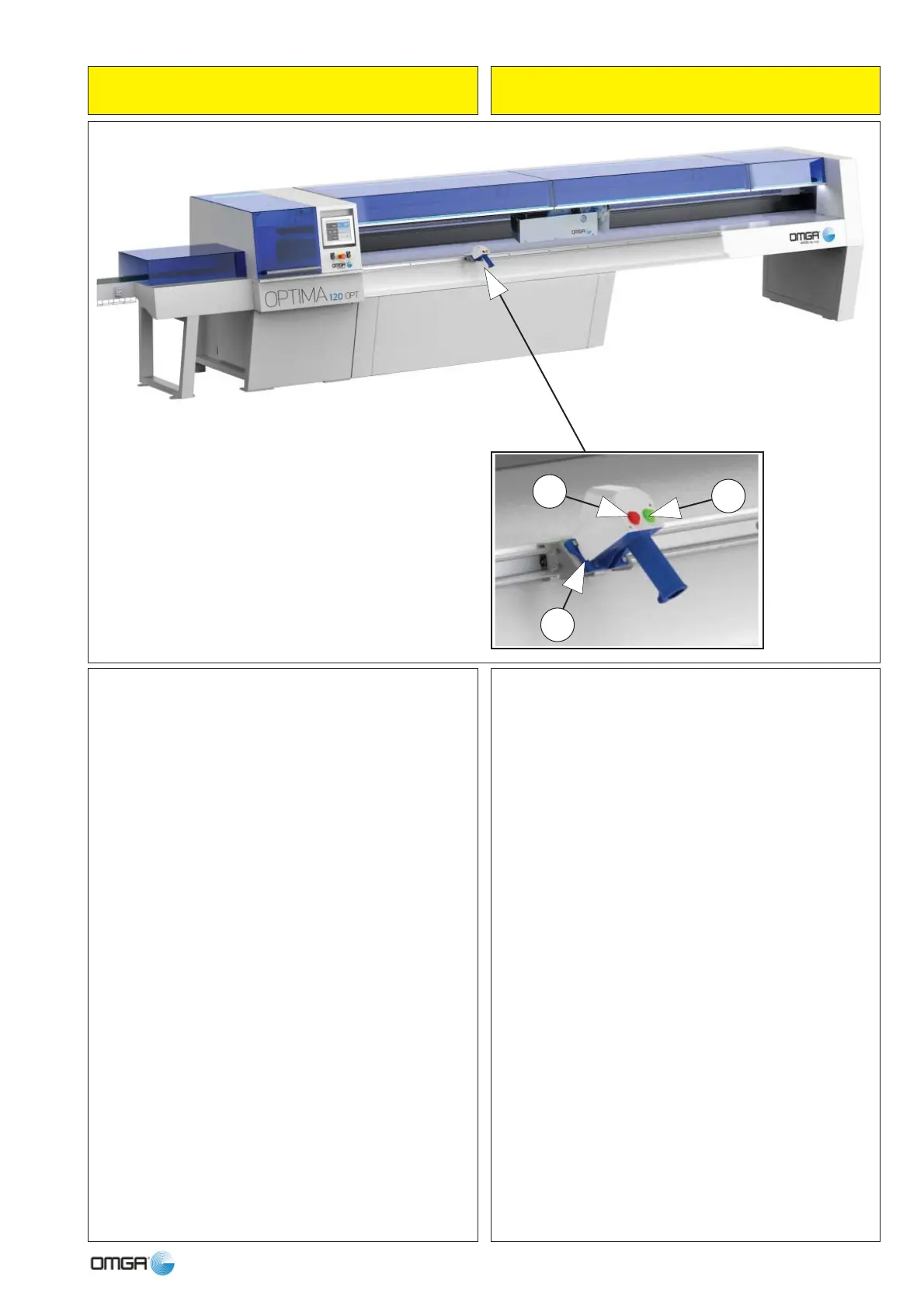
05 Marcatore Laser OPT
Montato su carrello movibile in avanti e indietro, può
scorrere.
Sul carrello sono presenti due pulsanti, verde (a sinistra)
e arancio (a destra):
Pulsante VERDE (6)
(a trascinamento) serve per evidenziare:
1 - Intestatura: pulsante premuto in trascinamento fi no
al punto desiderato per l’intestatura*
2 - Difetto: pulsante premuto in trascinamento da inizio
fi no a fi ne difetto*
Pulsante ARANCIO (7)
(a impulso veloce) serve per evidenziare:
2^ Qualità: un impulso per inizio 2^ qualità (spia pul-
sante accesa), un secondo mpulso per fi ne 2^ qualità
(spia pulsante spenta)*
(a pressione per n secondi) serve per evidenziare:
Fine barra e conseguente START del carro con pinza in
posizione di carico barra (spia pulsante lampeggiante)*
Start ciclo, dopo aver bloccato la barra in pinza*
* Si raccomanda all’Operatore di consultare attentamen-
te il manuale del software fornito a corredo.
05 Laser Marker OPT
Mounted on a carriage moving forwards and backwards,
it can run along the entire length of the workpiece.
On the carriage there are two push-buttons, green (on
the left) and orange (on the right):
GREEN push-button (6)
(press and hold) for:
1 - Trim cut: push-button pressed and held to required
point for trim cut*
2 - Defect: push-button pressed and held from start to
end of defect*
Pulsador NARANJAORANGE push-button
(rapid pulse) for:
2nd Quality: one pulse to start 2nd quality (push-button
warning light lit), a second pulse to end 2nd quality
(push-button warning light off)*
(pressed for n seconds) for:
End of bar and consequent START of carriage with
gripper in bar loading position (push-button warning
light fl ashing)*
Start cycle, after locking the bar in the gripper*
* Carefully consult the software manual supplied.
5
6
7



 To Next Page