EasyManua.ls Logo

Omnex T150 - User Manual

Omnex T150
4 pages
Print Icon
To Next Page IconTo Next Page
Loading...
T150 / R150 User Guide
STEP 1
Install Batteries
Remove the battery cover on the
back of the
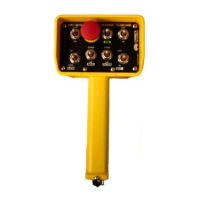
T150
, and install the
four
AA
alkaline batteries as
shown in Figure 1.
STEP 2
T150
R150
T
his device complies with the requirements of the Federal Communication Commission (FCC) as specified in document CFR47 Part 15.247 and Industry and
Science Canada (ISC), as specified in document RSS 210. The device is permitted only on a no-interference, no-protection basis, that is, it must cease operation
when it is determined that it causes harmful interference to the services authorized by the FCC or the ISC.
Changes or modifications to the equipment not expressly approved by OMNEX will void the warranty.
Power Up T150
Activation of any switch will cause the
T150
to power up. However as a
safety feature, the
[EStop]
switch must be pressed and released, or if
already pressed, released within 10 seconds for unit to remain powered
up.
Using The T150
The
ACTIVE
LED will flash two times per second indicating that the
T150
is transmitting to the
R150
. When a function switch is used, the
ACTIVE
LED will flash brightly upon activation of the switch and return to flashing at
a rate of two times per second when there is no switch activity.
During normal operation the
LOW BATT.
LED will flash to indicate a low
battery condition.
The
[EStop]
button is used for both an emergency shutdown as well as a
safe way of powering down the
T150
after operation.
Each switch has a device specific label to identify its function.
The Trigger is a Proportional Control switch used in conjunction with a
function switch (i.e.
[ROT CW]
). The type of Proportional Control output is
dependent on the option of the receiver but will generally be either a
Voltage, PWM or Current Control.
STEP 3
Rev. 1.03
Figure 1
DMAN-2293-01
Bldg. 74 – 1833 Coast Meridian Road, Port Coquitlam, BC, Canada V3C 6G5

www omnexcontrols com

Other manuals for Omnex T150

Questions and Answers

  • S
    Stephanie WernerAug 12, 2025
    What to do if the fuse is blown in my Omnex T150 Receiver?
    • B
      bwoodAug 12, 2025
      If the fuse is blown in your Omnex Receiver, the suggested solution is to change the fuse. Additionally, inspect the wiring to check for short circuits, such as bare wires. If the problem continues to occur after these steps, it is recommended to call for service.
  • R
    Ronnie Butler MDAug 15, 2025
    What to do if the Link light on the Omnex T150 doesn't turn green?
    • J
      jasonwilliamsAug 15, 2025
      If the Link light on the Omnex Receiver does not turn GREEN when the power switch is toggled on the transmitter to download, try the downloading steps again.
  • M
    Michelle DonaldsonAug 19, 2025
    What to do if there is a short to supply in my Omnex Receiver?
    • D
      Diane CruzAug 20, 2025
      If there is a short to supply in your Omnex Receiver, disconnect A & B connectors from the receiver and check all outputs for power, looking for issues like bare wires or improper connections. Make the necessary adjustments. If the problem persists, it is recommended to call for service.
  • B
    Brian WoodwardAug 23, 2025
    What to do if 2 output wires are connected in my Omnex Receiver?
    • A
      Alyssa CantuAug 23, 2025
      If you observe that 2 output wires are connected and the indicator comes on when a function is pressed on your Omnex Receiver, disconnect each output wire one at a time and press the function button. If the light clears, that output is incorrectly connected. Continue this process for each output until all output wires have been identified.
  • D
    daniel98Aug 27, 2025
    What to do if the E-Stop wire is connected to another output wire in my Omnex T150?
    • A
      Amanda YoungAug 27, 2025
      If the E-Stop wire is connected to another output wire in your Omnex Receiver, inspect the wiring and look for improper connections.
  • J
    Jillian ChaneyAug 31, 2025
    What to do if the status light is flashing red on my Omnex T150?
    • B
      Brittany RobinsonAug 31, 2025
      If the status light on your Omnex Receiver is flashing red, it indicates that one of the input/output wires has been connected to the power source. Inspect the wiring, looking for short circuits, such as bare wires. If the problem continues, it is recommended to call for service.
  • A
    Aaron BaileySep 3, 2025
    What to do if there is a short to supply in Omnex Receiver?
    • C
      Crystal WarnerSep 3, 2025
      If there's a short to supply in your Omnex Receiver, disconnect A & B connectors from the receiver and check all outputs for power, looking for issues like bare wires or improper connections; then make the correct adjustments. If the issue persists, call for service.
  • K
    Kimberly ClarkSep 7, 2025
    What to do if Omnex Receiver didn’t receive all of the information?
    • H
      huffmanchristineSep 7, 2025
      If the Omnex Receiver didn’t receive all the information, try the downloading steps again. If that doesn’t solve the problem, send both the transmitter and receiver in for service.

Summary

Install Batteries

Power Up T150

Using The T150

T150 LED Indicators

Describes ACTIVE and LOW BATT. LED behavior for status indication and battery level.

EStop Button Functionality

Explains the EStop button's role in emergency shutdown and safe powering down.

Switch Identification and Trigger Operation

Details switch labels and the Trigger's proportional control output types.

Setting ID Codes

Current Control Module Calibration

Transmitter; Receiver Replacement and Service

Troubleshooting

R150 LED Status Indicators

Details the meaning of ESTOP, FUNCTION/FAULT, LINK, and STATUS LEDs on the R150.

T150 LED Status Indicators

Explains the ACTIVE and LOW BATT. LEDs on the T150 for device status.

Inputs and Outputs

Replaceable Parts

Deutsch Connector Pin Assignments

Warranty Information

Omnex T150 Specifications

General IconGeneral
BrandOmnex
ModelT150
CategoryReceiver
LanguageEnglish

Related product manuals