Navigating LCD Menus
The Jog wheel lets you navigate around front panel menus, make selections, and adjust values. A
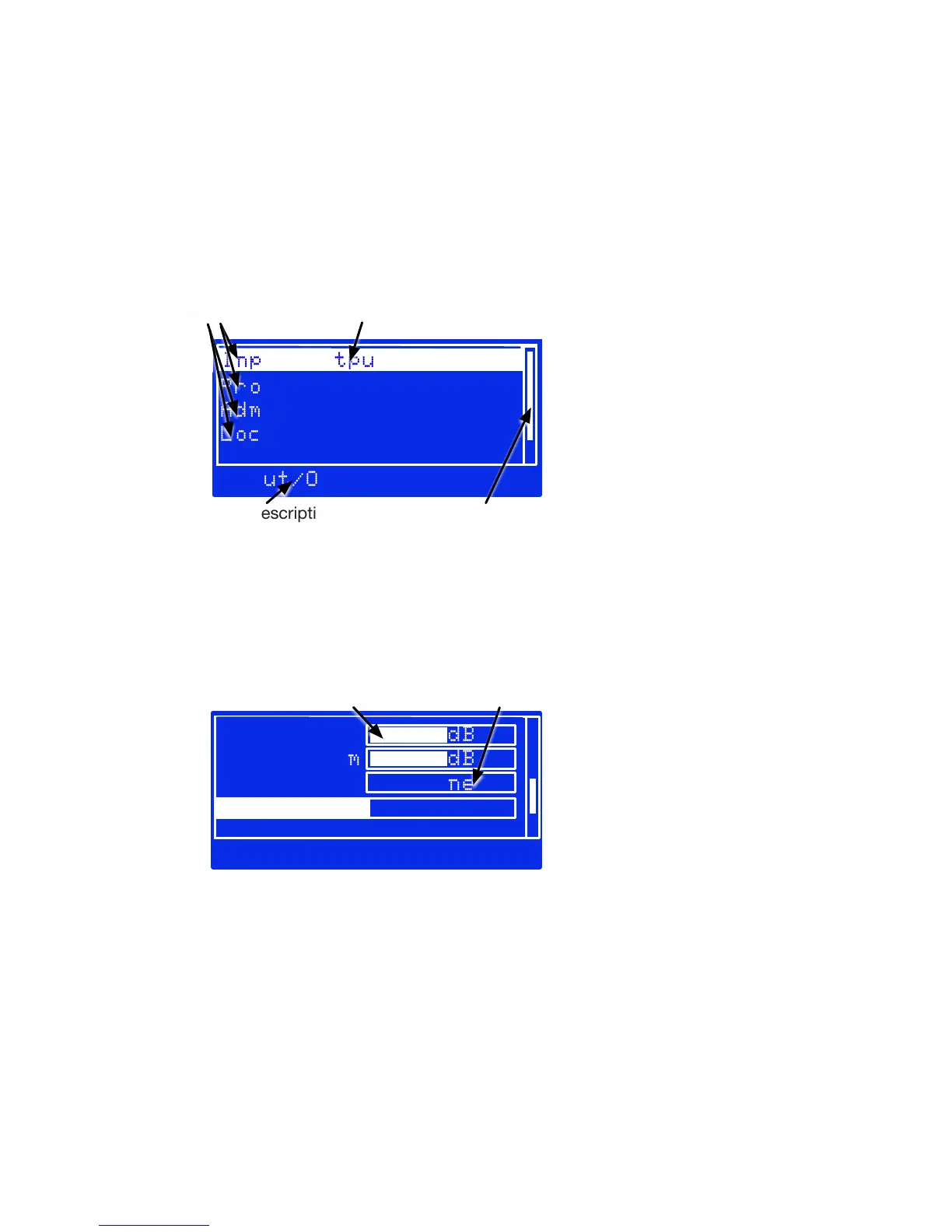
screen might display possible submenus, like this one:
Input/Output
Processing
Administrative
Lock Front Panel
Input/Output
Menu choices
Scroll bar
Selected choice
Hint or Description
LCDTypicalMenu.pdf
In this example, you’d turn the wheel to highlight one of the lines. If there are more choices
than can be displayed at once on the screen, a scroll bar helps you keep track of vertical progress
through the choices.
When your selected choice is highlighted, tap the wheel to enter that submenu.
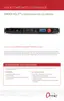
Or a screen might let you choose values, like this one:
Mono Mode
STEREOMono Mode
LW Level 0.0dB
Right Trim 0.0dB
Invert None
Slider value
Text Choice
LCDTypicalSliders.pdf
The LW Level and Right Trim above are typical sliders. When one of them is selected, tap
the wheel to adjust its value. Then turn the wheel to raise or lower the value, on the screen that
appears. When you’re satisfied with the change, tap again to return to the previous menu.
CHAPTER 4
| 20
FRONT PANEL AND LCD


 To Next Page