00030092.DOC, Version 1.0
19/27
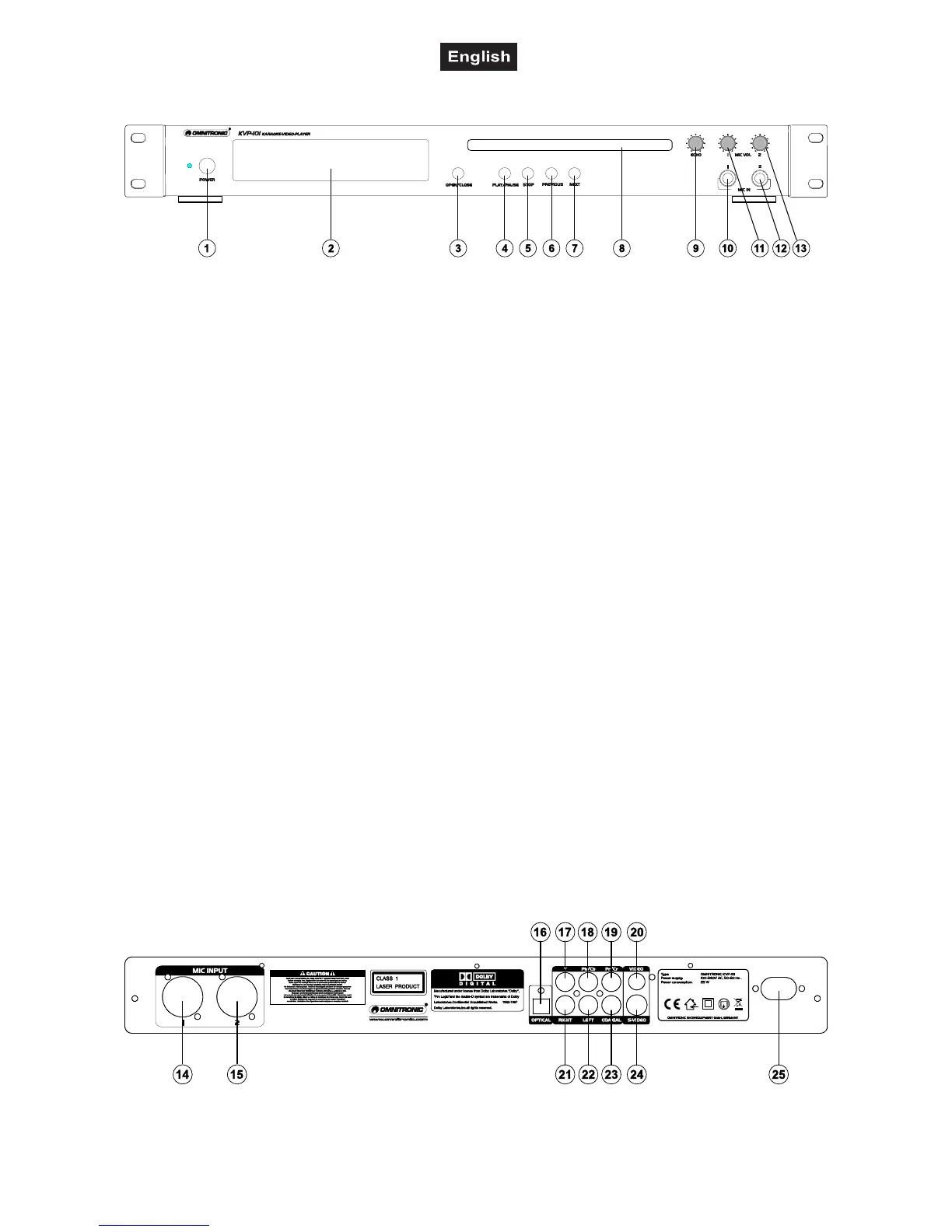
4.2 Front panel
1. POWER SWITCH
Press this button to start operation.
2. DISPLAY
LC-display for displaying the different modes and functions. Please refer to the explanations under 6.3 LC-
display.
3. OPEN/CLOSE BUTTON
Via the Open/Close-button, you can open and close the CD-tray. This button is disabled in play mode.
4. PLAY/PAUSE-BUTTON
With the Play/Pause-button, you can start the playback and stop it again. Please refer to the explanations
under 6.4 Play/Pause.
5. STOP BUTTON
For stopping the playback
6. PREVIOUS-BUTTON
Via the PREVIOUS-button, you can select the desired track.
7. NEXT-BUTTON
Via the NEXT-button, you can select the desired track.
8. DISC-TRAY
To enter the disc. Please refer to the explanations under 6.2 CD-tray.
9. ECHO-CONTROL
10. MIC1-SOCKET
You can connect microphones with jack.
11. MIC LEVEL-CONTROL
With the Mic Level-control, you can adjust the mic volume.
12. MIC2-SOCKET
You can connect microphones with jack.
13. MIC LEVEL-CONTROL
With the Mic Level-control, you can adjust the mic volume.
4.3 Rear panel



 To Next Page