G-32 Pushbutton Switch A16
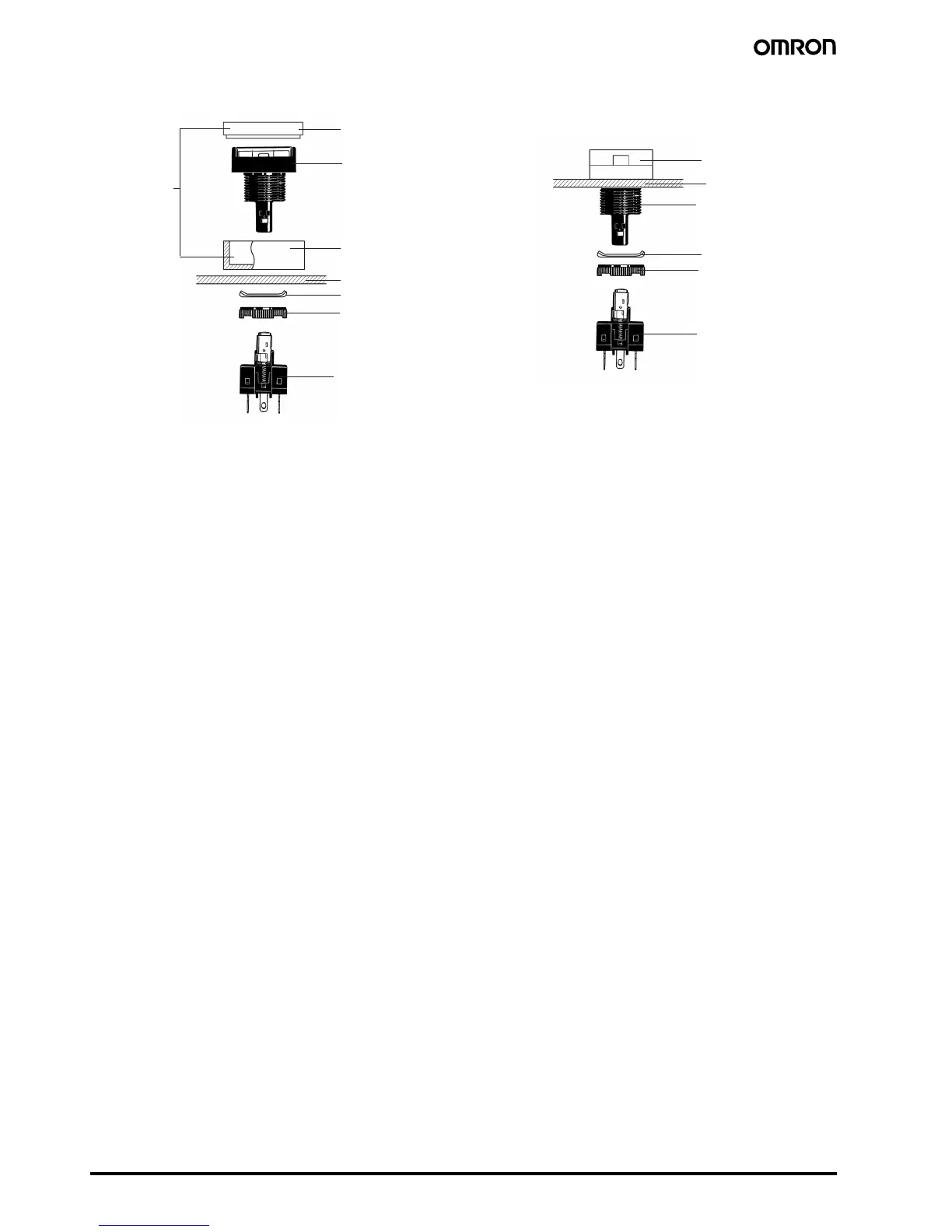
■ Mounting the A16Z Dust Cover
1. Separate the Dust Cover into 2 parts: cover A and cover B.
2. Insert the Case into cover B.
3. Mount these parts together onto the panel.
4. From the back of the panel, mount the lock ring and secure with
the mounting nut.
5. Insert cover A into cover B. Ensure that the entire perimeter of
cover A is securely attached to cover B by pressing in different
directions.
6. Mount the Switch Unit to the Case.
Note: Recommended panel thickness: 0.5 to 2 mm.
■ Mounting the A16Z Switch
Guard
1. Insert the Case into the Switch Guard.
2. Mount these parts together onto the panel.
3. From the back of the panel, mount the lock ring and secure with
the mounting nut.
4. Attach the Switch Unit to the Case.
Note: Recommended panel thickness: 0.5 to 2 mm.
Pushbutton Unit
Panel
Lock ring
Mounting nut
Switch Unit
Cover A
(transparent)
Cover B
(black)
Set
A16ZJ-5060
Switch Guard
Panel
Pushbutton Unit
Lock ring
Mounting nut
Switch Unit



 To Next Page