15
Please read “A Few Suggestions Before Blood Pressure
Measurement”and “How To Apply The Arm Cuff”before
taking a reading.
1. Press the ON/OFF Button.
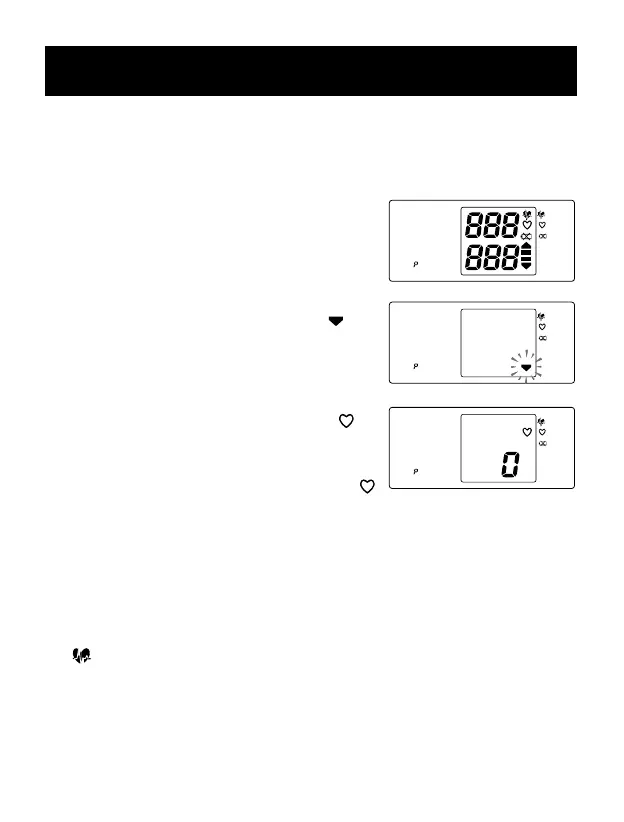
a) All display symbols appear for approxi-
mately one second.This is the initial
LCD test.
b) The display symbols disappear and
the Deation Indication Symbol ( )
start to ash.
c) When the monitor completes the
necessary preparations before
measurement, the Heart Symbol ( )
appears next to a zero.
NOTE: Wait for the Heart Symbol ( )
before taking a measurement.
2. Press the START button.As the cuff
begins to inate, the IntelliSense
TM
monitor automatically determines your
ideal ination level.During this
process, the IntelliSense
TM
symbol
( ) will be ashing on the display.
Because this monitor detects the pulse
even during ination, do not move your
arm and remain still during the mea-
surement.
SYSTOLIC
mmHg
DIASTOLIC
mmHg
PULSE /min
NTELLISENSE
READY TO
MEASURE
REPLACE
BATTERIES
SYSTOLIC
mmHg
DIASTOLIC
mmHg
PULSE /min
NTELLISENSE
READY TO
MEASURE
REPLACE
BATTERIES
SYSTOLIC
mmHg
DIASTOLIC
mmHg
PULSE
/min
NTELLISENSE
READY TO
MEASURE
REPLACE
BATTERIES
Initial LCD Test
Initial LCD Test
Ready to Measure
Deation Indication
HOW TO TAKE A READING







 To Next Page