16
HOW TO TAKE A READING
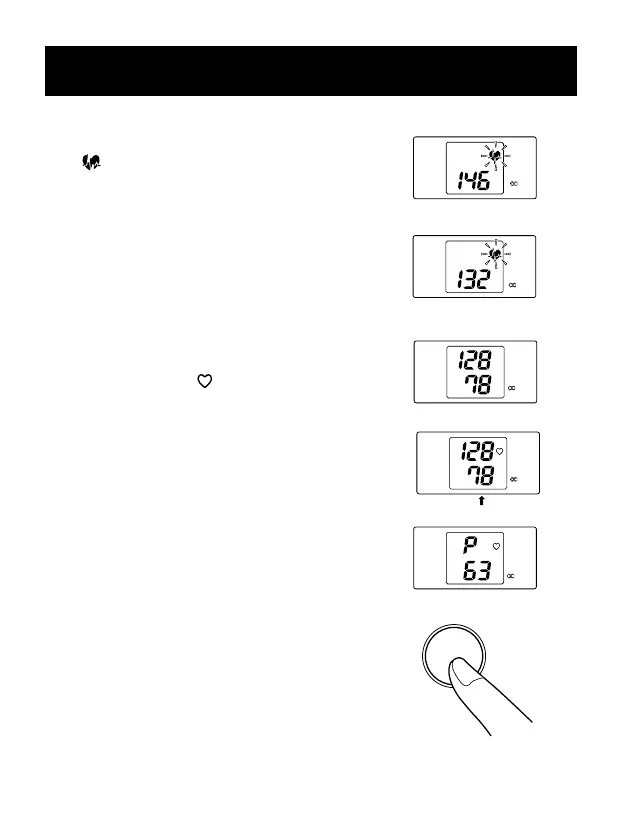
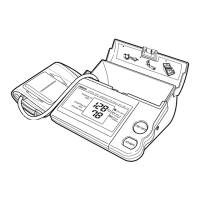
3. The IntelliSense
TM
Progress Indicator
( ) will ash on the display showing
that the monitor’s fuzzy logic intelligence
is determining your personal measurements.
NOTE:Because blood pressure is
being measured even during deation,
it is important to remain still until
the reading is fully completed.
4. When the measurement is complete, a
Heart Symbol ( ) ashes and the
arm cuff deates.
5. At the end of the measurement,
our blood pressure and pulse are
alternately displayed.
6. Press the ON/OFF button to turn the
monitor off.
NOTE:If you forget to turn the
monitor off,the the power will
turned off automatically after
ve minutes.
SYSTOLIC
mmHg
DIASTOLIC
mmHg
PULSE
m/n
INTELLISENSE
REPLACE
READY TO
MEASURE
( OO)
SYSTOLIC
mmHg
DIASTOLIC
mmHg
PULSE
m/n
o
INTELLISENSE
REPLACE
READY TO
MEASURE
( OO)
SYSTOLIC
mmHg
DIASTOLIC
mmHg
PULSE
m/n
INTELLISENSE
REPLACE
READY TO
MEASURE
( OO)
SYSTOLIC
mmHg
DIASTOLIC
mmHg
PULSE
m/n
INTELLISENSE
REPLACE
READY TO
MEASURE
( OO)
SYSTOLIC
mmHg
DIASTOLIC
mmHg
PULSE
m/n
INTELLISENSE
REPLACE
READY TO
MEASURE
( OO)
ON/OFF







 To Next Page