14
PART NAMES AND FUNCTIONS OF THE OMRON TENS APP
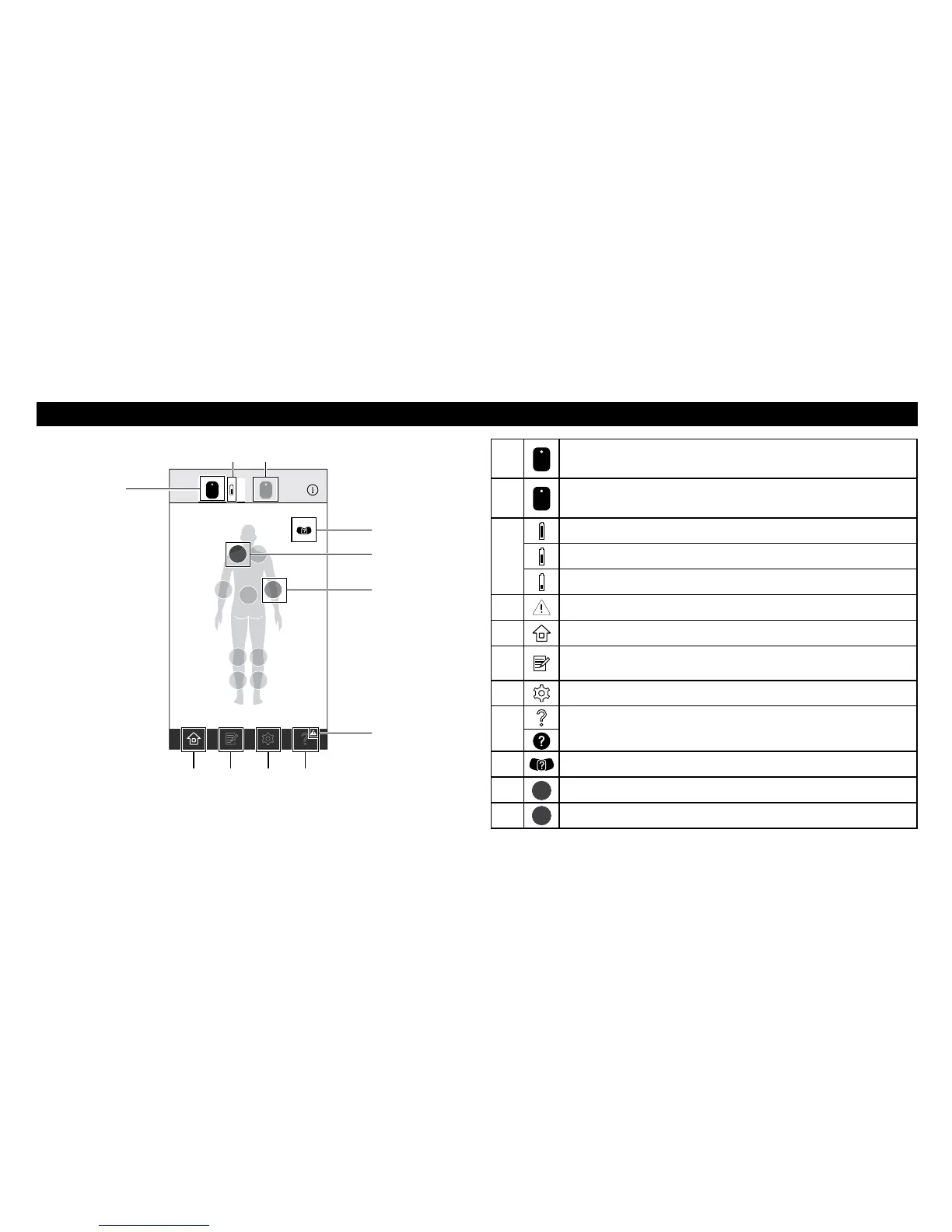
Therapy Setting Screen
1
A
Tap to make the first connected device active. You can select a
treatment area that the first connected device will be placed.
2
B
Tap to make the second connected device active. You can select a
treatment area that the second connected device will be placed.
3
Battery charge is full.
Battery charge is about half full.
Battery charge is close to low.
4
Displayed when there is any notification.
5
Tap to show the therapy setting screen.
6
Tap to show the pain diary screen to record your pain level or
view your pain history.
7
Tap to show the settings screen.
8
Tap to show the help information.
9
Tap to show the proper pad placement.
J
A
Indicates the area that the first connected device will be placed.
K
B
Indicates the area that the second connected device will be placed.
A
B
A B
1
3 2
I
J
K
4
8765
Screen design may be changed. View of the screen may be slightly
different depending on the smartphone type.


 To Next Page