7
Serial Communications Connection Procedure
8
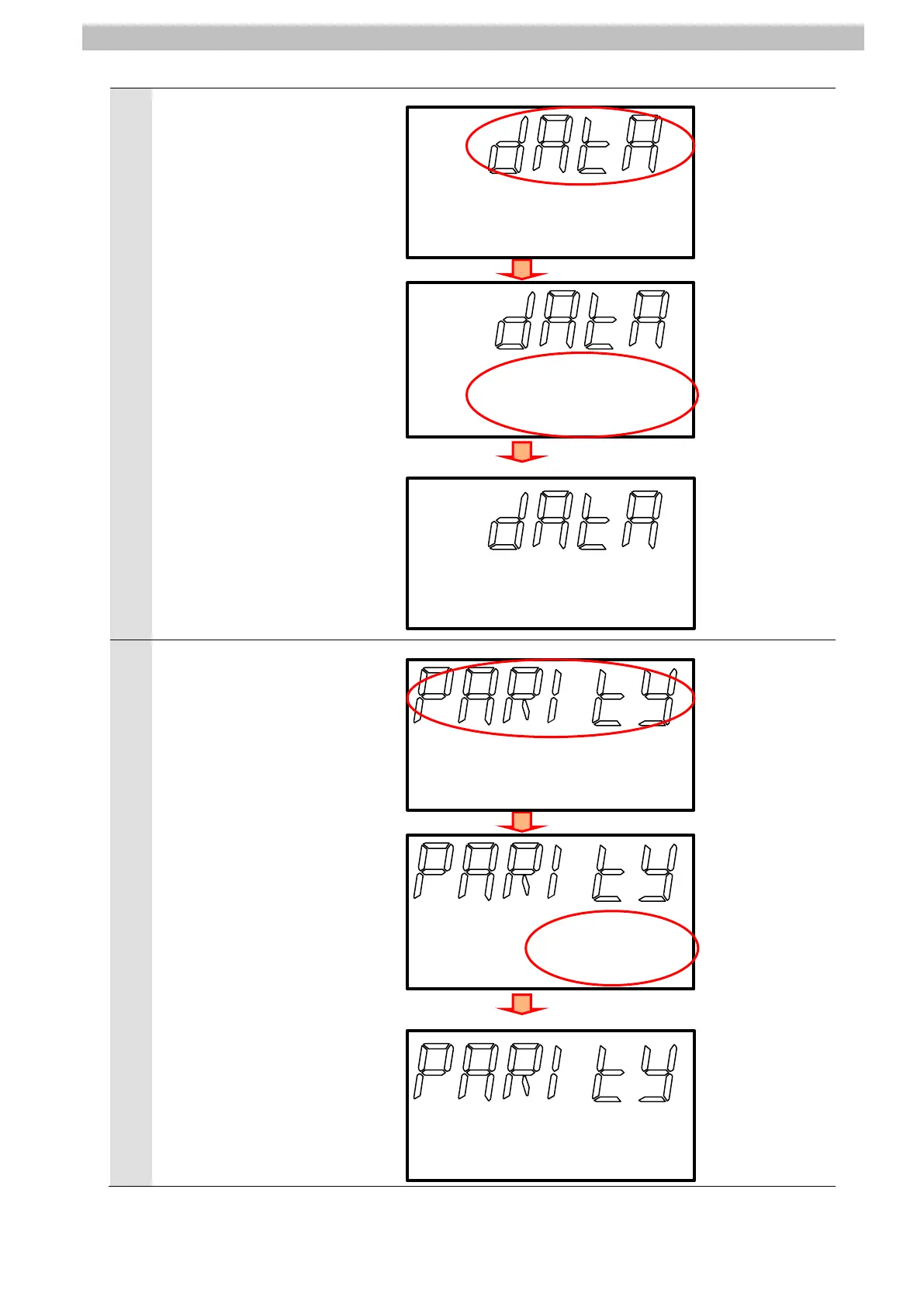
DATA is displayed on Main
Display.
Press the ZERO/SET Key once.
Check that the following set
value is displayed on
Sub-display.
Data length: 8bit (Default)
*If the value is different, change
the value by pressing the
(UP) or the
(DOWN) Keys.
Press the ZERORST/ESC Key
once.
The first menu shown in this
step is displayed again.
Press the
(RIGHT) Key once.
8blt
PARITY is displayed on Main
Display.
Press the ZERO/SET Key once.
Check that the following set
value is displayed on
Sub-display.
Parity: OFF (None: Default)
Press the ZERORST/ESC Key
once.
*If the value is different, change
the value by pressing the
(UP) or the
(DOWN) Keys.
The first menu shown in this
step is displayed again.
Press the
(RIGHT) Key once.
0ff
<Setting range>
8bit (Default)
/7bit
<Setting range>
OFF (Default)
/ODD/EVEN



 To Next Page