EasyManua.ls Logo

Omron E3 Intense - User Manual

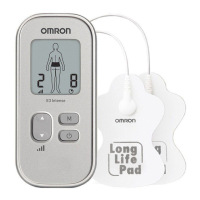
Omron E3 Intense
26 pages
Print Icon
To Next Page IconTo Next Page
Loading...
FR
DE
IT
ES
NL
RU
TR
EN
AR
Pain Reliever
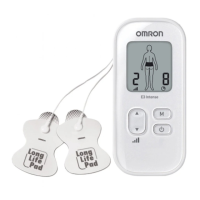
E3 Intense (HV-F021-EW)
E3 Intense (HV-F021-ESL)
Instruction Manual
IM-HV-F021-E-05-03/2018
9200776-0E
• Pain Reliever. Instruction Manual.
• Appareil anti-douleur. Mode d’emploi.
• Schmerztherapiegerät. Gebrauchsanweisung.
• Dispositivo per il trattamento del dolore. Manuale di istruzioni.
• Dispositivo para alivio del dolor. Manual de instrucciones.
• Apparaat ter verlichting van pijn. Gebruiksaanwijzing.
ɗɥɟɤɬɪɨɧɟɣɪɨɦɢɨɫɬɢɦɭɥɹɬɨɪ ɞɥɹ ɨɛɟɡɛɨɥɢɜɚɧɢɹ.
Ɋɭɤɨɜɨɞɫɬɜɨ ɩɨ ɷɤɫɩɥɭɚɬɚɰɢɢ.
• A÷rÕ Giderici. KullanÕm KÕlavuzu.

Questions and Answers

  • M
    melissaandersonAug 18, 2025
    Why is the intensity not felt with my Omron Medical Equipment?
    • N
      nrichardsonAug 18, 2025
      If you're not feeling the intensity or it's very weak with your Omron Medical Equipment, make sure you're using both pads, as the therapy requires both. Check that the cord is properly connected to the unit. Also, the intensity setting might be too low, so try pressing the ‘UP’ button. If the gel is damaged or the batteries are weak, replace the pads or batteries respectively.
  • D
    Debra GonzalezAug 20, 2025
    What to do if Omron E3 Intense Medical Equipment pad gel does not stick to skin?
    • J
      James LopezAug 20, 2025
      If the pad gel on your Omron Medical Equipment isn't sticking to your skin, try washing the adhesive surface of the pads gently under cold, slow-running water for about 16 seconds and then air dry them. Ensure your skin isn't too wet and dry the area before applying the pads. If the pads have been washed too much or stored improperly (high temperature, humidity, or direct sunshine), consider replacing them. If you are perspiring, dry the pad placement area.
  • J
    Juan HallAug 22, 2025
    Why does my skin turn red or feel irritated using Omron E3 Intense Medical Equipment?
    • G
      George RoseAug 23, 2025
      If your skin turns red or feels irritated when using the Omron Medical Equipment, wash the adhesive surface of the pads softly with your fingertips for about 16 seconds under cold slow running water. Limit therapy sessions to less than 15 minutes. Ensure the pads are attached properly to the body. If the pad surface is worn out, replace both pads at the same time.
  • C
    Carolyn HaynesAug 26, 2025
    What to do if Omron E3 Intense Medical Equipment power cut off during use?
    • A
      Adrienne MccoyAug 26, 2025
      If your Omron Medical Equipment is cutting off during use, the batteries might be weak, so replace them both. Alternatively, the cord may be broken, requiring a replacement.
  • C
    Carlos RomeroAug 28, 2025
    Why is the pad icon displayed on my Omron E3 Intense?
    • S
      Scott JohnsonAug 28, 2025
      If the pad icon is displayed on your Omron Medical Equipment, it could be due to several reasons. First, ensure that both pads are firmly attached to your skin. If the adhesive surface of the pads is dirty or dry, wash it gently under cold, slow-running water for about 16 seconds. Also, verify that the cord is correctly connected to the main unit. After making these corrections, power the device off and on.
  • M
    Mary WeeksAug 30, 2025
    Why is the battery icon empty on my Omron E3 Intense Medical Equipment?
    • S
      sjenningsAug 30, 2025
      If the battery icon on your Omron Medical Equipment is empty or close to empty, it likely indicates that the batteries are weak and need to be replaced.
  • V
    Vanessa LeonSep 1, 2025
    How to troubleshoot Omron E3 Intense with no power source?
    • A
      Alison BurnettSep 2, 2025
      To solve the 'no power source' problem with your Omron Medical Equipment, check if the batteries are aligned correctly and replace them if they are depleted.
  • S
    Stacey JohnsonSep 4, 2025
    How to fix very weak intensity level on Omron E3 Intense Medical Equipment?
    • D
      donnastevensonSep 4, 2025
      If you're not feeling the intensity or it feels very weak when using your Omron Medical Equipment, consider these possibilities: 1. Ensure you're using both pads, as they're both needed for the therapy to work. 2. Make sure you've peeled off the transparent film from the pads. 3. Check that the pads aren't stacked or overlapping; refer to the Pad Placement guide. 4. Verify the cord is correctly connected to the unit. 5. Increase the intensity setting by pressing the up button. 6. The gel on the pads might be damaged, requiring replacement. 7. Weak batteries can also cause this issue, so replace them if needed.
  • S
    smithlisaSep 7, 2025
    Why does Omron Medical Equipment power cut off during use?
    • K
      kimberly75Sep 7, 2025
      If the power cuts off during use with your Omron Medical Equipment, it could be due to weak batteries, so replace them both. Another possibility is a broken cord, which would also need replacing.
  • C
    carolsanfordSep 9, 2025
    What does the pad icon mean on my Omron Medical Equipment?
    • K
      Karen ClarkSep 9, 2025
      If the pad icon is displayed on your Omron Medical Equipment, it could be due to a few reasons: * Only one pad is attached, or both pads are not attached. Re-attach any dislocated pad(s) firmly onto the skin and then power the device off and on. * The transparent film hasn't been removed from the pad. Peel off the film on the adhesive surface of the pads and then power the device off and on. * The cord isn't properly connected to the main unit. Connect the cord plug correctly into the jack at the bottom of the main unit and then power the device off and on. * The adhesive surface of the pads is dirty or dry. Wash the adhesive surface of pads softly with your fingertips for about 3 seconds under cold slow running water and then power the device off and on.

Summary

Introduction

How the Pain Reliever Works

Explains the Triple Action TENS technology and its pain relief mechanisms.

Intended Use and User

Details the medical purpose and specifies that the unit is for adult home use.

Important Safety Precautions and Warnings

Safety Symbols Guide

Explains the meaning of danger, warning, and caution symbols used in the manual.

Contraindications: Devices and Conditions

Lists devices and medical conditions where the unit must not be used.

Conditions Requiring Medical Consultation

Advises consulting a healthcare professional before use under specific medical conditions.

Contraindications: Specific Individuals

Identifies individuals, such as pregnant women and children, who should not use the unit.

Forbidden Pad Placement Areas

Details specific body areas where pads must never be applied due to risk.

Activity Restrictions During Use

Lists activities during which the unit should not be used for safety reasons.

Pain Management and Therapy Warnings

Provides guidance on pain management and when to consult a professional.

Unit Modification Prohibitions

Warns against altering the unit or using unapproved accessories.

Pad Application Warnings

Advises applying pads to healthy skin and stopping if irritation occurs.

Pad Usage Precautions

Details how to use, care for, and position pads correctly for optimal results.

General Usage Cautions

Covers unit operation, environmental conditions, and electromagnetic interference.

Cord Safety and Handling

Provides instructions on proper cord connection, handling, and replacement.

Battery Safety and Disposal

Details battery handling, disposal, and usage precautions.

General TENS Precautions

Covers long-term effects, skin application, TENS limitations, and hypersensitivity.

Potential Adverse Reactions

Informs about potential skin irritation and advises stopping use if adverse reactions occur.

Know Your Unit

Package Contents

Lists all items included in the product packaging.

Optional Medical Accessories

Mentions optional accessories available for purchase.

Button and Display Functions

Explains the purpose and function of each button and display icon on the unit.

Assembly Steps

Inserting Batteries

Provides step-by-step instructions on how to insert the batteries correctly.

Connecting Electrode Cord

Guides on how to connect the electrode cord to the main unit.

Attaching Pads to Electrode Cord

Instructions on how to connect the electrode cord to the therapy pads.

Preparing New Pads

Details on removing the protective film from new electrode pads.

Storing Pads on Holder

Illustrates how to store the pads on the provided pad holder.

Attaching to Belt Clip (Optional)

Shows how to attach the unit to the belt clip for portability.

Getting Started with Therapy

Pad Placement Guidelines

Provides essential rules for placing pads on the body for optimal therapy.

Pad Placement Examples

Illustrates correct pad placement for various body areas like lower back and arm.

Pad Placement for Joints and Legs

Shows pad placement for elbow, knee, hip, thigh, and calf areas.

Pad Placement for Foot and Ankle

Illustrates pad placement for the ankle and foot areas.

Pad Placement for Shoulder

Shows pad placement for the shoulder, front and back.

Forbidden Placement Areas (Chest;Thorax)

Reiterates warnings against placing pads on or near the chest and thorax.

Selecting Therapy Modes

Explains how to choose one of the nine available massage or pain relief modes.

Switching Between Modes

Describes the process of cycling through modes using the 'M' button.

Choosing the Right Mode for Your Pain

Provides a guide linking specific conditions and sensations to appropriate modes.

Mode Descriptions and Sensations

Details the sensations and intended uses for Joint, Shoulder, Tap, Knead, and Rub modes.

Selecting Intensity Level

Guides users on how to adjust and find the appropriate intensity level.

Adjusting Intensity for Pain Relief

Explains how to increase or decrease intensity based on sensation and comfort.

Recommended Therapy Duration

Advises on session length and frequency for optimal results.

Managing and Reducing Pain

When to Start Therapy

Recommends starting therapy as soon as pain begins for best results.

Recommended Usage Duration and Frequency

Details session limits and frequency for effective pain management.

When to Stop Using the Unit

Lists conditions under which use of the unit should be stopped immediately.

Cleaning and Storage

Cleaning the Electrode Pads

Provides detailed steps on how to wash and maintain the adhesive pads.

When to Replace Electrode Pads

Criteria for determining when electrode pads need to be replaced.

Cleaning the Main Unit

Instructions on how to clean the main device using a damp cloth.

Storing the Electrode Pads

Guidance on storing the pads correctly on the pad holder.

Storing the Unit and Pads Together

Advice on storing the complete unit and pads, including environmental considerations.

Troubleshooting Common Issues

Intensity Issues

Addresses problems with the unit not providing sufficient or any sensation.

Skin Irritation or Redness

Solutions for skin irritation or redness experienced after use.

Power Supply Problems

Troubleshooting steps for when the unit has no power or shuts off unexpectedly.

Battery Indicator Issues

What to do when the battery icon indicates low power.

Pad Adhesion Problems

Solutions for when the electrode pads are not sticking properly to the skin.

Pad Icon Display Issues

Explains how to resolve issues indicated by the pad icon on the display.

Technical Data

Product Identification

Details the product category, description, and model codes.

Operational Specifications

Covers operating modes, power source, and expected battery life.

Electrical Specifications

Lists technical parameters like frequency, pulse duration, and output voltage.

Environmental and Storage Conditions

Specifies operating and storage temperature, humidity, and air pressure ranges.

Physical Dimensions and Weight

Provides the physical dimensions and weight of the unit.

Package Contents List

Lists the items included in the product package.

Safety and Protection Classifications

Details safety classifications like applied part type and ingress protection.

Description of Symbols

Safety and Warning Symbols

Explains the meaning of danger, warning, and caution symbols used in the manual.

Compliance and Certification Symbols

Details symbols related to product compliance and certifications.

Technical and Identification Symbols

Explains symbols for technical specifications and product identification.

IP Classification and Directive Compliance

Provides details on IP classification and EC Medical Device Directive compliance.

Electromagnetic Compatibility (EMC) Information

Correct Disposal of Product (WEEE)

Instructions for environmentally safe disposal of the product as WEEE.

Warranty Information

Warranty Period and Coverage

Details the 3-year warranty period and what is covered by OMRON.

Warranty Geographical Limitations

Specifies the regions where the warranty is valid.

Warranty Exclusions

Lists specific items and conditions not covered by the OMRON warranty.

How to Obtain Warranty Service

Provides instructions on how to apply for warranty service and where to find contact information.

Warranty Renewal Clarification

Clarifies that repairs or replacements do not extend the original warranty period.

Conditions for Granting Warranty

Outlines the requirements for claiming warranty service, including proof of purchase.

Manufacturer and Company Information

Manufacturer Details

Provides the name and address of the product manufacturer, OMRON HEALTHCARE Co., Ltd.

EU Representative Details

Lists the EU representative for the product, OMRON HEALTHCARE EUROPE B.V.

Production Facility Information

Details the location of the production facility, OMRON DALIAN Co., Ltd.

Subsidiary and Contact Information

Lists OMRON subsidiaries and their respective addresses and websites.

Omron E3 Intense Specifications

General IconGeneral
Product colorWhite
Number of modes3
Built-in displayYes
Number of intensity levels15
Therapy methodTranscutaneous Electrical Nerve Stimulation (TENS)
Integrated timer-
Power sourceBattery
Package weight574 g
Weight and Dimensions IconWeight and Dimensions
Depth170 mm
Width60 mm
Height220 mm

Related product manuals