EasyManua.ls Logo

Omron E4 Tens - User Manual

Omron E4 Tens
16 pages
Print Icon
To Next Page IconTo Next Page
Loading...
Instruction manual page 01
Gebrauchsanweisung Seite 17
Gebruiksaanwijzing pagina 33
Mode dʼemploi page 49
Manuale de instructone pagina 65
Manual de instrucciones pagina 81
E4 Tens
E4 Tens Massager
Low-Frequency Electronic Pulse Massager
IM-HV-F128-E-04-10/2011
1628187-0G
28070122-15IMTensE4cover26050501TensE4Omslag11/12/0818:17ページ1

Questions and Answers

  • T
    Tracy NewmanAug 1, 2025
    What to do if Omron E4 Tens power turns off while using?
    • R
      Regina LeeAug 1, 2025
      If your Omron Massager turns off unexpectedly, there could be several reasons. First, the batteries might be weak or exhausted, so try replacing them with two new, identical 1.5V alkaline AAA LR03 batteries. Second, the treatment period of 15 minutes may be over, as the power turns off automatically after this time; in this case, restart the treatment or turn off the massager. Finally, the electrode cord might be broken, requiring a replacement.
  • A
    Ashley MorrisAug 8, 2025
    Why is it difficult to feel stimulation with my Omron Massager?
    • P
      Peter StricklandAug 9, 2025
      If you're finding it hard to feel the stimulation from your Omron Massager, there are a few things to check. Ensure the Long Life pads are attached firmly to your skin and that they are not overlapping each other. Also, verify that the electrode cord is connected correctly. Finally, the intensity might be too weak, so try increasing it by turning the dial switch.
  • L
    lhallAug 15, 2025
    Why Omron E4 Tens Massager power turns off too soon?
    • G
      Glen GayAug 15, 2025
      If the power on your Omron Massager turns off too soon, it might be because the Long Life pads are not attached correctly to the skin. Make sure to attach the Long Life pads correctly to the skin.
  • K
    Kevin GarciaAug 25, 2025
    What to do if Omron E4 Tens skin turns red or feels irritated?
    • R
      Rebecca RichardsonAug 25, 2025
      If your skin turns red or feels irritated after using the Omron Massager, it could be due to a dirty or dry adhesive surface on the Long Life pads. Try washing the adhesive surface softly with your fingertips for about 3 seconds under slow running water. Alternatively, the Long Life pads may be damaged, requiring replacement.

Summary

Safety Information and Warnings

Understanding Safety Icons and Symbols

Explains icons and symbols used for safety warnings and prohibitions in the manual.

Critical Safety Dangers

Lists critical situations and medical devices that must not be used with the unit, posing severe risks.

Usage Precautions and Consultations

Outlines precautions for use, potential side effects, and situations requiring medical consultation.

Product Overview and Components

Main Unit and Accessory Identification

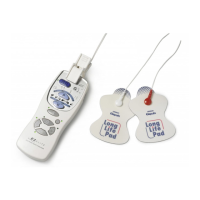
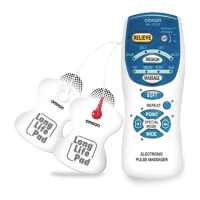
Identifies the main unit, electrode cord, connectors, pads, holder, and storage case.

Control Panel Functions and Display

Control Panel Button Functions

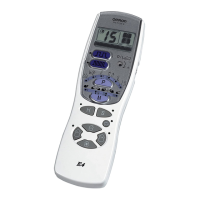
Details the functions of each button and display element on the OMRON E4 Tens massager.

Treatment Programs for Various Complaints

Guide to Selecting Treatment Programs

Describes twelve treatment programs for various complaints, outlining their effects and duration.

Personalizing Treatment Settings

Adjusting Mode, Surface, and Intensity

Explains how to adjust stimulation modes, treatment surface, intensity, and repeat function.

Device Preparation and Setup

Battery Installation Guide

Provides step-by-step instructions for correctly inserting batteries into the main unit.

Initial Use and Pad Connection

Connecting Cords and Pads for First Use

Guides users on connecting the electrode cord and applying the pads for the first time.

Proper Electrode Pad Placement

Body Placement for Electrode Pads

Illustrates recommended locations for attaching electrode pads on different body parts for effective treatment.

Using the OMRON E4 Tens Massager

Selecting Programs, Modes, and Intensity

Details how to turn on the unit, select programs, adjust settings like Hyper/Soft mode, and set intensity.

Ending a Treatment Session

Manual and Automatic Treatment Stop

Explains how the massager stops automatically and manual methods to stop treatment if needed.

Maintenance and Care of Pads

Cleaning Electrode Pads for Reusability

Provides instructions on washing electrode pads when they become dirty or difficult to attach.

Cleaning and Storing the Massager Unit

Unit Cleaning and Pad Storage Procedures

Describes methods for cleaning the main unit and proper storage conditions for the device and pads.

Troubleshooting and Problem Solving

Resolving Device Operational Issues

Lists common problems, their causes, and recommended solutions for the OMRON E4 Tens massager.

Maintenance Tips and Battery Changes

Covers advice on spare parts, self-repair limitations, and how to replace batteries.

Electromagnetic Compatibility (EMC) Details

EMC Standards and Usage Precautions

Explains EMC standards and precautions regarding the use of electronic devices near the massager.

Product and Battery Disposal

Environmentally Safe Disposal Procedures

Provides instructions for environmentally responsible disposal of the product and used batteries.

Technical Specifications and Data

Device Specifications and Accessories

Lists detailed technical specifications, power requirements, dimensions, weight, and available accessories.

Omron E4 Tens Specifications

General IconGeneral
DisplayLCD
TechnologyTENS (Transcutaneous Electrical Nerve Stimulation)
ModesMultiple
Pre-set ProgramsYes
Intensity LevelsAdjustable
TimerYes
Power SourceBattery
Electrode PadsIncluded
Massage ModesMultiple
PortabilityPortable

Related product manuals