EasyManua.ls Logo

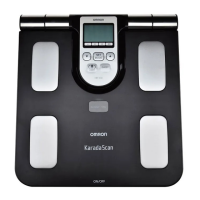
Omron KaradaScan HBF-358-BW - User Manual

Omron KaradaScan HBF-358-BW
15 pages
Print Icon
To Next Page IconTo Next Page
Loading...
ON/OFF
OMRON HEALTHCARE Co., Ltd.
53, Kunotsubo, Terado-cho, Muko, Kyoto, 617-0002 Japan
OMRON HEALTHCARE SINGAPORE PTE LTD.
438A Alexandra Road, #05-05/08, Alexandra Technopark Singapore 119967
www.omron-healthcare.com.sg
Max Weight 135kg
Thank you for purchasing OMRON Body Composition Monitor.
Before using this unit for the first time, please be sure to read this Instruction Manual
carefully and use the unit safely and properly.
Please keep this Instruction Manual at hand all the time for future reference.
Model HBF-358-BW
Instruction Manual
Body Composition Monitor
5334083-5A

Questions and Answers

  • V
    vincentcampbellJul 31, 2025
    What to do if Omron KaradaScan HBF-358-BW don't turn on?
    • Y
      yfieldsAug 1, 2025
      If your Omron Scales aren't turning on, it could be due to several reasons: * The batteries might not be inserted. * The batteries might be inserted with incorrect polarity. * The batteries might be worn out. In this case, replace all four batteries with new ones.
  • S
    sarahhardingAug 8, 2025
    Why won't my Omron Scales measure body composition?
    • T
      Tony WrightAug 8, 2025
      If your Omron Scales display your weight but won't start the body composition measurement, it's likely because personal data hasn't been set, or the UP/GUEST button wasn't pressed. Make sure you enter personal data for a Personal ID Number or use Guest mode to resolve this.
  • J
    Jennifer GarciaAug 15, 2025
    Why are Omron Scales body composition readings inaccurate?
    • J
      Joseph CookAug 15, 2025
      Inaccurate body composition readings on your Omron Scales can stem from a few factors: * The unit might be placed on a carpet or other soft flooring. Place the unit on a hard and level floor. * Cold feet or body, causing poor blood circulation. Warm yourself up before taking a measurement. * Extremely cold electrodes. Place the unit in a warm room for a few minutes before use. * Feet that are too dry. Slightly moisten the soles of your feet with a damp towel.
  • J
    Joseph YoderAug 23, 2025
    How to fix Omron KaradaScan HBF-358-BW Scales when it displays 0.0 kg?
    • A
      Ashley TaylorAug 23, 2025
      If your Omron Scales display '0.0 kg' even when you step on, or the weight barely increases, you may have stepped onto the unit before '0.0 kg' was displayed. Wait until '0.0 kg' is displayed before stepping onto the unit.

Summary

Notes on Safety

General Safety Precautions

Covers dangers, warnings, and cautions for safe operation and potential risks.

Operating Instructions

Know Your Unit

Identifies the components and parts of the body composition monitor.

Inserting and Replacing Batteries

Instructions for battery installation, replacement, and life.

Setting and Storing Personal Data

Guides users through setting age, gender, and height for accurate measurements.

Useful Information

Principle of Body Composition Calculation

Explains the Bioelectrical Impedance (BI) method used by the monitor.

Measures Whole Body to Avoid Fluctuations

Details how the unit accounts for daily water shifts for accurate body composition.

Recommended Measurement Times

Provides optimal times of day for consistent body fat percentage measurements.

Avoid Taking Measurements Under Certain Conditions

Lists situations that can affect measurement accuracy due to body water changes.

Understanding BMI

Explains Body Mass Index and its calculation using height and weight.

Understanding Resting Metabolism

Defines resting metabolism as the energy needed for basic bodily functions.

Understanding Body Age

Explains how body age is derived from resting metabolism and body composition.

Understanding Body Fat Percentage

Defines body fat percentage and its calculation method.

Understanding Visceral Fat Level

Describes visceral fat as fat surrounding internal organs and associated health risks.

Understanding Subcutaneous Fat

Describes subcutaneous fat as fat below the skin, not directly linked to disease.

Factors Affecting Calculated Results

Lists user groups whose body fat percentage may differ significantly.

Taking a Measurement

Correct Posture for Measurement

Illustrates the proper body positioning and hand placement for accurate readings.

Checking Measurement Results

Explains how to navigate and interpret the various measurement results displayed.

Understanding Measurement Results

Provides charts for interpreting Body Fat Percentage, Visceral Fat Level, and BMI.

Measuring Weight Only

Measurement Procedure

Details the steps for turning on the unit and stepping on it for weight measurement.

Error Displays

Troubleshooting Error Messages

Provides solutions for specific error codes like Err1, Err2, Err3, Err4, Err5, and Err.

Troubleshooting

Common Problems and Solutions

Covers issues like zero display, abnormal weight/composition, and no power.

How to Take Care of and Store the Unit

Cleaning and Storage Guidelines

Details how to clean the unit and suitable conditions for storage.

Technical Data

Product Specifications

Lists model, display ranges, set items, weight accuracy, and power supply details.

Omron KaradaScan HBF-358-BW Specifications

General IconGeneral
TypeBody Composition Monitor
Weight Capacity150 kg
Weight Measurement Increment0.1 kg
Body Fat MeasurementYes
Muscle Mass MeasurementYes
Bone Mass MeasurementYes
Memory FunctionYes
Display TypeLCD
Power Source4 x AA batteries
Weight2.5 kg
Dimensions330 x 330 x 35 mm
Body Fat PercentageYes
Body Fat Percentage Increment0.1%
Body Mass Index (BMI)Yes
Visceral Fat LevelYes
Skeletal Muscle PercentageYes
Muscle Mass PercentageYes
Bone Mass PercentageYes
Resting MetabolismYes
Body AgeYes
Memory4 users
BMI Range90

Related product manuals