Oper at o r Pan el V O L UM E T R I C D O SER M AC H I NE – M o d. DV G 5 00R P – OM R O N N B 5 Q 13/24
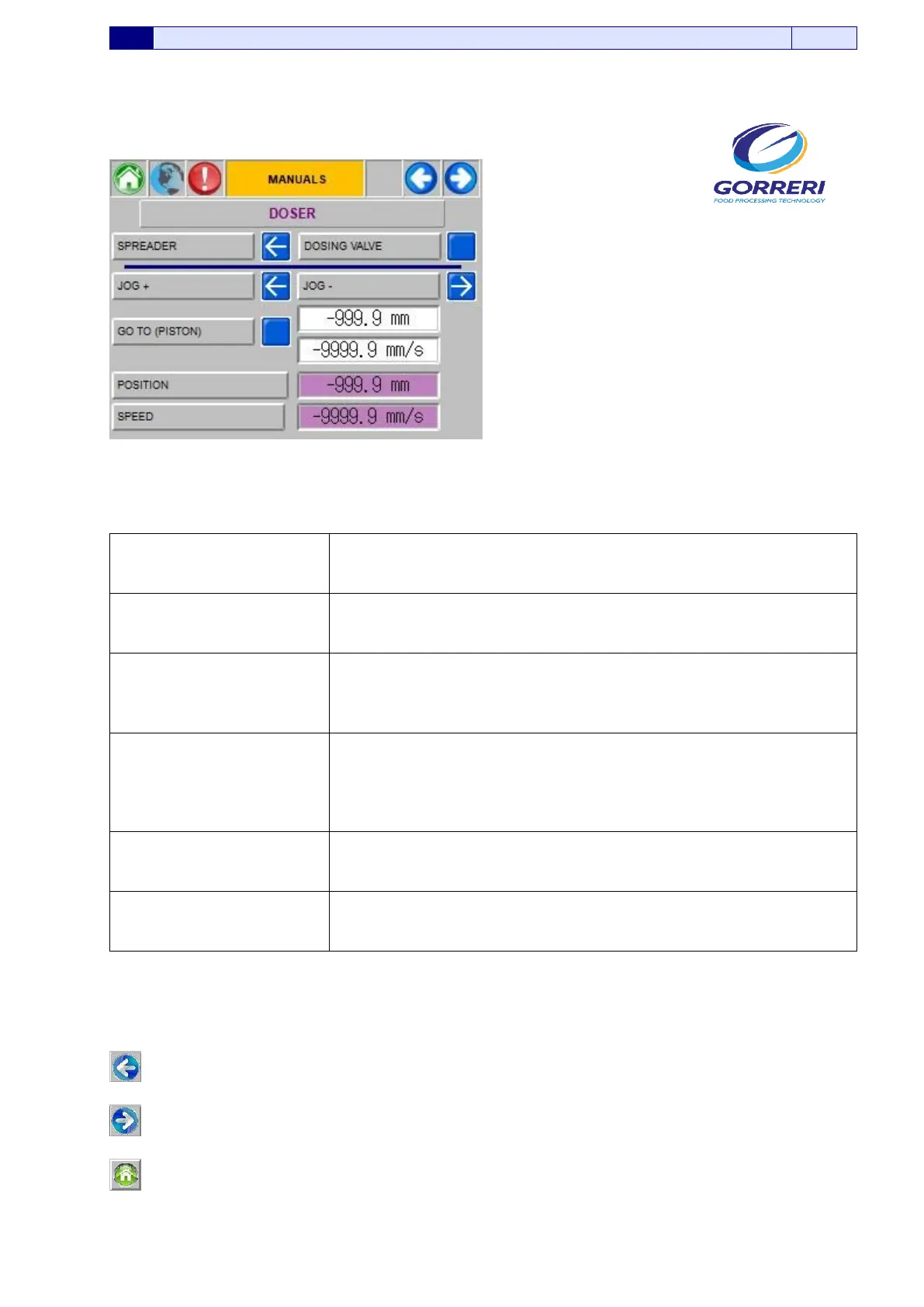
5.5.2 MANUAL CONTROLS – DOSER
Pic. 5.5.2
Information indicated in the Manual Controls – Doser page, are carefully explained as follows:
SPREADER
If you press the proper button you activate or deactivate manually
the lateral dosing nozzle.
DOSING VALVE
If you press the proper button you activate or deactivate manually
the dosing valve
JOG +
JOG –
If you press the proper arrows, you can manually change the
position of the dosing piston
GO TO (PISTON 1)
If you press the proper button it is possible to bring the dosing
piston in the fixed position.
In the lateral side it is possible to set the position (expressed in
millimeters) and the speed (expressed in millimeters per second)
of the dosing piston.
POSITION
In this line, it is possible to visualize (expressed in millimeters per
second) the actual position of piston
SPEED
In this line, it is possible to visualize (expressed in millimeters per
second) the actual speed of piston
If you press this button, you come back to the previous panel.
If you press this button, you enter the following panel
If you press this button, you enter the Main Page Menu






 To Next Page